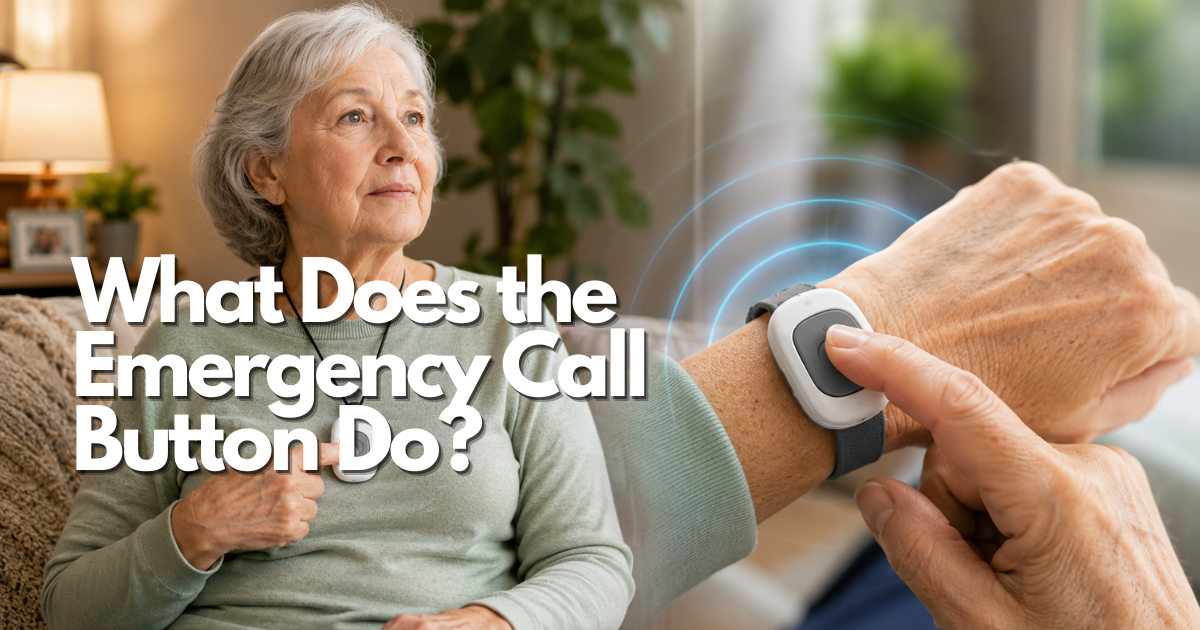
If you are asking what does the emergency call button do, the short answer is that pressing it sends an alert through a defined response path; the next step depends on who receives that alert, what information is available, and whether the person can communicate.
Quick answer: what does the emergency call button do in an emergency?
An emergency call button starts a request for help. Depending on the arrangement, the press may ring a receiver nearby, notify a caregiver, open a two-way conversation with a professional response center, or place a call to emergency services. The button itself does not decide what medical care is needed. It begins the communication path that another person or service must follow.
The useful question is not whether the button is “active.” It is whether the person can press it, recognize the confirmation, reach the intended responder, provide or access the location, and use a backup if the first path fails. A button that makes a sound but does not lead to a person with a clear next action is an incomplete emergency plan.
In the United States, use 911 for an immediate threat to life or safety when it is safe to do so. A button can support that call or route the alert elsewhere, but it does not automatically replace direct emergency communication. The National Institute on Aging describes emergency response systems as tools that can let an older adult press a button on a necklace or bracelet to call for help, while also noting that such systems do not replace regular check-ins and must be maintained.
| Possible action | Who receives it | What must happen next |
|---|---|---|
| Sound or display a local alert | A nearby person, household receiver, or building staff member | Someone recognizes the signal, reaches the person, and decides on the next response |
| Send a caregiver notification | A selected contact, phone, app, or alert list | The recipient notices it, confirms the situation, and follows an escalation rule |
| Connect to a response center | A trained or designated responder through a service | The responder confirms the event, uses the account information, and follows the service procedure |
| Start an emergency call | 911 or another emergency number, depending on the setup | The caller or responder provides location and emergency details and follows call-taker instructions |
What an emergency call button starts when it is pressed
The press is the beginning of an event, not the complete event. A simple way to understand it is to separate four layers: activation, connection, recipient, and response. The user activates the button. A signal travels through the available connection. A person or system receives it. That recipient takes the next action according to the plan.
Emergency call button sends an alert to a defined response path
The response path may be local, personal, professional, or direct to emergency services. A local button might activate a chime in another room. A caregiver arrangement might send a text or call. A professional service might open a conversation with a response center. A direct emergency route may start a 911 call. These paths can look similar from the user’s perspective while producing very different outcomes.
Before relying on a button, write the destination in plain language. “Press to call Sam,” “press to reach the response center,” and “press to call 911” describe different plans. Do not label a control “emergency” if the user and caregiver do not know where it goes. The older adult should be able to explain the destination without memorizing technical terminology.
Emergency call button may provide confirmation that the alert started
Confirmation can be a tone, vibration, light, spoken message, a change on a receiver, or a person answering. It helps the user know whether the button registered the press. It does not prove that help is already on the way. A signal may fail after the button responds, a caregiver may miss the notification, or a receiver may be out of power.
Test whether the older adult can distinguish an activation confirmation from a low-battery warning, a charging indicator, or an accidental press. If the person cannot see or hear the confirmation, provide an accessible explanation and a response routine that does not depend on one sensory cue.
Emergency call button can carry account or location information when available
A response system may have a registered name, address, apartment number, emergency contact, medical note, or location feature. The information available depends on the device, connection, service, permissions, and current records. A button cannot make an outdated address correct. It cannot guarantee room-level location simply because a service uses the word “location.”
Keep the home address and unit number beside the receiving equipment. Include safe entry instructions and a current contact list when appropriate. If the button is used away from home, ask how a temporary location is handled. The information that helps a responder must be accurate, accessible, and limited to what the person has agreed to share.
Emergency call button may open two-way communication, but not every button does
Some arrangements let a responder speak with the older adult after activation. Others produce a local sound or send a notification without a conversation. Two-way voice can help a responder ask what happened, but its usefulness depends on speaker volume, microphone placement, background noise, hearing, speech, distance from a base unit, and the user’s ability to answer.
Ask what the person should do after pressing: wait, speak, move toward a base unit, answer a phone, or use another signal. Practice the actual instruction from a chair, bed, bathroom, and floor-level position when safe. A caregiver standing beside the equipment may hear clearly while the person in another room cannot.
What the emergency call button does for different recipients
The recipient determines the next action. This is why the same button label can represent different levels of support. A household should identify the first receiver, the backup receiver, and the condition that moves the event to emergency services.
Emergency call button alerts a nearby receiver or person
A local receiver can make a sound, flash, or display a message for someone in the home or nearby. This may be appropriate when a spouse, caregiver, neighbor, or staff member is close enough to respond. Test the actual walls, doors, floors, and noise conditions. A receiver that cannot be heard in the bathroom or bedroom does not cover those areas merely because it works beside the base unit.
Decide what the nearby person does when the signal starts. They may check the room, speak through an intercom, call the older adult, bring a phone, or request emergency help. Write the sequence where the responder can find it. A local signal without an assigned listener is an alarm without a response plan.
Emergency call button notifies a caregiver or selected contact
A caregiver notification may arrive by voice call, text, app alert, email, or another connected method. The notification can shorten the time to awareness, but it does not prove that the caregiver saw it. The recipient may be driving, asleep, out of range, or handling another emergency.
Use a primary and backup contact who have agreed to the role. Set an escalation rule: the first person acknowledges the alert, calls the older adult if appropriate, and contacts the backup or 911 when the situation requires it. Do not rely on a long list of contacts who have never practiced the response.
Emergency call button connects to a professional response center
A professional response center may receive the alert, identify the account, attempt to speak with the user, review the response instructions, and contact caregivers or emergency services according to its procedure. The exact sequence varies by service and location. Ask what happens when the wearer cannot answer, when the address is uncertain, and when the first contact does not respond.
Do not describe a response center as a hospital, clinician, or emergency department. A responder may coordinate help, but the button does not diagnose a condition or provide treatment. Read the current service terms and keep the address, contacts, and access instructions updated.
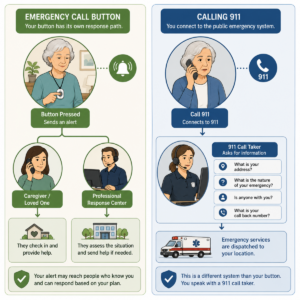
Emergency call button may start a 911 call, depending on its setup
Some emergency controls connect directly to 911, while others contact a person or response center first. Verify the destination instead of assuming. If the button starts 911, the caller may need to state the address, apartment or unit, phone number, and nature of the emergency. The official 911.gov FAQ explains that call takers may ask these questions and that callers should remain on the line until instructed to disconnect.
If the older adult cannot speak, the household needs a locally verified accessibility plan. A button cannot promise that every 911 center accepts the same alternative communication method. The response plan should say what the person and caregiver do when voice communication is not possible.
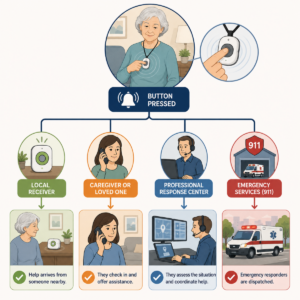
Emergency call button response steps after activation
Use a short sequence to teach the older adult and caregiver what to expect. The exact wording should match the chosen device or service, but the logic is consistent: press, confirm, communicate if possible, provide location, and follow the next instruction.
Emergency call button feedback tells the user whether the press registered
First, the user should notice a recognizable signal. It may be tactile, visual, audible, or spoken. The feedback should be easy to distinguish in the rooms and lighting where the button is used. If the older adult cannot perceive it, teach the next step without relying on that feedback alone.
Emergency call button response should identify who is speaking
When a person answers, the older adult should know whether it is a family member, caregiver, response-center worker, or 911 call taker. A simple instruction card can say: “Tell them your name, address, room, and what happened.” If the person cannot speak, the contact or service should follow the documented no-response procedure.
Emergency call button escalation begins when the first response is not enough
The first recipient may need to call another person, open the door, ask a neighbor to check, or contact 911. Decide the escalation before an emergency. Include what happens when the older adult does not answer, when the caregiver cannot travel, when a pet or locked door blocks entry, and when the alert is received from an unexpected location.
Emergency call button activation should not end the wider emergency plan
After the alert, the responder still needs to determine the situation, location, access, and urgency. The button is an invitation to respond, not a complete account of what happened. Keep relevant information current and make sure the responder knows which parts of the plan are reliable.
| Stage | Question for the user | Caregiver verification |
|---|---|---|
| Press | Can the older adult find and press the button from the likely position? | Observe without taking over and note whether clothing, bedding, or mobility aids interfere |
| Confirm | Can the user recognize that the alert registered? | Test the sound, vibration, light, or spoken feedback in the real environment |
| Communicate | Can the user hear, speak, or otherwise respond to the recipient? | Check the no-speech or no-response procedure and the user’s accessibility needs |
| Locate | Can the user state the address, unit, room, or current location? | Keep a current address card and provider record where responders can use it |
| Escalate | Does the user know what happens if the first responder does not answer? | Name a backup person and a clear point at which 911 or another service is called |
Emergency call button limits: what it does not do
Understanding the limits prevents a button from creating false confidence. The button may be valuable precisely because it makes a request for assistance easier, but it does not remove the need for judgment, communication, maintenance, or a backup route.
Emergency call button does not diagnose an illness or decide urgency
The button cannot determine whether chest discomfort, weakness, confusion, a fall, shortness of breath, or another symptom is serious. It does not diagnose, treat, lift, or stabilize a person. Teach the older adult that pressing for help is appropriate when the situation feels unsafe or uncertain, and teach the caregiver when to call emergency services.
Emergency call button does not guarantee that someone will answer
A local receiver can be muted or out of range. A caregiver can miss a notification. A service connection can fail. A 911 call can disconnect. The response plan should account for the first failed attempt rather than treating a successful light or tone as proof that help is coming.
Emergency call button does not guarantee precise location
Location information may come from an account address, a receiver, a phone, a network, or a location feature. Those sources can be outdated, unavailable, approximate, or limited to a home address rather than a room. The household should keep the address, apartment or unit, entry instructions, and current contacts visible and updated.
Emergency call button does not replace check-ins or home access planning
The National Institute on Aging notes that emergency response systems do not replace regular check-ins by family, friends, and caregivers. The same principle applies to a button connected to a person. Decide who notices a missed check-in, who can enter the home, and who has permission to contact emergency services.
Emergency call button for seniors in common everyday situations
The answer to “what does the emergency call button do” becomes clearer when the event is specific. The button is a way to request a next action; the right next action depends on the situation, the person’s abilities, and the response path.
Emergency call button after a fall or sudden illness
After a fall, the person may be on the floor, unable to reach a phone, or unsure whether it is safe to stand. The button can alert someone without requiring the person to walk to another room. Teach the older adult not to cancel the alert simply because the first pain eases. A responder should ask whether the person struck their head, is bleeding, has severe pain, or cannot move safely, then follow the appropriate emergency procedure.
Do not encourage a person to crawl toward the button if doing so could worsen an injury. Place the button on the person or within reach from likely floor-level positions when the setup allows. A fall plan should also include what happens if the person cannot press it.
Emergency call button when the user cannot speak clearly
The alert can tell a responder that help is requested, but a voice conversation may still be difficult. The response center or caregiver may use account information, a registered address, a no-response procedure, text, a visual signal, or another agreed method. Verify what is actually supported in the local area and by the chosen arrangement.
Put a short information card near the receiver with the person’s name, address, unit, language or communication needs, and preferred contacts, but avoid unnecessary private details. The card supports a response; it is not a replacement for an emergency service’s own questions.
Emergency call button for seniors who live alone
For someone who lives alone, the button may shorten the time between a problem and another person learning about it. It cannot ensure that a caregiver can enter the home or that the alert is noticed. Pair it with regular check-ins, a safe access plan, and a backup contact. Review the arrangement if the person begins spending time in a basement, yard, garage, or other area outside the receiver’s tested range.
Emergency call button after an accidental press
Accidental presses happen. The user should not be afraid to explain the mistake. If a person answers, say that there is no emergency and follow the service’s instructions. Do not hang up on a 911 call made by mistake; the official 911.gov guidance says to stay on the line and explain what happened so call takers do not assume an emergency and dispatch without clarification.
Emergency call button and 911 boundaries
A call button can be one route to emergency help, but 911 itself is a local public-safety system. The destination, location information, callback behavior, and text capabilities can vary. The user and caregiver should know whether the button calls 911 directly, reaches a response center, or contacts a person who must decide whether to call 911.
Emergency call button may contact 911 directly or use an intermediate responder
Read the exact instructions for the button. If it calls a family member first, that person may be responsible for emergency escalation. If it reaches a professional center, the center may follow its own procedure. If it calls 911 directly, the call taker still needs the location and nature of the emergency. Do not infer the destination from a red button, an “SOS” label, or a general product description.
Emergency call button users should be ready for 911 location questions
911.gov says call takers may ask for the street address, apartment or room, phone number, nature of the emergency, and details such as injuries or symptoms. Keep those details visible and teach the older adult to answer as clearly as possible. If the person cannot speak, the family needs a locally verified alternative and should not assume that every 911 center has the same text or accessibility capability.
Emergency call button tests should not create a false 911 dispatch
Do not press a button connected to 911 as a casual test. Follow the device provider’s approved procedure. For a planned exercise that involves 911, use the center’s published non-emergency contact route in advance rather than dialing 911 to ask whether testing is allowed. The official 911 FAQ says test calls can be scheduled through that local process and should not be made simply by calling 911 for instructions.
Emergency call button and unserviced phone limits are different questions
Some wireless phones without active service can connect to 911, but 911.gov warns that location and callback capabilities may be limited. That does not make an inactive phone a complete emergency call-button system. It does not alert caregivers, maintain a response center account, or ensure that a dropped call can be returned.
Emergency call button accessibility and user control
The button only helps if the person can activate it and understand what follows. Accessibility is not a finishing touch. It affects the shape, placement, feedback, response conversation, written information, and teaching method.
Emergency call button pressing should match dexterity and mobility
Test the control with the user’s everyday hand strength, tremor, arthritis, gloves, clothing, walker, or wheelchair. A button should be distinguishable by touch and should not require the person to stand, remove clothing, or find a tiny switch after a fall. If the user removes a wearable during sleep or bathing, document the alternate response route for that period.
Emergency call button feedback should support hearing and vision needs
A flashing light does not help someone who cannot see it, and a loud tone does not help someone who cannot hear it. Use visual, audible, and tactile cues that fit the person’s needs. Test with ordinary lighting, background noise, glasses, hearing aids, and closed doors. Confirm that the user can tell whether the alert started and whether a responder answered.
Emergency call button communication should allow for speech differences
Ask the responder or service what happens when the user speaks slowly, uses an assistive communication method, cannot answer questions, or becomes confused. A caregiver may need to provide a location and access information, but that permission should be planned and understood. Do not assume that a generic voice conversation is accessible to every user.
Emergency call button teaching should preserve consent and dignity
Explain what the button does, who receives the alert, what information is shared, and how an accidental press is handled. Invite the older adult to practice and ask what feels uncomfortable. If memory or judgment changes, involve the person as much as possible and use appropriate caregiving or professional guidance to balance safety and autonomy.
Emergency response device and emergency call button differences
The words “emergency call button” can describe the control a person presses, while an emergency response device may describe the complete system around that control. Keeping those ideas separate makes the safety plan easier to explain. It also prevents a family from assuming that a button by itself includes a receiver, a communication connection, a staffed response center, or a guaranteed route to public safety.
Emergency call button is the activation control, not the entire response device
The button is the user’s starting action. The rest of the system determines what happens after that action. A wearable button may send a signal to a base unit in the home. A connected device may transmit an alert through a network. A service may pass the alert to a selected person or a response center. Another arrangement may start a voice call. Those are different response paths even though the user’s first step looks similar.
When teaching the system, use a sentence that names the full sequence: “Press this control, wait for the confirmation, and then expect this person or service to respond.” Do not stop at “press this if you need help.” The second sentence is what gives the user a realistic expectation and helps a caregiver identify a failure if the expected response never appears.
Emergency response device may include a wearable, receiver, connection, and service
A complete arrangement can include a control worn on the body, a home receiver, a power source, a network connection, a contact list, an account record, and instructions for escalation. Not every arrangement has every part. Some rely on a nearby receiver; some rely on a connected communication path; some depend on a person hearing an alert and acting on it. Ask the provider or installer to name each part in plain language and identify what is required for the alert to reach its destination.
This inventory is especially useful after a move, a change in internet or phone service, a new caregiver, or a change in the user’s mobility. A control can still light up or make a sound while the larger response path is unavailable. The important test is not only whether the button reacts. It is whether the intended recipient receives a test alert and knows what to do with it.
Emergency call button and a phone are not interchangeable response paths
A phone can be an important backup, but a phone call and a dedicated button may place different demands on the user. A phone may require unlocking, finding a contact, reading a screen, holding the device, or speaking first. A button may be easier to reach during a fall, but it may depend on a charged receiver, a signal, a service account, or a person who can respond. Choose language that describes the actual path rather than calling either option universally better.
Build the backup around the user’s real routines. If the button is worn during the day but left in a drawer at night, the night plan needs its own reachable option. If the user spends time in a yard, basement, garage, or another floor, verify the response path in that location. A plan can have more than one tool, but each tool should have a defined purpose and a clear instruction for when to use it.
Emergency call button plan matters as much as the physical control
A response plan answers four practical questions: who receives the alert, what information do they have, how can they enter or reach the user, and what should they do if there is no answer? Write the answers where the caregiver can find them, review them with the user, and update them when circumstances change. The plan should also say when to request emergency services rather than waiting for a second contact.
Do not promise that a button will solve every emergency. Instead, describe what it adds: a simple activation step, a defined notification route, and an opportunity to get help when ordinary communication is difficult. That honest description supports safer use and avoids a false sense of protection.
Set up an emergency call button response plan
Setup is complete only when the older adult, the receiving person, and the backup responder understand the same sequence. A short written plan can prevent hesitation during a stressful moment. It can also reveal missing information before an actual alert occurs.
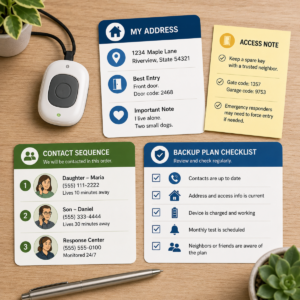
Emergency call button address and access record
Record the full service address, apartment or room details, entrance instructions, building access limits, and a reliable callback number. Include the user’s preferred name and any concise information a responder needs to find the correct door. If the address has several entrances, identify the one that is normally accessible. If a key, lockbox, building code, or front-desk procedure is part of the plan, record who is authorized to use it and how the information is protected.
Review this record after a move, renovation, change in building access, or change in the person who holds a key. A saved address from an old home can delay assistance. If the response path relies on an account, confirm that the account record has the same address and that a caregiver knows how to report an update.
Emergency call button placement and reachability
Place the control where the user can reach it during the activities in which help may be needed: getting out of bed, bathing, using the toilet, preparing food, climbing steps, or walking outdoors. Test the actual distance from the floor, a chair, the bed, and the usual path through the home. A control placed on a counter may be convenient in the morning but unreachable after a fall.
Check clothing and habits. A wearable that is removed for sleep, bathing, or exercise creates a predictable gap. Solve the gap with an appropriate alternate route, a safe storage location, or a revised routine. Never attach a control in a way that creates a strangulation, trip, or entanglement hazard. Ask a qualified clinician or service professional for help when the user’s mobility or balance makes placement uncertain.
Emergency call button teaching and consent
Demonstrate the press, the confirmation, the response conversation, and the accidental-press instruction. Have the user repeat the explanation in their own words. Ask them to describe who will receive the alert and what will happen if they cannot speak. This teach-back method is more useful than asking whether everything is understood.
Explain privacy in concrete terms. The recipient may see an address, receive an account name, hear the user’s voice, or learn that an alert was activated. The user should know which people or services receive those details. Do not add a family member to a response list without discussing the role and the information involved. A safety plan should increase practical support without erasing the older adult’s choices.
Emergency call button no-response instructions
Write a sequence for the first receiver, the backup receiver, and emergency services. The sequence should state how long a person should wait only when that timing is supplied by the actual service instructions; do not invent a universal interval. It should say what to do if the user does not answer, if the caller hears distress, if the location is uncertain, or if the responder cannot enter.
Keep the instruction short enough to use under pressure. For example: confirm the address, try the planned callback, contact the backup person, and request emergency help when the circumstances require it. The precise order may differ by system. The important point is that every recipient knows the next action instead of assuming someone else is handling the alert.
Test what the emergency call button does after setup
A test should examine the complete response path, not merely the sound or light on the control. Use the provider’s approved test procedure and explain to every recipient that the alert is a test. A test connected to public emergency services requires special care; use the local procedure and never create a false dispatch.
Emergency call button user test from realistic positions
Ask the user to activate the control from several realistic positions, such as a chair, the floor beside the bed, the bathroom doorway, and the usual outdoor area. The goal is to observe reachability, strength, orientation, and feedback. Notice whether clothing covers the control, whether the user can hear the response, and whether they know what to say after activation.
Do not turn the exercise into a surprise. Tell the user what will happen and allow them to stop if the test causes distress. If the user cannot safely get into a test position, use a supervised simulation and ask the service how to test the relevant range without creating a fall risk.
Emergency call button recipient test and acknowledgement
Confirm that the intended recipient receives the alert, recognizes it as a test, and can see the correct name or location information. Ask the recipient to read back the response plan. A missed notification, a wrong address, or an outdated contact is a system problem even if the button itself activated normally.
Record the date, test location, result, and any change made. If the arrangement includes a response center, ask how the test is documented and whether a failed connection generates a clear notice. If the arrangement uses a family contact, verify that the person can hear or see the alert and has a backup when unavailable.
Emergency call button test after a move, update, or service change
Repeat the full test after a change that could affect the response path. Examples include moving to another address, changing a communication service, replacing a receiver, changing the contact list, modifying a door lock, or adding a new floor to the user’s routine. The user’s confidence should not be used as proof that the destination record is current.
Emergency call button accidental-press test boundary
An accidental press is a normal possibility, not evidence that the user has failed. Teach the user to stay on the line or follow the service’s cancellation instruction and to explain that help is not needed. If the button has no cancellation path, the user should not assume that silence cancels the alert. The receiving person needs an explicit accidental-press procedure.
Never test a direct public-safety route by making an unannounced false call. If a real accidental activation reaches 911, follow the call taker’s instructions and explain what happened. Do not hang up simply because the press was unintended; the official 911 guidance says an accidental call should be explained so the center can determine that no emergency is present.
| Check | What to observe | What to record |
|---|---|---|
| User activation | Can the user reach and press the control from a realistic position? | Location, clothing, assistance needed, and any barrier. |
| Feedback | Can the user tell that the alert registered? | Sound, light, vibration, spoken message, or other cue. |
| Recipient | Does the intended person or service receive and identify the alert? | Recipient, time, displayed information, and acknowledgement. |
| Response plan | Does the recipient know the address, access route, and escalation step? | Missing information and the person responsible for updating it. |
| Backup | What happens if the first path does not respond? | Backup contact, approved procedure, and next review date. |
Emergency call button privacy, consent, and scam safety
Emergency assistance can require personal information, but the amount shared should match the response need. A clear privacy conversation helps the older adult use the control with confidence and helps the family avoid giving access to people who are not part of the plan.
Emergency call button information should match the response need
Useful information may include the service address, room or apartment, a callback number, accessibility needs, language preference, emergency contacts, and instructions for entry. Avoid adding detailed medical history that a recipient cannot use during the first response. If a service requests more information, ask why it is needed, who can access it, how it is updated, and how to correct an error.
Keep printed response information in a protected but reachable place. A note left in an open window or attached to an exterior door can expose private details. Share entry information through the established response route and review who still needs access when a caregiver relationship changes.
Emergency call button caregiver access needs agreement
A caregiver may need to receive alerts, confirm a location, or help update a response record. Those responsibilities should be agreed in advance. Explain whether the caregiver can view an alert history, listen to a conversation, cancel an alert, or change contact information. If the older adult has a representative or professional care team, follow the applicable care and privacy process rather than making assumptions.
Emergency call button scam claims and caller ID
Scammers can use urgent stories to request money, account credentials, or personal information. The Federal Trade Commission warns that caller ID can be spoofed and recommends taking time to verify unexpected requests instead of relying on the displayed number. Teach the user and caregivers not to disclose passwords, payment details, or one-time codes to an unexpected caller claiming to be checking the emergency system.
Use a known contact method to verify a service question. Do not press links or return a call using only the instructions in an unsolicited message. If a caller says the emergency device has failed and demands immediate payment or remote access, pause and contact the service through its established support channel. A real safety concern can be checked without surrendering control of the account.
Emergency call button lost-device and account response
If a wearable or control is lost, report it through the service’s official process and decide whether the response path should be paused, replaced, or supplemented. A lost control may still be associated with an account or may be found by someone who does not understand its purpose. Review the contact list and access permissions after a replacement. Keep a temporary backup within reach while the primary path is being restored.
Maintain an emergency call button and its backup path
Maintenance is part of the response plan because power, signal, access, and contact information can change without the user noticing. A simple recurring review is easier to remember when it is tied to an existing household routine, such as a monthly medication review or a regular caregiver visit.
Emergency call button battery and receiver check
Follow the actual device instructions for charging, battery replacement, receiver placement, and warning signals. Check the control, the receiver, and any required connection. A light or tone may indicate power without proving that an alert can reach the recipient, so combine the physical check with an approved response test. Replace or charge batteries before the warning becomes an emergency.
Emergency call button address and contact review
Review the service address, access information, callback number, primary contact, backup contact, and emergency escalation instruction. Ask the user whether the people listed are still willing and able to respond. Remove obsolete contacts rather than letting the list grow indefinitely. A contact who no longer answers can create delay and confusion.
Emergency call button backup when power or signal fails
Ask what the system does during a power interruption, network outage, low battery, or weak signal. The answer is specific to the actual arrangement. Keep the backup option reachable and teach when to use it. A backup is not useful if it is stored in another room, requires a password the user cannot recall, or depends on the same failed connection.
Emergency call button failure record after a missed alert
When an alert is missed, write down the time, location, battery state, receiver behavior, connection status, recipient action, and what the user experienced. Do not assume the control is safe because it worked once afterward. Contact the provider or responsible technical support, ask for a documented explanation, and repeat a supervised test before relying on the system again.
Caregiver checklist for what the emergency call button does
A caregiver can make the system understandable by checking the user’s expectations, the response route, and the maintenance details together. The checklist below is intended for preparation and review; it is not a substitute for the instructions supplied with the actual service or device.
Before teaching an older adult what the button does
Identify the button’s destination, confirmation method, recipient, location record, backup route, and accidental-press procedure. Confirm that the plan matches the user’s hearing, vision, speech, mobility, memory, and daily routine. Resolve unclear points with the provider or appropriate professional before asking the user to rely on the system.
Monthly emergency call button readiness review
Ask the user to show where the control is kept or worn, explain what happens after a press, and identify who will respond. Check charge or battery indicators, placement, access information, and contact availability. Use the approved test process at the interval recommended by the provider and after any change that could affect the system.
After an emergency call button alert or failed test
Record the outcome while it is fresh. If the alert was real, follow up on injuries, emotional distress, medication or care changes, and whether the response plan worked. If the test failed, use the backup route until the problem is resolved. Update the written plan when the event reveals a new need, such as a better placement, a different contact, or an alternate way to communicate.
Frequently asked questions about what the emergency call button does
What does the emergency call button do when it is pressed?
It starts the response path assigned to that button. Depending on the arrangement, the press may notify a selected person, send an alert to a response center, or start a call to public emergency services. The button may provide a sound, light, vibration, or spoken confirmation. Check the actual instructions to learn the destination, because the control’s appearance does not identify the recipient.
Does an emergency call button call 911 automatically?
Not always. Some arrangements reach a caregiver or response center first; others can be configured to contact public emergency services. Read the service instructions and confirm the route with the person responsible for setup. If the route reaches 911, the call taker may still need the address, apartment or room, phone number, and details of the emergency.
Who answers an emergency call button alert?
The answer depends on the response path: a family member, caregiver, designated contact, professional response center, or public emergency call taker. The user should be taught the expected role and how to recognize that the response has started. If more than one person may respond, the plan should identify the escalation order rather than leaving everyone to guess.
Can an emergency call button work if the user cannot speak?
It may still send an alert, but the next steps vary. A responder may use available account or location information, listen for clues, call a backup contact, or follow the service’s no-response procedure. Do not assume that a silent connection guarantees help or that every service has the same accessibility process. Ask the service how it handles a user who cannot speak and create a locally appropriate backup.
Does an emergency call button know the exact location?
It may have a stored service address or another location feature, but the accuracy and availability depend on the system and the setting. A stored address can be wrong after a move, and a response control may not identify the room or floor. Keep the current address and access details in the response record and tell the responder where the user is when communication allows.
What happens if an emergency call button is pressed by mistake?
Follow the system’s accidental-press instruction and explain clearly that help is not needed. If a responder answers, stay engaged until they confirm the alert is resolved. If the activation reaches 911, do not hang up; explain the accidental call and follow the call taker’s instructions. Practice this response so the user does not feel ashamed or avoid the button later.
Can an emergency call button replace regular caregiver check-ins?
No. An alert system can add a direct way to request help, but it does not prove that the user is safe when no alert is sent. The user may be unable to press the control, the control may be out of reach, or the response path may fail. Keep the check-in schedule, home access plan, and backup communication method that fit the person’s needs.
How often should an emergency call button be tested?
Use the interval provided by the service or device instructions, and test again after a move, contact change, power or connection change, replacement, or failed alert. Include a realistic reachability check and confirm that the intended recipient receives the alert. Never make an unannounced test through 911; use the local approved procedure for any public-safety test.
Official sources for emergency call button safety and response
The guidance in this article is based on the following current official sources. Local emergency capabilities and the instructions for a particular service can differ, so use these sources for general principles and verify the details that apply to the user’s location and response arrangement.
- 911.gov: Frequently Asked Questions — location questions, accidental calls, testing, wireless phone limits, and the importance of following the call taker’s instructions.
- 911.gov: About 911 — the role of the public emergency communication system and the need to account for local capabilities.
- National Institute on Aging: Falls and Fractures in Older Adults — emergency response systems, fall response planning, and related safety considerations for older adults.
- National Institute on Aging: Services for Older Adults Living at Home — alert-system setup, use, maintenance, costs, and the role of regular support.
- Federal Trade Commission: Phone Scams — caller-ID spoofing, unexpected requests for money or information, and safer verification habits.