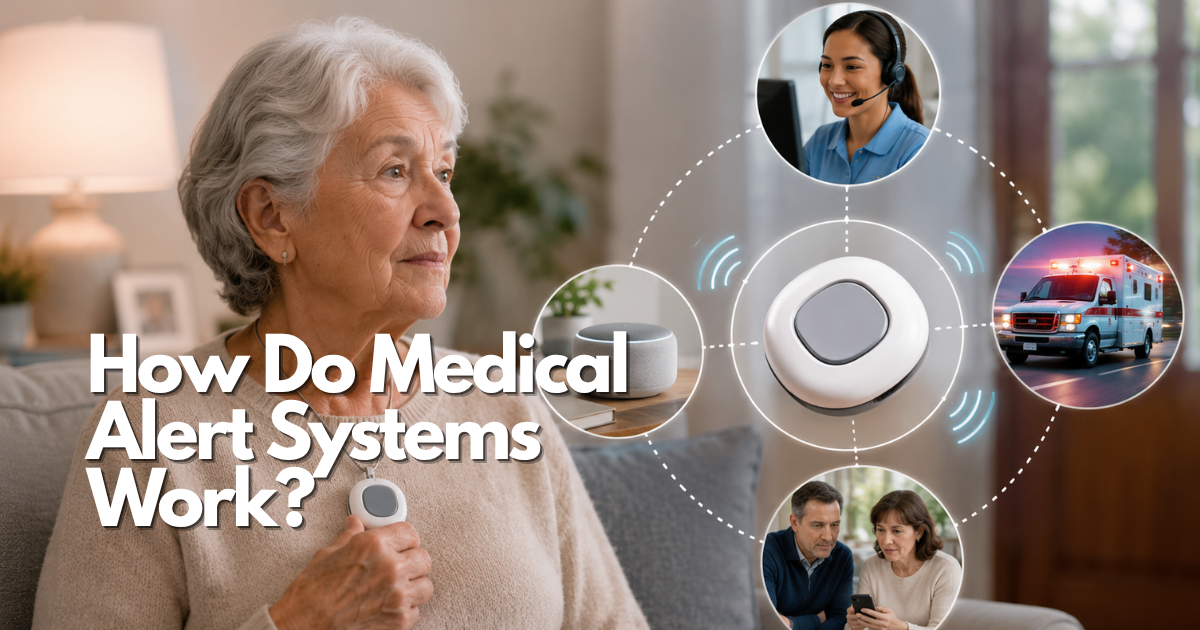
Medical alert systems work by giving a person a simple way to request help through a wearable, base unit, mobile device, or phone. What happens next depends on the connection, the service plan, the emergency profile, and whether the system has been tested where the person actually lives and travels.
Quick answer: how do medical alert systems work after the help button is pressed?
When a user presses a help button, the system sends a request through its configured connection. A monitored service may connect the person with a response center; another arrangement may alert family contacts or use a phone application. The receiver follows the provider’s or household’s response plan, which may involve speaking with the user, calling listed contacts, or contacting emergency services. The button is only the first step. A useful system also needs an accurate address or location, current contacts, a person who can use it, and a backup when it cannot work.
National Institute on Aging guidance describes emergency medical alert systems as wearable electronic monitors that can help alert responders when an older adult falls, becomes lost, or needs urgent medical assistance. NIA also cautions that the service must be set up correctly, worn, and maintained, and that it cannot replace regular check-ins by family, friends, or caregivers.
Medical alert system parts: button, connection, response, and profile
Understanding the four parts prevents feature labels from becoming false reassurance. The person needs a way to trigger help, a connection needs to carry the request, someone needs to receive it, and that person or service needs enough information to respond appropriately. Providers package these parts differently, but the questions remain the same.
Medical alert system buttons and wearables
A button may be worn as a pendant, wrist device, clip, or part of a mobile unit. It must be easy to reach and press with the person’s everyday strength, vision, hearing, and dexterity. Try it with normal clothing, from a seated position, and in the places where the person may be unable to reach a phone. A device that is comfortable but left on a dresser cannot perform its emergency role.
Medical alert system connection methods
Home systems may use a base station and a wearable button. Mobile systems may use cellular service and location features. App-assisted systems may depend on a phone, app permissions, Bluetooth, and internet or cellular service. Ask exactly which connection the selected configuration uses, what happens during a power or network outage, and whether it works in the person’s usual locations. Do not assume a device uses the same network as the person’s phone.
Medical alert system response paths
A monitored response center, a family-contact list, and a direct emergency calling arrangement are not interchangeable. Ask who receives the first request, how they identify the user, what they do when the user cannot speak, and when they escalate. A family member may be caring and reliable but unavailable overnight; a monitoring center may have a defined protocol that still needs to be read and tested. Never infer response time or dispatch behavior from a marketing phrase.
Medical alert system emergency profiles
The profile can include the user’s name, address, emergency contacts, communication needs, mobility information, allergies or conditions that matter in urgent care, and entry instructions. Keep it concise and current. An old address, disconnected contact, or outdated health detail can be worse than a shorter profile. Confirm who can update it and schedule a review after a move, caregiver change, or relevant health change.
How home medical alert systems work inside a house
An in-home arrangement generally links a wearable button with a base station. The system is only useful in the rooms where the person may need it, so range and two-way voice should be tested in the bathroom, bedroom, kitchen, entry, basement, and any outdoor area the person uses. Wall construction, distance, closed doors, and household noise can affect practical use.
In-home medical alert system range and voice checks
Test the device from the floor, not only while standing beside the base station. Check whether the user can hear the responder and whether the responder can hear the user. If the person spends time in a detached garage, yard, or another floor, ask whether those locations are in range. A stated range is not a promise that every home layout will work the same way.
Medical alert systems during power outages
Ask whether the base unit has battery backup, how long it is intended to operate, and what features stop working if electricity, internet, or phone service is interrupted. Keep an independent way to call for help reachable. A charged phone, a neighbor plan, or a scheduled check-in can be part of that backup, but it must be usable when the same outage affects the main system.
How mobile medical alert systems work outside the home
A mobile medical alert system is designed to travel with the user, often through cellular service and sometimes location tools. It may be a better fit for someone who walks, drives, visits family, or spends time away from a base station. It also introduces battery, coverage, charging, and location questions that should be tested before reliance.
Medical alert systems that work outside the home
Ask whether the device works in the neighborhoods, stores, medical offices, and travel areas that matter. Test it where permitted by the provider’s procedure. A mobile device may lose coverage, have a low battery, or provide an imperfect location estimate, especially indoors. The user should still know how to state an address or landmark when they can speak.
How a mobile medical alert system handles location
Location is an aid, not a guarantee of precise rescue. Ask what location source is used, who can see it, how often it updates, and what happens when it is unavailable. For a person with cognitive change, location sharing should be discussed with the person and caregivers as a privacy and autonomy decision, not quietly enabled because the technology allows it.
| Arrangement | Test before relying on it | Common limitation to plan for |
|---|---|---|
| Home base and wearable | Range and two-way voice from each high-risk room. | Power, range, and leaving the wearable behind. |
| Mobile cellular unit | Coverage, charging, and location in routine destinations. | Battery depletion and coverage gaps. |
| Phone or app-assisted alert | Permissions, sound, contact notifications, and phone access. | Muted, locked, lost, or uncharged phone. |
| Family-contact plan | Who answers first and what happens if nobody responds. | No continuous monitoring or defined escalation. |
What medical alert systems can and cannot do
A medical alert system can shorten the path from a person in trouble to a request for help. It cannot diagnose a condition, prevent every fall, guarantee a response, replace emergency services, or make a home safe by itself. Clear limits improve the system because they lead to backups rather than assumptions.
Medical alert system fall detection limits
Some services offer automatic fall detection, but it may miss an event, trigger a false alert, or require a user response. The manual button remains important. Ask the provider what its feature is intended to detect, what it may miss, whether it works in the selected service mode, and what happens if the user is silent.
Medical alert systems do not replace caregiver check-ins
NIA specifically notes that emergency alert systems cannot replace regular check-ins. A device can help in one urgent moment, while a check-in can notice gradual changes, loneliness, missed medication, a broken appliance, or a pattern of falls. Build both into the plan when the person’s situation calls for them.
Medical alert system backup planning
Use at least two independent ways to get help. If the primary system depends on a base station, the backup should not depend on the same power outlet alone. If it depends on a phone, the backup should not be another inaccessible phone. Decide who calls 911, who goes to the home, who has entry information, and what happens if the user does not answer.
Set up and test a medical alert system before depending on it
Setup is complete when the person can use the system, the response information is correct, and a realistic test succeeds. Do not treat activation or delivery as proof that the plan works.
Medical alert system setup checklist
- Enter the exact address, unit number, and clear contact information.
- Confirm the user’s communication, mobility, language, and emergency needs.
- Teach the user when and how to press the button.
- Assign battery, charging, and profile-update responsibilities.
- Follow the provider’s approved test procedure.
- Write down the result and correct any gap before relying on it.
Medical alert system test calls
Schedule a test if the provider requires it. Test from the person’s normal location and wearing position. Confirm who answers, what they see, whether they can hear the user, and how emergency contacts are notified. Repeat after a move, contact change, replacement device, app update, network change, or real failure.
Medical alert system maintenance
Keep a short log of tests, battery warnings, repairs, profile updates, and changes in the person’s needs. A yearly review is useful, but a correction is needed immediately when an address, contact, or health alert becomes wrong. If the device becomes uncomfortable or is no longer worn, treat that as a safety issue to solve, not a minor preference.
Medical alert system changes after a move or hospital stay
A move can change the address, apartment number, building entry instructions, base-station placement, range, cellular coverage, and the people who can respond. A hospital stay can change mobility, medication, communication needs, and the person’s ability to use the device. Treat either event as a new setup, not a small account update. Confirm the current profile, relocate the equipment deliberately, and perform a new provider-approved test before relying on it.
Ask the person which room feels most difficult after the change. That answer often identifies the first place to test: a new bathroom layout, unfamiliar stairs, a bedroom farther from the base station, or an entrance that responders may have difficulty finding. Update the caregiver plan at the same time, since an old neighbor or keyholder may no longer be relevant.
Privacy questions for medical alert systems and apps
Medical alert system privacy questions to ask
- What information is collected during use, testing, and support calls?
- Who can view location, recordings, contacts, and health details?
- How long is information retained, and what happens after cancellation?
- How are caregivers added or removed from account access?
- What privacy choices can the user change?
Choose how medical alert systems work for the person’s actual routine
A system works best when its operating requirements match the person who will use it. Before comparing plans, write down a normal day and a difficult day. Include time alone, bathing, sleeping, stairs, outdoor walks, trips to appointments, memory changes, phone use, and the times when the person is most likely to need help. This turns a vague wish for safety into questions that can be tested.
Medical alert systems for someone who lives alone
Someone who lives alone may benefit from a quick way to request help, but the plan should not stop there. Identify who can enter the home, who has current contact information, whether a neighbor is available, and how the person reaches 911 if the wearable is unavailable. A system with a response center can have a different role from a family-notification app. Ask which role is needed before paying for features that do not solve the actual gap.
Consider ordinary practical barriers. A person may remove a pendant for a shower, leave a phone in another room, or be unable to hear a base station from behind a closed door. A solution that works on a sales demonstration but not during the person’s highest-risk routine needs adjustment. The useful test is not whether the device turns on; it is whether the person can call for help in the hardest likely moment.
Medical alert systems for hearing, vision, memory, and dexterity needs
Check how the user knows a request was sent, whether they can hear the response, and whether the button can be found by touch. A person with low vision may need tactile cues and a charging routine that does not depend on a tiny indicator. A person with hearing loss may need a plan that does not rely solely on spoken instructions. A person with tremor or arthritis should try the button and clasp with their usual hand strength.
Memory changes need a simple routine. The device should have one familiar storage or wearing location, and the caregiver should know what to do if it is removed or lost. Do not assume a person will remember a multi-step app workflow in an emergency. A simpler alert that is worn consistently can be safer than a more elaborate arrangement that requires frequent troubleshooting.
Medical alert systems and caregiver consent
Caregivers should involve the wearer in the choice whenever possible. Explain what the button does, who will be contacted, what location information may be shared, and what happens after a test or accidental press. The goal is support, not surveillance. If a person objects to a location feature or family access, discuss alternatives and the practical risks openly rather than enabling settings without their understanding.
When decision-making capacity is uncertain, seek guidance from appropriate healthcare or legal professionals. A device account cannot determine consent or legal authority. Keep the emergency plan consistent with the person’s preferences and the provider’s documented procedures.
Medical alert system costs and service terms affect how it works
Cost is part of system reliability because a service that is misunderstood or unexpectedly unaffordable may be cancelled. NIA notes that emergency medical alert services commonly involve a startup fee and a monthly service charge, and that costs can vary by company, features, and coverage area. Do not rely on an introductory price or an old review. Ask for the current terms of the exact arrangement.
Medical alert system fees to verify
Ask about equipment ownership or rental, activation, monitoring, optional fall detection, mobile service, replacement, shipping, cancellation, return deadlines, and account changes. Request the answers in writing. A household should calculate the first month, a normal month, and a replacement month so there is no surprise when the device is lost or damaged.
Medical alert system coverage questions
Do not assume Medicare, Medicaid, a private insurer, or a long-term care plan will pay for a particular device or service. NIA states that Medicare will not pay for emergency medical alert systems, while some Medicaid, private insurance, or long-term care arrangements may help in some cases. Benefits and eligibility can change, so verify directly with the plan or program before ordering.
Troubleshoot medical alert system failures before the next emergency
When a system fails, begin with safety: use a direct emergency method if help is needed now. Afterward, identify whether the problem was the wearable, battery, base station, mobile coverage, app permissions, contact list, account, or user routine. A vague conclusion such as “it did not work” will not prevent another failure.
Medical alert system low battery and charging problems
Put charging into a routine the person can maintain. If the device charges overnight but the person is at greatest risk while getting up at night, that routine creates a gap. Ask the provider how low-battery alerts work and who will notice them. Do not use an unapproved charger or assume a spare cable will work with a proprietary device.
Medical alert system connection and app problems
After a phone update, network change, new router, new phone, move, or app update, repeat the provider-approved test. Check permissions, Bluetooth status, notification settings, cellular service, and account sign-in. If the service reports an outage, write down the backup plan and ask when a retest is appropriate. A status light or app screen alone is not proof that a response request will reach the right person.
Medical alert system contact-list failures
Contacts change jobs, move, silence phones, and sometimes stop participating in caregiving. Review the order of contacts and the no-answer procedure. Ask each person whether they still agree to be called and what information they need. If the contact is expected to enter the home, confirm that entry instructions remain safe and current.
Caregiver medical alert system handoff plan
Do not leave all maintenance to one person without a backup. Write down who owns the account, who manages updates, who performs test calls, who notices charging problems, and who is the backup when the main caregiver travels or becomes ill. Store the provider support number and a short response script in a secure, easy-to-find place.
Medical alert system response script for caregivers
The script should cover the first minutes: confirm the user’s location if possible, call 911 for immediate danger, meet responders when appropriate, notify the next contact, and document what happened. It should also state when not to delay by calling several family members first. A clear script supports the caregiver and reduces the chance that an alert turns into confusion.
Medical alert system readiness checklist
Use this checklist before a person depends on the service. It is meant to expose a gap, not to create a perfect score. If one answer is uncertain, test it, ask the provider, or add a backup.
- The user can locate and press the button with their normal clothing and abilities.
- The system works in the bathroom, bedroom, kitchen, and any other place where help may be needed.
- The user understands what happens after a press and how to handle an accidental activation.
- The address, apartment number, emergency contacts, communication needs, and entry instructions are current.
- The response path is written down: who receives the alert, who escalates, and what happens if the user is silent.
- Battery, charging, base-station placement, and outage behavior have an assigned owner.
- The household completed a provider-approved test and recorded the result.
- Location sharing and caregiver account access have been discussed with the user.
- A separate phone, neighbor, check-in, or other independent backup is available.
- The person and caregiver know when to call 911 directly.
Review the checklist after a move, hospitalization, caregiver change, new phone, service-plan change, device replacement, or actual alert. The system can only be dependable when its information and routine remain connected to the person’s current life.
Frequently asked questions about how medical alert systems work
What happens if a medical alert button is pressed by mistake?
Follow the provider’s instructions rather than ignoring the alert. Many systems let the user tell the responder it was accidental, but the exact cancellation process varies. Practice that process during an approved test so an older adult is not afraid to use the button in a real emergency. A caregiver should also know whether accidental calls trigger a notification and whether any repeated false alerts need a device, fit, or routine review.
Can a medical alert system work when the user cannot speak?
It may, depending on the service protocol and the information available to the responder. Ask the provider what it does after silence, how it uses the emergency profile, and whether it contacts emergency services or listed contacts. Make sure the profile identifies communication limits and a current address. Never assume every provider treats silence in the same way.
Do medical alert systems work without Wi-Fi?
Some do, but it depends on the service and connection method. A home base, cellular unit, or app may have different requirements. Verify the exact model and test it in the home.
Do medical alert systems work outside the home?
Mobile systems may work outside the home when they have coverage and battery, but they can have gaps. Confirm the locations, location method, and service terms rather than assuming nationwide performance.
Can medical alert systems call 911 automatically?
Response paths vary. Ask the provider who receives the alert, how escalation works, and what happens if the user cannot respond. Call 911 directly for immediate danger when possible.
Do medical alert systems detect all falls?
No. Automatic fall detection can miss events or create false alerts. The wearer should still know how to press the help button, and the household needs a separate backup plan.
How often should a medical alert system be tested?
Follow the provider’s instructions and test after meaningful changes. Record the test result so the household knows the last verified date.
Can a medical alert system replace a caregiver?
No. It can support a response plan, but it cannot replace regular human check-ins, clinical care, or broader safety planning.
How do medical alert systems work with a locked door or pet in the home?
The device does not solve access by itself. Add accurate entry instructions to the emergency profile only if the provider supports them, decide who can meet responders, and review the plan after a lock, roommate, pet, or building-access change. Never leave a key or access code in a way that creates a separate security risk. A caregiver should know what information emergency responders may need and what the service can actually relay.
Should a medical alert system be worn at night?
That depends on the person’s routine, comfort, and the exact device instructions. Nighttime trips to the bathroom can be a high-risk time for some people, so the household should decide deliberately rather than assume the device will be nearby. If it is removed for charging or comfort, put an independent reachable backup in place.
Medical alert system readiness decision
A medical alert system is ready when the user can reach it, the connection works in the places that matter, the response path is understood, the profile is current, and an independent backup exists. If any link is uncertain, test and correct it before treating the device as reliable.
Keep the decision practical. The most appropriate arrangement is the one that answers the person’s most likely emergency scenario, can be used with their abilities, and can be maintained by the household. Revisit that decision whenever the routine or support network changes instead of assuming the original setup remains dependable forever.
Official sources used to verify this guide
- National Institute on Aging: Services for Older Adults Living at Home — general use, setup, battery, cost, and check-in limits.
- HHS: Health information on personal phones and tablets — privacy and HIPAA boundaries.
- U.S. Department of Veterans Affairs: Preventing Falls — alert systems as one component of a wider fall-prevention plan.
Sources accessed August 17, 2026. Provider features, response processes, coverage, costs, network performance, and privacy terms require direct current verification.
3 comentarios en «How Do Medical Alert Systems Work?»