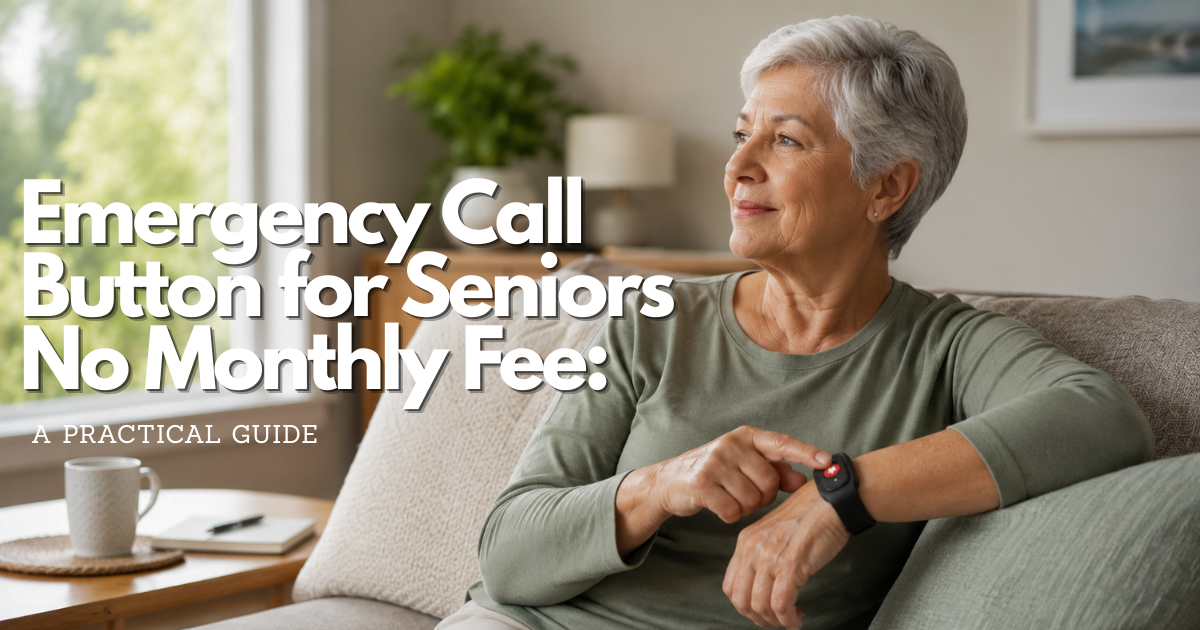
An emergency call button for seniors no monthly fee arrangement can be possible, but the missing subscription does not remove the need for a response plan, a working connection, batteries, testing, or a person who can act when the button is pressed.
Quick answer: can an emergency call button for seniors work without a monthly fee?
Yes, but “no monthly fee” usually means that a professional monitoring subscription is absent or paid through another program. It does not mean the complete emergency response path is free, maintenance-free, or guaranteed to reach help. A one-time device may sound an alarm locally, contact a caregiver through an existing connection, or depend on a phone, internet service, batteries, and a trusted person. Each route trades recurring cost for responsibility or capability.
The safest low-cost choice is the arrangement that the older adult can activate, that reaches a clearly identified responder, and that someone checks regularly. Before choosing any button, answer four questions: Who receives the alert? What connection carries it? What happens if the older adult cannot speak? What is the backup when the button, battery, contact, or network fails?
If the person faces a life-threatening or otherwise urgent event in the United States, use 911 when it is safe. An inexpensive local alarm or an unmonitored button should not be presented as equivalent to a staffed response center. Current National Institute on Aging guidance describes emergency alert systems as commonly having an initial charge plus an ongoing service charge; it also places these systems outside ordinary Medicare payment while noting that Medicaid, private insurance, or other programs may sometimes help. A no-monthly arrangement therefore needs careful verification rather than a promise based on a label.
| Meaning | What may be removed | What still needs a plan |
|---|---|---|
| No monitoring subscription | A recurring payment to a professional response center | Who receives the alert, how they respond, and how the device connects |
| One-time hardware purchase | A recurring equipment rental or service charge | Battery replacement, damage, replacement, and any required phone or internet service |
| Existing household connection | A separate communication plan for the button | Whether the current phone, internet, or caregiver network stays available |
| Public or private assistance | Some or all of an eligible household’s out-of-pocket cost | Eligibility, renewal, provider rules, and what happens if assistance ends |
What “no monthly fee” changes in an emergency call button
The phrase describes a payment model, not a safety level. A button can be purchased once and still require a charged battery, a receiver, an active phone line, a compatible app, a nearby caregiver, or a working electrical outlet. If the device uses a connection that the household already pays for, the button may have no separate monthly charge while the household still has a communication bill.
Emergency call button for seniors costs include more than a service subscription
List every cost before deciding that an arrangement is free. Possible costs include the button or receiver, shipping, activation, a charging cable, batteries, a replacement after water or impact damage, a phone or internet plan, data use, a caregiver’s device, taxes, and a professional installation. A local siren may have no subscription but still require a compatible receiver or a second device in another room.
Also count the maintenance cost in time. Someone must notice a low battery, confirm that a caregiver’s number still works, test the response path, update the home address, and replace a lost button. A plan that shifts the monthly bill to an irregular but forgotten task can fail just as quietly as a canceled subscription.
Emergency call button for seniors service and emergency response are different layers
A button is the activation layer. A response service is the destination and procedure behind the activation. An alert can ring a local receiver, send a message to selected contacts, open a phone call, or reach a professional center. These are not interchangeable. A local alarm may be excellent for alerting a person in the next room and unsuitable for someone who lives alone. A contact list may be affordable and unsuitable when nobody can answer.
Ask the provider or seller to describe the complete event in plain language. What does the user press? What signal leaves the button? Who sees or hears it? What information identifies the home? What happens when no one responds? What does the user hear after activation? If the answer stops at “it sends an alert,” the response path is incomplete.
Emergency call button for seniors hardware and recurring communication are separate decisions
A one-time device can be sensible when the family already has a reliable phone or caregiver network and the older adult can use it. It can be a poor fit when the person needs a staffed center, cannot reach a phone, spends long periods alone, or may be unable to explain the location. Decide whether the device is a local alarm, a contact shortcut, a personal response tool, or a direct emergency-services path.
Do not assume that a button’s physical design tells you where the alert goes. A large red control may only activate a chime. A wearable may depend on a base station. A button sold for home use may not work outside the receiver’s range. The name “SOS” does not establish that the device contacts 911 or a professional responder.
Types of emergency call button for seniors options that may avoid a recurring monitoring fee
Several arrangements can reduce or remove a separate monthly monitoring charge. They should be evaluated by response path rather than by the promise of a low price. The categories below are intentionally neutral: the same type can be suitable for one household and unsafe for another.
Local emergency call button with a home alarm or receiver
A local button can activate a chime, siren, light, or receiver in the home. It may help when another person is present and close enough to hear or see the signal. This type can be simple to maintain, but it cannot summon someone who is away unless another connection carries the alert. Check the receiver’s range through walls, floors, doors, and outdoor areas that matter.
Decide what the sound means. If the alert could be mistaken for a doorbell, appliance alarm, or low-battery tone, label it and practice the response. A caregiver should know whether to enter the room, call the older adult, call 911, or use another step. A loud local alarm is not a substitute for a person who has agreed to respond.
Self-monitored emergency call button for seniors through an existing phone or internet connection
Some arrangements use an existing phone, home internet connection, or caregiver app to contact selected people. The button may avoid a second monitoring subscription, but the underlying service still matters. Confirm whether the phone or internet must remain active, whether the caregiver needs an app account, and what happens if the recipient has no data connection or has changed devices.
For an emergency call button for seniors no monthly fee arrangement, the existing connection is part of the cost and safety calculation even when no separate alert subscription appears on the bill.
Self-monitoring puts escalation work on the household. A first contact may need to call a second contact, confirm the address, and decide when to request emergency services. Write that sequence down. Do not create a list of ten contacts that nobody checks; choose a short list of people who have agreed to answer and know their role.
One-time emergency call button for seniors with a caregiver response network
A one-time button may be paired with a family, neighbor, building staff member, or scheduled check-in plan. This can reduce recurring service costs when the network is dependable and the home has a safe access plan. It is not a professional monitoring service. Response depends on the availability, judgment, travel time, and communication ability of the people in the network.
Use a written roster with a primary responder and a backup. Record what each person can do: call the older adult, open the door, bring a phone, check the home, or contact emergency services. Ask permission before sharing the person’s address, health information, location, or access code. Review the roster whenever a neighbor moves, a caregiver’s schedule changes, or the older adult’s needs increase.
Emergency call button with a public or private assistance route
A qualifying household may receive help through a government program, Medicaid waiver, private insurance, long-term-care coverage, or a local aging service. Assistance may lower the cost of a phone connection, device, or response service, but the rules are not universal. A program may require an application, proof of eligibility, a participating provider, a renewal, or a specific care plan.
Ask the program what it actually pays for. Coverage for a phone line is not automatically coverage for a personal emergency response service. Coverage in one state or plan does not establish coverage in another. Keep the button usable while an application is pending and keep a backup if eligibility changes.
Emergency call button versus a phone kept for 911-only use
A wireless phone without an active calling plan may be able to call 911, but that is not the same as a no-monthly emergency call button for seniors or a complete response system. The official 911.gov FAQ cautions that an unserviced handset can leave the call center without usable location data and without a reliable way to reconnect if the call ends. Treat it as a limited emergency route, not a promise of monitoring, caregiver notification, or location support.
Store any backup phone where the older adult can reach it, keep the address visible, and teach when to call 911. Do not give an inactive phone to a child or treat it as a harmless alarm; 911.gov notes that uninitialized phones can generate false calls that burden emergency centers.
Who receives an alert from an emergency call button without monitoring?
Removing a monthly center does not remove the need for a recipient. It changes who owns the next action. A low-cost plan should name that person or system and explain how the alert becomes help. “It will notify someone” is not specific enough for a safety plan.
Home emergency call button alerts need someone within hearing range
A receiver or local siren can be useful when a caregiver, spouse, neighbor, or staff member is close by. Check the real distance, not the distance on an open floor. Close doors, move to the bathroom, go downstairs, and test from the floor if that reflects a likely event. If the responder sleeps through the sound or cannot enter the home, the local alert has no second step.
Caregiver emergency call button alerts need an answer and escalation rule
A text, call, or app notification may reach a caregiver without a professional fee, but it does not guarantee that the notification is seen. The caregiver may be driving, asleep, out of service, or dealing with another emergency. Set a time limit for an unanswered alert, then identify the next contact and the conditions for calling 911.
Tell the older adult what to expect after pressing the button. If the person hears no voice, sees no confirmation, or cannot speak, the plan should still provide an action. If the system sends alerts to several people, make sure they know who is primary so that everyone does not wait for someone else.
Professional emergency call button monitoring has a different responsibility model
A staffed response center may provide a trained person to receive the activation, ask questions, use account information, and follow an escalation procedure. That service is commonly funded through a recurring fee, although an eligible program or organization may pay some or all of it. A free or one-time device should not be described as equivalent unless it provides the same verified response function.
Ask who answers, where the center is located, whether it operates continuously, what happens when the wearer cannot speak, and whether the center can contact 911 or only a list of caregivers. Ask how the account address is kept current. The exact terms belong in writing and should be reviewed after a move or service change.
| Response path | Best fit when | Main dependency or gap |
|---|---|---|
| Local chime or receiver | A trusted person is nearby and can hear or see the alert | It does not reach someone who is away and may not work through the whole home |
| Caregiver call, text, or app alert | Agreed contacts can respond and follow an escalation rule | A notification can be missed, delayed, or lost when the recipient’s device or service fails |
| Professional response center | The older adult needs a staffed first response and account-based instructions | Usually has a recurring service cost or program eligibility requirement |
| Direct 911 call | There is an immediate emergency and the user can reach and activate the route | Location, callback, language, speech, battery, and network limits still need planning |
How to evaluate an emergency call button for seniors before relying on it
Evaluate the complete arrangement in the room and routine where the older adult would use it. A product page can describe a button, but only a practical test reveals whether the person can find it, press it, hear the result, and reach a responder. Use a written question list so a low price does not make important gaps invisible.
Emergency call button activation should be clear under stress
Ask the older adult to locate the button without a prompt, press it with the hand they normally use, and explain what they expect to happen. Test from a chair, bed, bathroom, kitchen, doorway, and floor-level position when safe. Notice whether the device is covered by clothing, bedding, a walker, or a mobility aid. A button that is easy to use only while seated beside a caregiver is not ready for independent use.
Check feedback after activation. Is there a tone, vibration, light, voice, or receiver response? Can the person distinguish a successful alert from a low-battery warning or an accidental press? If the device has a cancellation procedure, learn it from the current instructions and never invent a test sequence that could create a real dispatch.
Emergency call button connection questions reveal hidden monthly costs
Ask whether the button needs a base unit, phone line, internet connection, cellular service, app, account, or another device. Ask which of those are included and which are paid separately. If an existing service is used, find out whether the button stops working when that service is suspended, the router loses power, the app is signed out, or the caregiver changes phones.
Ask what the device does during a power outage, a low battery, a weak signal, an internet interruption, or a service-provider change. A battery in the button may keep the button powered while the receiver or network is unavailable. The answer should identify the failure and the next action, not simply say “it has backup.”
Emergency call button response questions should be answered in writing
Request direct answers to these questions before relying on a no-monthly setup:
- Who receives the first alert, and how are they notified?
- Can the older adult speak with the responder, or is the alert only a sound, text, or notification?
- What happens if the older adult cannot answer or the first contact does not respond?
- What address or location information is available, and who updates it?
- Which parts work outside the home or away from the receiver?
- How are tests scheduled, and how is a false alarm handled?
- What happens when the device is lost, damaged, wet, or out of battery?
- What payment or service is still required even when there is no monitoring subscription?
Emergency call button water, wearability, and placement need separate checks
A button may be worn in one wet setting and not another. Ask specifically about showers, baths, pools, rain, cleaning, and immersion. Check the charging base and receiver separately; a wearable’s water rating does not make a powered base safe to wet. If the person removes the button to bathe, identify how help can be requested during that gap.
Observe the person’s real clothing and movement. A lanyard may catch on a handle, a wrist device may be removed for sleep, and a button on a belt may be inaccessible after a fall. The best placement is the one the person accepts and can reach, not the one that looks most convenient in a demonstration.
Emergency call button for seniors no monthly fee and 911 boundaries
A no-monthly emergency call button can support a safety plan, but it does not change when 911 is appropriate. If there is an immediate danger to life, serious injury, sudden severe symptoms, fire, or another urgent emergency in the United States, call 911 when safe. A local alarm, caregiver notification, or non-monitored button may be an earlier signal or backup, but it should not delay emergency services when they are needed.
Emergency call button activation is not the same as a 911 connection
A button may alert a neighbor, ring a receiver, or open a conversation with a caregiver. It may not contact 911 at all. If direct emergency calling is part of the plan, verify the exact activation path and teach the older adult how to state the address, apartment or unit, and nature of the emergency. Keep that information visible even if the button or service stores an address.
911-only phone access has location and callback limits
The 911.gov FAQ explains that an inactive wireless handset can still reach 911, but the center may receive no dependable location and may have no return path after a disconnection. That route is therefore not a substitute for a monitored emergency response device, a caregiver network, or a current address plan. Do not advertise an unserviced phone as a free monitoring system.
Emergency call button tests should use the local non-emergency process
Do not press a button connected to 911 simply to see what happens. Follow the device provider’s testing instructions, and if a 911 test is necessary, contact the local 911 center through its non-emergency number first. The official 911.gov guidance says test calls can be scheduled through a local non-emergency number and should not be placed casually.
Costs and lower-cost routes for an emergency call button
Start with the response function and then examine how the cost is paid. A no-monthly arrangement can be reasonable when the person needs a local alert and another adult is nearby. It can be unsafe when the person needs a staffed first response or spends long periods alone. Cost should narrow the options only after the household knows what kind of help is required.
Emergency call button equipment and maintenance costs
Ask for a complete ownership list: the button, receiver or base, batteries, charger, mounting parts, shipping, replacement, repairs, and any required connection. Find out whether a device becomes unusable when a battery is removed, whether the battery is replaceable, and whether the manufacturer or seller supports repairs after the stated warranty. A device that cannot be maintained locally may be more expensive over time even when it has no subscription.
Medicare and emergency call button costs need an official coverage check
NIA’s guidance says emergency medical alert systems are not paid by Medicare and may receive help from Medicaid, private insurance, or long-term-care plans in some circumstances. That statement is a general starting point, not a guarantee for a specific plan or state. Ask the plan or program what service, equipment, or response arrangement is covered and what documentation applies.
Do not describe a phone discount, medical equipment benefit, or home-care service as automatic coverage for an emergency call button. The Medicare coverage overview explains that coverage depends on the item or service, federal and state rules, and coverage decisions. Verify the exact item and payer before signing an agreement.
Medicaid and local assistance can vary by state and program
Some Medicaid programs, waivers, managed-care plans, disability services, or local aging programs may help with a personal emergency response arrangement. Eligibility can depend on state rules, income, care needs, a waiver, or an approved care plan. Ask the state Medicaid office, plan, case manager, or local aging agency what is available and whether a participating provider is required.
Keep a no-monthly backup while an application is reviewed. If assistance ends, the button may be returned, the service may stop, or the household may receive a new device with different instructions. Record the renewal date and ask what happens to the emergency plan if documentation is late.
Lifeline may lower a phone bill but is not a promise of a free emergency response service
Lifeline is a federal program that can lower the cost of qualifying phone or internet service for eligible households. The official Lifeline program overview explains that eligibility, one-benefit-per-household rules, provider participation, use requirements, and annual recertification matter. The application guidance explains that applicants apply through available methods and then choose a participating phone or internet company.
That distinction matters when someone searches for an emergency call button for seniors no monthly fee: a lower phone bill may support the connection, but it does not by itself create a responder, a wearable button, or a professional escalation procedure.
A Lifeline benefit may help keep an underlying communication connection active, but it does not automatically provide a monitored button, a response center, a caregiver, or a wearable. Confirm the actual service and support terms. Never give sensitive information to a caller who claims to enroll you urgently; use the official Lifeline site or a provider you locate independently.
| Question | Why it matters | Evidence to keep |
|---|---|---|
| Who pays for the response function? | A subsidy, caregiver, existing service, or no one may be responsible | Program letter, service terms, or written family agreement |
| What connection remains active? | The button may depend on a phone, internet, power, app, or receiver | Connection requirements and outage instructions |
| Who answers after activation? | A local alarm and a staffed center have different response duties | Named responder and escalation sequence |
| What gets replaced? | Batteries, water-damaged parts, and lost devices can end the plan | Replacement policy, battery type, and maintenance owner |
| When does eligibility or support end? | A public or private benefit may require recertification or renewal | Renewal date and contingency plan |
Set up an emergency call button without a monthly monitoring plan
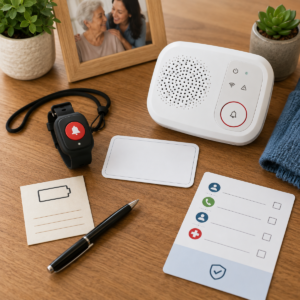
Setup should be treated as a household procedure, not as opening a box. Write the response path, place the button where the person can reach it, confirm the connection, and practice the action with the older adult. The person should understand what pressing the button does and what will happen next.
Emergency call button address and access information
Keep the street address, apartment or unit number, floor, entry instructions, and a short description of the home beside the receiver or button. Include a primary contact and backup contact with permission. If a responder needs a key, access code, building entry instruction, or pet information, store that detail securely and share it only with people who need it.
Update the record after a move, lock change, renovation, caregiver change, or change in the older adult’s usual room. A home alarm can make noise without telling a neighbor which door to open. A caregiver can receive a notification without knowing where the person is. Location information must be current and usable.
Emergency call button placement should match the older adult’s routine
Place the button or wearable where it is accessible from the chair, bed, bathroom, kitchen, and any other place where a sudden illness or fall is plausible. If a receiver is used, place it where the designated responder can hear it. Avoid a location that creates a trip hazard, gets covered by clutter, or requires the user to stand before reaching it.
Emergency call button teaching should use one simple instruction
Use a short script such as: “Press the button when you need help, then tell the responder where you are.” Adapt the words to the older adult’s language and memory. Practice the action without making the person feel tested or blamed. Ask the person to explain who will answer and what to do if nobody answers.
Consent matters even when a caregiver pays. Explain whether the button sends location, contact information, or an alert to other people. Ask before sharing health information or adding a caregiver to an account. If the person refuses the device, explore the reason and discuss other response paths instead of hiding it.
Test an emergency call button with no monthly monitoring fee
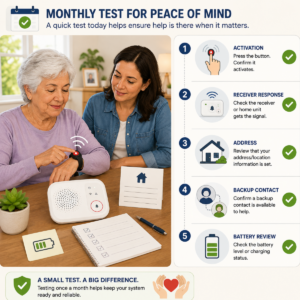
Testing a no-monthly arrangement means testing both the device and the people behind it. A local receiver, caregiver notification, and 911 route require different checks. Record the date, location, battery condition, activation method, destination, and result. Do not count a light or chime as proof that help can reach the person.
Emergency call button user test from likely locations
Have the older adult activate the button independently from the main chair, bed, bathroom, kitchen, and the floor if a safe practice position is possible. Use ordinary clothing, glasses, hearing aids, mobility equipment, and lighting. Ask the person to describe what confirmation they received and what they would do if the responder did not answer.
Emergency call button contact test and escalation check
Notify the contact that the test is beginning. Confirm what appears on the receiving end, how long it takes to arrive, whether the contact knows the address, and whether the backup contact understands the next step. If the contact misses the test, do not quietly mark it as a pass. Change the plan or name a different responder.
Emergency call button outage, battery, and service-change test
Ask what the user should do when the battery is depleted, the receiver loses power, the phone or internet is down, the app is signed out, or a caregiver’s number changes. You do not need to create an outage to document the plan, but you should know the instructions and keep the backup equipment charged. After a service or device change, repeat the full user test.
Emergency call button privacy, consent, and scam protection
Removing a monthly monitoring service may reduce the amount of information sent to a response center, but a connected button can still expose a name, phone number, address, location, health detail, or caregiver relationship. A local alarm may share less data while depending more heavily on people nearby. Compare the information flow with the response benefit.
Emergency call button data should be limited to the response need
Ask what information the button, receiver, app, provider, caregiver, or program stores. Find out who can see the alert history, location, address, contact list, or account details. Give responders the information needed to act, but avoid placing passwords, financial information, or an unnecessary medical history on a card beside the device.
Review location sharing separately from emergency contact access. A caregiver may need an address and an entry instruction without needing continuous location access. If the device uses an app, check account recovery, permissions, lost-device steps, and whether the older adult can understand who is connected.
Emergency call button consent should include family and caregiver roles
Discuss who can change contacts, receive alerts, access location, request replacement equipment, or cancel a service. Paying for a button does not automatically authorize unlimited monitoring of an older adult. Explain the plan in accessible language and revisit it after a health, relationship, or living-arrangement change.
If the person cannot make or communicate a decision independently, follow the applicable legal and care process. Do not use a technical password as a substitute for consent or lawful authority. A safety plan works better when the person knows what the button does and trusts the people who will respond.
Emergency call button offers and “free” claims can be scam targets
A caller may claim that a senior has been approved for a free emergency button, that a benefit expires today, or that a device must be activated by giving a payment card or government identification number. The Federal Trade Commission warns that scammers use pressure, spoofed caller ID, and requests for money or personal information. An urgent offer is not evidence of a legitimate program.
Slow down. Ask for the organization’s name and written information, then end the call and use a phone number from an official website, statement, plan card, or independently located provider. Do not share a Social Security number, account password, one-time code, banking details, or remote access to a phone because an unexpected caller says the button is at risk. Report suspected scams through the FTC’s phone-scam guidance.
Maintain an emergency call button without a monthly service
A device without a subscription still needs ownership. Put maintenance on a calendar and name the person responsible for each task. The older adult may be able to check the button, while a caregiver may need to replace batteries or confirm the receiving network. Make the division explicit so no task exists only as an assumption.
Emergency call button batteries and charging routine
Check the battery according to the current instructions and replace or recharge it before the warning becomes urgent. Keep the charger or replacement batteries in a known, safe place. Do not use a damaged cable, swollen battery, cracked housing, or device that becomes unusually hot. If the button is worn, inspect the clasp, strap, casing, and activation surface.
For a local receiver, check the receiver’s power as well as the wearable’s battery. A button can be fully charged while the part that produces the alert is unplugged or muted. Confirm that the household knows what the low-battery sound means and who will act on it.
Emergency call button contact and address review
Review the primary and backup contacts at a regular interval and after any change in phone number, work schedule, health, relationship, or location. Ask each contact whether they still agree to respond. Remove people who no longer want the role. Check the home address, apartment, building entry, pets, and safe key or access information.
Emergency call button replacement after loss, damage, or service change
When the button is lost or damaged, tell the older adult which alternate path to use before sending the device for repair. If an account or program supplied it, ask whether the replacement changes the activation method, recipient, address record, or privacy settings. Test the new button from the places that matter.
If the service or caregiver network changes, do not assume that the old button still points to the old responder. Remove outdated instructions from the home, update the address card, and record the date of the new test. A silent service change can create the same risk as a dead battery.
Emergency call button limits and backup plans
No-monthly arrangements are most useful when their limits are visible. A button can be out of reach, uncharged, damaged, outside receiver range, disconnected from the underlying service, or answered by a person who cannot get to the home. A response plan should say what happens next instead of treating the button as a guarantee.
When an emergency call button cannot replace a staffed response center
A local button or caregiver alert may not be adequate for someone who lives alone, cannot reliably remember the activation, cannot speak after a fall, or has no responder who can reach the home. A professional center may better match that need, even if its cost requires a program, insurance check, or different household budget. The question is not whether a subscription is desirable; it is whether someone with a defined responsibility can respond.
When an emergency call button cannot replace a broader safety plan
A button does not prevent a fall, unlock a door by itself, provide first aid, identify every medical problem, or guarantee that emergency services can locate the person. It should sit beside an address record, medication and health information the person chooses to share, a home-access plan, check-ins, and a direct 911 route for immediate emergencies.
Emergency call button failure plan for power, signal, and contact gaps
Write one action for each likely failure:
- Button unreachable: use a second reachable method or move the button and receiver.
- Battery empty: use the charged backup and start the replacement routine.
- Receiver or network unavailable: use the verified alternate connection or direct emergency route.
- Contact does not answer: follow the escalation list rather than waiting indefinitely.
- Location uncertain: read the current address card to the responder and update the service record.
- Older adult cannot speak: use the agreed accessibility and no-response procedure.
| Failure | What may happen | Prepared backup |
|---|---|---|
| The button is left in another room | The older adult cannot activate it after a fall or sudden illness | Move it to the person, add a second route, or reconsider the response design |
| The caregiver misses the alert | A text, app message, or call is not seen | Use a named backup contact and a time-based escalation rule |
| The receiver loses power | The button works but no local alarm sounds | Keep the receiver powered as instructed and maintain another communication path |
| The service address is outdated | A responder may go to the wrong entrance or home | Keep a current card and update any provider, program, or emergency record |
| The older adult cannot speak | The responder receives too little information | Use the documented no-response or accessibility procedure |
Emergency call button caregiver checklist without recurring monitoring
Use this checklist when setting up a no-monthly arrangement or reviewing one that has been in place for a while. It is a readiness tool, not proof that a button will work in every emergency.
Before choosing an emergency call button for seniors
- Write the intended response path and name the first responder.
- List every required connection, device, battery, app, receiver, and service.
- Record what the phrase “no monthly fee” excludes and what costs remain.
- Confirm the older adult can reach and press the button in likely locations.
- Ask how a no-response event, lost device, power failure, and damaged device are handled.
- Check whether a public, private, or Lifeline program may help with a relevant cost, using official eligibility information.
- Discuss privacy, consent, location sharing, caregiver access, and scam verification.
Before relying on a senior emergency call button
- Place the button or wearable where the person can reach it from the chair, bed, bathroom, and kitchen.
- Test the actual receiver, caregiver alert, or response path from realistic positions.
- Confirm the address, unit, access instructions, and responder numbers.
- Check battery, charger, receiver power, audible feedback, and low-battery warnings.
- Have the older adult explain what happens after pressing the button.
- Keep the backup path visible and tell the older adult when to call 911.
Monthly emergency call button readiness review
- Ask the older adult to perform the activation without coaching.
- Verify that the intended contact answers and knows the escalation sequence.
- Review contact availability, address accuracy, entry information, and consent.
- Inspect the button, strap, casing, receiver, battery, and charger.
- Check for a recent move, service change, phone change, software change, or health change.
- Record a failed step and assign a person and date for correction.
Frequently asked questions about emergency call button for seniors no monthly fee
What is an emergency call button for seniors with no monthly fee?
It is an arrangement in which the household does not pay a separate recurring monitoring charge for the button. The alert may go to a local receiver, caregiver, existing phone connection, public program, or another destination. The device may still have an upfront cost, battery needs, connection requirements, replacement costs, or caregiver responsibilities.
Can an emergency call button work without a professional monitoring service?
Yes, if another responder receives and acts on the alert. A local alarm, caregiver network, or self-monitored phone path can work for some households. It is not equivalent to professional monitoring when no one is reliably nearby or when the older adult may be unable to speak or explain the location.
Does no monthly fee mean the emergency call button is free?
No. It may mean that the recurring monitoring charge is absent, while the device, receiver, batteries, phone or internet connection, data, repairs, replacement, or caregiver time still have costs. Ask for the complete cost and response path in writing.
Can an emergency call button without a monthly fee contact 911?
Some devices or connected arrangements may provide a route to 911, while others only alert a caregiver or produce a local signal. Confirm the exact destination. If the route uses an unserviced wireless phone, 911.gov warns that location and callback limits may apply. In a real emergency, call 911 when safe and give the address and nature of the emergency.
What does an emergency call button do when nobody answers?
The answer depends on the arrangement. A local button may continue sounding, a caregiver alert may remain unanswered, and a professional center may follow its no-response procedure. Write the escalation step before relying on the button. If the plan has no next responder, it is incomplete.
Can Medicaid or another program pay for an emergency call button?
Some Medicaid programs, waivers, private plans, long-term-care plans, or local programs may help, but eligibility and covered services vary. The NIA says Medicaid and other programs may provide coverage in some circumstances. Verify the exact benefit with the program, plan, case manager, or participating provider and keep a backup while approval is pending.
Can Lifeline provide a no-monthly emergency call button?
Lifeline helps eligible households lower the cost of qualifying phone or internet service. It is not automatically a personal emergency response service or a monitored button. Use official Lifeline information to confirm eligibility and provider participation, then ask what the underlying connection supports.
How often should a no-monthly emergency call button be tested?
Test it on a regular schedule that fits the person’s risk and setup, and repeat a full user test after a move, device replacement, battery change, service change, contact change, or health change. Follow provider instructions and never call 911 merely to practice. Use the local non-emergency process for a planned 911 capability test.
Official sources for emergency call button costs and safety
This guide uses current official sources for emergency calling, aging-at-home alert systems, public communications assistance, Medicare verification, and scam prevention. Program rules, provider terms, local 911 capabilities, and eligibility can change, so use the source that matches the reader’s location and situation.
- National Institute on Aging: Services for Older Adults Living at Home — emergency alert system costs, setup, battery care, check-ins, and general coverage limits.
- 911.gov: Frequently Asked Questions — unserviced wireless phones, location and callback limits, test calls, VoIP, and caller information.
- 911.gov: About 911 — the role of 911 and local emergency communications.
- Medicare: What Original Medicare covers — why a specific item or service must be checked against current Medicare coverage rules.
- Lifeline Support: About Lifeline — federal phone and internet assistance, household rules, use, and recertification.
- Lifeline Support: How to Apply — application methods and participating-provider steps.
- Federal Trade Commission: Phone Scams — pressure tactics, spoofed caller ID, and protection of money and personal information.
1 comentario en «Emergency Call Button for Seniors No Monthly Fee: A Practical Guide»