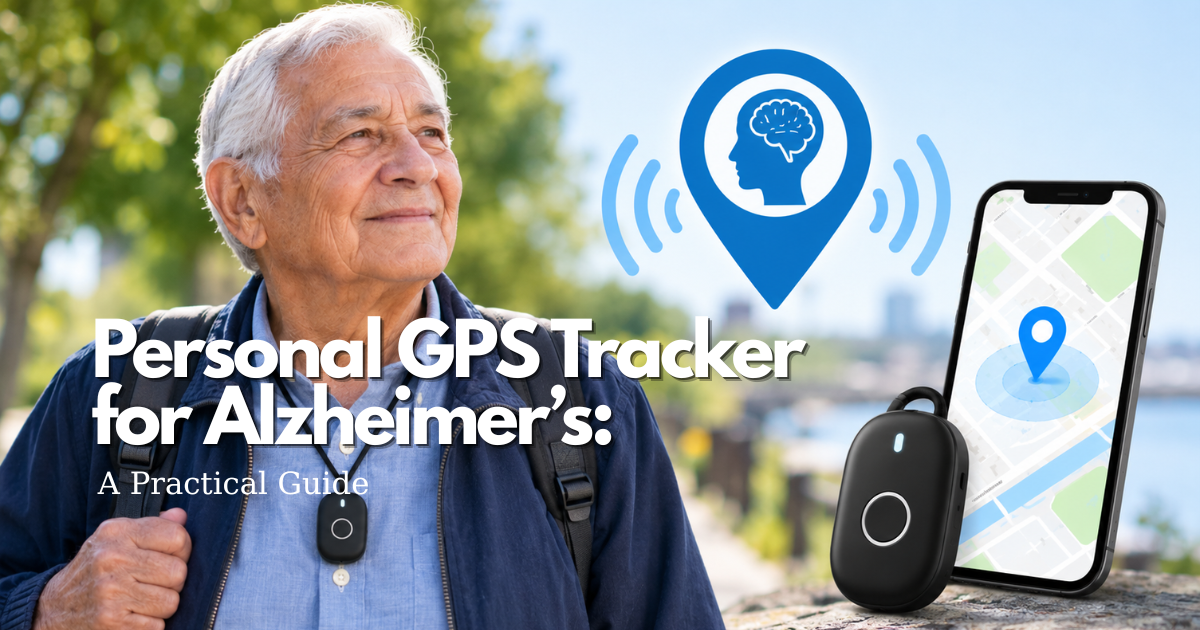
However, a Personal GPS Tracker for Alzheimer’s cannot diagnose a disease, prevent wandering, guarantee a current location, or replace conversation, supervision, and human support.
The right tracking arrangement depends on the person’s stage of Alzheimer’s disease, daily routines, willingness and ability to use the device, cellular and GPS coverage, battery limitations, privacy expectations, and the caregiver’s ability to respond.
A Personal GPS Tracker for Alzheimer’s should therefore be considered part of a broader care plan rather than a standalone solution.
Safety note: A tracker is a safety layer, not a lock, restraint, or substitute for supervision. Never use a GPS device to secretly control a person, confine them, block an emergency exit, or delay urgent help. Location information can be delayed, approximate, unavailable indoors, or lost when a device is removed, uncharged, damaged, or outside its coverage area.
If a person with Alzheimer’s disease is missing, injured, or in immediate danger, begin the established response plan and contact local emergency services rather than waiting for another location update.
Quick Answer: When Can a Personal GPS Tracker for Alzheimer’s Support Care?
A Personal GPS Tracker for Alzheimer’s may support care when a person could become lost, the device matches the person’s routine and abilities, the person or authorized decision-maker understands the arrangement, and a named care partner can act on the information.
It may help during:
- A familiar neighborhood walk
- A regular errand
- A medical appointment
- A visit with friends or family
- A drive
- A transition between home and a care setting
- Outdoor activities
- A familiar daily routine
A Personal GPS Tracker for Alzheimer’s works best as one part of a larger safety plan that also includes identification, a current photo, likely destinations, safe movement, familiar routines, and a defined response team.
Start with the safety problem, rather than the product category.
Ask what you actually need to address:
- Could the person leave home unexpectedly?
- Could they forget a familiar route?
- Do they sometimes miss an expected arrival?
- Are they likely to remove a wearable?
- Could they leave a phone behind?
- Would a simple communication feature be useful?
- Is the primary concern outdoors or indoors?
- Is someone available to respond when an alert arrives?
The answers may point toward different or complementary safety tools.
A door alert may identify a departure earlier. A phone may provide easier communication. A supervised memory-care program may already have an approved resident-safety system. A Personal GPS Tracker for Alzheimer’s can add location awareness, but it should not be expected to solve every safety need.
The Alzheimer’s Association describes GPS and location-sharing technology as one possible tool for people who may wander and emphasizes that location tracking is not the same as having a 24-hour companion. The National Institute on Aging also presents GPS alongside identification, recent photographs, local awareness, and other safeguards.
Those limitations are central to using a Personal GPS Tracker for Alzheimer’s responsibly.
When Tracking May Support a Person’s Familiar Activities
A Personal GPS Tracker for Alzheimer’s may support someone who still wants to walk, visit a neighbor, attend an appointment, complete a familiar task, or spend time outdoors.
Whenever possible, involve the person in deciding:
- When location will be shared
- Who can view the information
- Which alerts will be enabled
- How the device will be worn or carried
- What happens if the device is removed
- How location history will be handled
Explain the Personal GPS Tracker for Alzheimer’s as a way to make assistance easier rather than as evidence that the person is incapable of independence.
For example, a caregiver might explain that the device helps the family know where to begin looking if the person does not arrive home as expected.
The goal should be to preserve as much ordinary routine, independence, and dignity as practical.
When a Personal GPS Tracker for Alzheimer’s Is Not Enough
A Personal GPS Tracker for Alzheimer’s may not provide adequate protection when:
- The person cannot safely remain alone.
- The person repeatedly removes or abandons the device.
- The usual route has unreliable cellular or location coverage.
- The person requires professional medical assistance.
- The main concern occurs indoors, where GPS may provide limited information.
- No caregiver or responder is available to act on an alert.
- The person needs hands-on supervision rather than remote location information.
Depending on the circumstances, additional measures may include supervision, environmental changes, door or pressure alerts, a medical-alert arrangement, an approved facility procedure, professional support, or a structured transportation plan.
The key question is not whether a Personal GPS Tracker for Alzheimer’s can provide location data. The key question is whether that information can be converted into a timely and appropriate response.
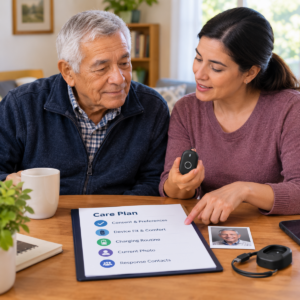
What the Care Partner Should Define First
Before selecting a Personal GPS Tracker for Alzheimer’s, define the event, recipient, expected response, and backup.
For example:
“If the device leaves the neighborhood during the afternoon walk, the daughter calls, checks the last known route, contacts the neighbor, and starts the missing-person response plan if the person cannot be reached.”
A defined response turns a location pin into an action instead of another source of uncertainty or panic.
The plan should answer four questions:
- What happened?
- Who receives the alert?
- What should that person do first?
- Who takes over if the primary responder cannot act?
These instructions should be written down and shared with anyone who may need to respond.
Understand What a Personal GPS Tracker for Alzheimer’s Can and Cannot Show
A Personal GPS Tracker for Alzheimer’s may calculate or receive location information through GPS, assisted GPS, cellular data, Wi-Fi, Bluetooth, or a paired smartphone.
Depending on the device and service, a caregiver may see:
- A current estimated location
- A recent location point
- A safe-area notification
- A device status
- Battery information
- A last known location
- A communication request
- A help request
Before relying on a Personal GPS Tracker for Alzheimer’s, determine exactly how the system obtains this information and how the application labels it.
Last Known Location vs. Current Location
A map point has a timestamp.
If a Personal GPS Tracker for Alzheimer’s has not communicated recently, the displayed point may represent where the device was earlier rather than where the person is now.
Buildings, trees, bridges, dense neighborhoods, network interruptions, receiver design, and other environmental conditions can affect positioning.
GPS accuracy therefore depends on the device, environment, network, and location method—not simply on whether satellites are available.
Care partners should learn to check both the location and the age of the location before making a decision.
A location that is several minutes old should not automatically be interpreted as a live position.
Safe-Area Notifications for Alzheimer’s Wandering Care
A safe area, often called a geofence, may notify a caregiver when a Personal GPS Tracker for Alzheimer’s crosses a virtual boundary around a home, neighborhood, facility, or familiar destination.
For example, a caregiver might create a zone around the person’s home and receive an alert when the tracker moves outside it.
However, the alert may not arrive immediately after the boundary is crossed.
Timing may depend on:
- Location-update frequency
- Cellular coverage
- Battery level
- Device settings
- Tracking service
- App notification delivery
- Indoor or outdoor conditions
A geofence is a virtual notification, not a physical barrier.
A Personal GPS Tracker for Alzheimer’s should never be used to justify locking a person inside, blocking emergency exits, or restricting movement as a form of restraint.
Device Status, Battery, and Connection Information
Low-battery and offline notifications can be important safety information.
If a Personal GPS Tracker for Alzheimer’s stops communicating, the caregiver may be viewing an old location.
Learn whether the service reports:
- Battery level
- Charging status
- Last communication
- Network connection
- Device removal
- App connection
- Service status
An offline status does not necessarily explain why the device cannot communicate.
It may be:
- Charging
- Indoors
- Outside network coverage
- Unpaired
- Damaged
- Turned off
- Temporarily disconnected
The response plan should investigate rather than automatically assume that an offline tracker means the person is missing.
Communication and Help Requests
Some Personal GPS Tracker for Alzheimer’s devices provide:
- Voice calls
- Voice messages
- Help buttons
- Caregiver-initiated calls
- Two-way communication
A person with Alzheimer’s may hear a call but not understand the question, remember how to answer, or accurately describe their location.
Test communication features in both quiet and noisy environments.
Confirm:
- Who receives the call
- Who receives a help request
- Whether a backup responder receives it
- Whether an active subscription is required
- What happens if the person does not answer
- Whether the person can realistically operate the feature
Do not describe a consumer Personal GPS Tracker for Alzheimer’s as providing professional emergency monitoring unless the actual service terms verify that capability.
What Location Tracking Cannot Confirm
A Personal GPS Tracker for Alzheimer’s cannot confirm that a person:
- Is medically well
- Has not fallen
- Is wearing the device
- Can find their way home
- Is not frightened or confused
- Can communicate effectively
- Is safe simply because the map shows a familiar location
The tracker may also fail inside a building or show only a general area.
Location information should support a human response. It does not replace observation, supervision, care, or emergency action.
Match a Personal GPS Tracker for Alzheimer’s to the Person’s Routine
Alzheimer’s disease changes over time. A device that fits one stage may become confusing, uncomfortable, or impractical later.
Before relying on a Personal GPS Tracker for Alzheimer’s, assess:
- Daily routes
- Communication abilities
- Memory changes
- Mobility
- Vision and hearing
- Comfort with technology
- Ability to wear or carry the device
- Ability to charge the device
- Privacy preferences
- Need for supervision
Avoid choosing a Personal GPS Tracker for Alzheimer’s solely because it is marketed for dementia or because it includes a long list of features.
The device should fit the person—not the other way around.
Early-Stage Routines and Independent Outings
A person in an earlier stage of Alzheimer’s disease may still be able to discuss location sharing, carry a phone, follow familiar routes, and ask for help.
A Personal GPS Tracker for Alzheimer’s can be framed as part of a shared independence plan.
Discuss whether the person prefers:
- Continuous location sharing
- A check-in during an outing
- A safe-zone alert
- Location access only when a caregiver is concerned
Revisit the arrangement if the person’s understanding, route, comfort, or care needs change.
Middle-Stage Memory Changes and Repeated Routes
A person may continue walking purposefully while forgetting a destination, becoming confused after a detour, or removing a Personal GPS Tracker for Alzheimer’s without remembering why.
Choose a form that is comfortable and simple for the care partner to charge and maintain.
Combine tracking with:
- A recent photograph
- Identification
- Familiar activities
- Home safety measures
- Likely destinations
- A defined response plan
A Personal GPS Tracker for Alzheimer’s can provide information after movement begins, but it does not explain why the person is moving or address the underlying need that prompted the activity.
Later-Stage Care and Personal Supervision
As communication, judgment, mobility, and daily support needs change, a Personal GPS Tracker for Alzheimer’s may become less useful as the primary safety measure.
The person may no longer be able to:
- Wear the device consistently
- Remember to charge it
- Respond to calls
- Understand alerts
- Explain where they are
A care team may instead need closer supervision, a safer environment, an approved facility system, or professional guidance.
Keep a Personal GPS Tracker for Alzheimer’s only if it continues to provide practical value without causing distress or creating false reassurance.
Evening Restlessness and Changed Schedules
Some people with Alzheimer’s experience increased confusion or restlessness at particular times of day.
Review:
- When movement usually occurs
- What the person may be trying to do
- Whether the routine has changed
- Whether lighting is adequate
- Whether noise contributes to distress
- Whether basic needs have been addressed
A Personal GPS Tracker for Alzheimer’s can notify a caregiver about movement, but meaningful activity, reassurance, clear walking paths, and predictable routines may address the situation more directly.
Do not interpret a GPS alert as a behavioral diagnosis.
Driving, Rides, and Transportation Changes
If a person still drives safely, a Personal GPS Tracker for Alzheimer’s may help a care partner understand a route. However, the location of a vehicle is not necessarily the location of the person.
When driving is no longer considered safe, a tracker should not become a hidden substitute for a transportation plan.
Instead, consider:
- Familiar rides
- Destination contacts
- Identification
- Expected arrival times
- A response process for missed arrivals
Living Alone With Alzheimer’s Disease
Living alone creates a potential response gap.
A remote caregiver may receive an alert from a Personal GPS Tracker for Alzheimer’s but be unable to reach the person. A nearby neighbor may be available but not consistently so.
Define:
- Who can call
- Who can visit
- Who can check the home
- Who has an agreed method of accessing the home when appropriate
- When emergency services should be contacted
A Personal GPS Tracker for Alzheimer’s is not sufficient as the only safety measure when no one is available to respond.
Assisted Living and Memory-Care Settings
Ask the facility before introducing a Personal GPS Tracker for Alzheimer’s.
Staff may already use:
- Resident-safety systems
- Door alarms
- Nurse-call procedures
- Approved wearable devices
- Location systems
- Privacy policies
Confirm:
- Who receives an alert
- Who owns the account
- How the resident is identified
- Who charges the device
- What staff are authorized to do
- What information is documented
Family access to a Personal GPS Tracker for Alzheimer’s should not be presented as equivalent to facility monitoring.
A consumer device should not be introduced without understanding the facility’s policies.
Care Situations and the Role of a Personal GPS Tracker for Alzheimer’s
| Care situation | Potential tracker role | Important limitation | Companion layer |
|---|---|---|---|
| Familiar outdoor walk | Notify a care partner about a zone change or last known location. | Delay, coverage, battery, and map accuracy can affect the alert. | Route plan, recent photo, identification, and reachable responder. |
| Missed appointment arrival | Provide a location clue and support a call. | The device may be in a vehicle, bag, or building with weak signal. | Destination contact and expected arrival time. |
| Repeated wandering concern | Add a location layer to a broader safety plan. | It cannot prevent leaving or explain the reason for wandering. | Door alert, routine, likely destinations, and prompt search plan. |
| Living alone | Notify a remote care partner about a defined event. | A remote alert does not create hands-on help. | Neighbor, professional support, check-in routine, and emergency plan. |
| Memory-care residence | Complement an approved facility process if permitted. | Family access does not equal staff responsibility. | Facility policy, shift handoff, resident identification, and documentation. |
Use this table to identify the role of the Personal GPS Tracker for Alzheimer’s before comparing devices.
If the companion layer is missing, the family may have a care-plan gap rather than simply a shopping problem.
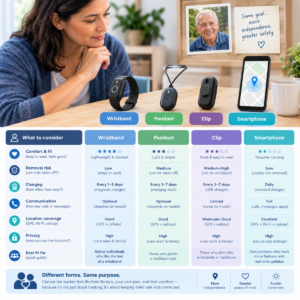
Choose the Form of a Personal GPS Tracker for Alzheimer’s Care
The person must be able to wear, carry, charge, or remain near the device for it to provide useful information.
Choose the least complicated form that fits the person’s:
- Body and mobility
- Daily routine
- Sensory abilities
- Comfort
- Privacy expectations
- Care environment
The best Personal GPS Tracker for Alzheimer’s is not necessarily the device with the most features. It is the one the person can safely and consistently tolerate.
Wristbands and Watches for Alzheimer’s Tracking
A wristband may be visible and convenient for a caregiver to check, but it can cause irritation, be removed for bathing, or become difficult to fasten.
A watch may provide communication and other functions, but a small screen can be confusing for someone with memory or vision changes.
Test the exact actions the person needs rather than every advertised feature.
A tracker watch for Alzheimer’s patients is therefore a form-factor decision, not automatically the right Personal GPS Tracker for Alzheimer’s for every person.
Pendants and Necklace-Style GPS Trackers
A pendant may be easier for some people to recognize or use than a wristband.
Check:
- Cord and attachment design
- Skin contact
- Clothing interaction
- Sleep
- Mobility aids
- Comfort during movement
- Risk of removal
- Whether the person accepts the device socially
A pendant that swings, catches on objects, or causes discomfort may be rejected.
Ask whether the Personal GPS Tracker for Alzheimer’s has an attachment design appropriate for ordinary use and whether it remains with the person during important activities.
Clip, Pocket, and Bag Devices
A clip or pocket device can be less noticeable than a wearable.
However, a Personal GPS Tracker for Alzheimer’s may remain in:
- A coat
- A purse
- A walker basket
- A vehicle
- A bag left at home
Test the device with the exact clothing, bag, and routes the person normally uses.
If the person changes jackets or leaves a bag behind, the device may no longer function as personal tracking.
Phone-Based Location Sharing
A smartphone may provide communication, a larger map, and familiar contacts.
It may also be:
- Left charging
- Muted
- Forgotten
- Turned off
- Carried without the necessary permissions
- Left behind during an outing
Determine whether the phone is genuinely reliable or simply a household object the person sometimes carries.
Test it on normal routes and after common changes such as battery drain, password updates, phone replacement, or operating-system updates.
A phone may complement a Personal GPS Tracker for Alzheimer’s, but the two should not be assumed to provide identical safety functions.
Indoor and Facility Location Alternatives
GPS may not be the most appropriate technology inside a large building, care facility, garage, or dense indoor environment.
Depending on the setting, an approved facility system, local door alert, Bluetooth- or radio-based zone system, or staff procedure may provide more useful information.
Do not assume that a Personal GPS Tracker for Alzheimer’s provides precise indoor positioning simply because it includes GPS.
Ask what the setting permits and, more importantly, what information a real responder can actually see and use.
Set Up Zones, Routes, and Caregiver Alerts for Alzheimer’s GPS Tracking
A Personal GPS Tracker for Alzheimer’s becomes more practical when its alerts fit the person’s real routes and the caregiver’s schedule.
Too many zones can create notification fatigue. One oversized zone may provide little useful awareness.
Build settings around the person’s actual day and test them before relying on them.
Map Familiar Places for Alzheimer’s GPS Tracking
Create a list of meaningful or likely destinations, such as:
- Home
- Former home
- Workplace
- Place of worship
- Favorite restaurant
- Usual store
- Bus stop
- Friend’s house
- Clinic
- Familiar park
The Alzheimer’s Association recommends knowing likely destinations when preparing for wandering.
A destination list remains useful even if a Personal GPS Tracker for Alzheimer’s is offline because it guides a human search.
Size a Safe Zone Around Ordinary Movement
When setting a geofence for a Personal GPS Tracker for Alzheimer’s, consider the sidewalk, driveway, yard, shared entrance, and normal detours when appropriate.
Avoid boundaries that cut across a routine walking path.
A zone should signal a meaningful change rather than punish ordinary activity.
Review the boundary whenever the person’s route, home, neighborhood, or care setting changes.
Choose Alert Recipients and Times
The caregiver responsible for charging a Personal GPS Tracker for Alzheimer’s may receive low-battery alerts.
The person who can physically reach the neighborhood may receive zone alerts.
A backup should cover:
- Sleep
- Work
- Travel
- Holidays
- Illness
- Unexpected caregiver absence
Do not send every alert to a large group unless one person is clearly accountable for acknowledgment.
Understand GPS Alert Intervals and Delays
Some tracking services update at intervals to balance battery life, network use, and service requirements.
A Personal GPS Tracker for Alzheimer’s may therefore report an alert after a boundary crossing rather than at the exact moment it happens.
Ask:
- How frequently location is updated
- How timestamps are displayed
- How delays are communicated
- What happens when coverage is lost
- How battery-saving settings affect updates
Do not describe a Personal GPS Tracker for Alzheimer’s as providing real-time monitoring without evidence for the exact device and service.
Document What Each Notification Means
Create a private key for notifications such as:
- Zone exit
- Low battery
- Offline
- Device removed
- Help request
- Last update
For every notification, document the first response and backup response.
Train family members and authorized caregivers to use the same definitions.
Clear language matters when the person’s location is uncertain.
Make Consent and Dignity Part of Alzheimer’s GPS Tracking
Alzheimer’s disease does not remove the need to consider the person’s wishes, privacy, and dignity.
A Personal GPS Tracker for Alzheimer’s can provide safety-related information while also creating privacy considerations.
The arrangement should be as transparent and limited as the situation allows.
Explain a Personal GPS Tracker for Alzheimer’s in Simple Language
Use concrete language such as:
“This helps us know where to start if you do not arrive home, and it lets us call you if we are worried.”
Explain:
- Who can see the location
- When alerts are sent
- Whether location history is stored
- How long information is retained
- What happens if the device is removed
Whenever practical, allow the person to choose between reasonable device forms or sharing levels.
Use the Least Intrusive Alzheimer’s Tracking Setting
Possible arrangements include:
- Location sharing only during an outing
- A zone alert
- A scheduled check-in
- Location on request
- Broader access for a defined care reason
More tracking is not automatically more safety.
If no one reviews continuous location history, collecting it may create additional privacy exposure without improving the response.
A Personal GPS Tracker for Alzheimer’s should collect only information that serves a defined safety purpose.
Review Decision-Making Ability Over Time
If the person can participate in the decision, include them.
If decision-making ability changes or becomes uncertain, involve appropriate healthcare, legal, or care professionals and follow applicable policies.
Document:
- The purpose of tracking
- Who has access
- The person’s preferences
- Review conditions
- What would cause the arrangement to change
Do not treat confusion, silence, or resistance as automatic permission to track.
Protect Location History and Caregiver Accounts
Use strong account access and remove former caregivers when their role ends.
Review app permissions and avoid sharing live location through broad messages.
Ask the service provider:
- How long location history is stored
- Who can access it
- Whether information is shared with third parties
- How accounts are secured
- How access can be revoked
Location information is sensitive, so a Personal GPS Tracker for Alzheimer’s should be managed with appropriate privacy and security practices.
Respond Respectfully When the Person Removes the Device
Device removal may indicate:
- Discomfort
- Heat
- Confusion
- Bathing
- Skin irritation
- Fear
- A desire for privacy
- Difficulty understanding the purpose
Check the person’s skin and device fit.
Ask what happened and consider another device form or a different safety layer.
Never hide a Personal GPS Tracker for Alzheimer’s, tighten it to prevent removal, shame the person, or use the device as a restraint.
Test a Personal GPS Tracker for Alzheimer’s Before Relying on It
A Personal GPS Tracker for Alzheimer’s should not be considered tested until the device, route, app, caregiver, and backup response have all been exercised safely.
Tell the person that a test is taking place.
Do not stage a disappearance, ask the person to enter danger, or create a frightening event.
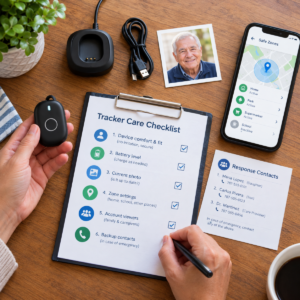
Test Wearing, Carrying, and Charging
Observe the device through an ordinary day, including:
- Dressing
- Meals
- Movement
- Rest
- Charging
- Outdoor activity
Check whether the Personal GPS Tracker for Alzheimer’s stays attached and whether the person tolerates it.
Confirm that the charger is easy to use and safely positioned.
Record the battery at the beginning and end of the day and identify predictable periods when the tracker is not worn.
Test a Familiar Outdoor Route
Walk or travel the normal route with the person.
Check the Personal GPS Tracker for Alzheimer’s:
- At the starting point
- During movement
- Near trees
- Near tall buildings
- At intersections
- At the destination
Record:
- Timestamp
- Apparent delay
- Displayed location
- Device status
- Whether the information is understandable
Use the person’s normal clothing and device position.
A tracker carried in a bag during testing may not represent real-world use if the person normally wears it on the wrist.
Test an Indoor Transition
Check locations such as:
- Building entrances
- Elevators
- Stores
- Clinics
- Garages
- Facility common areas
Learn whether the Personal GPS Tracker for Alzheimer’s shows a general estimate, last outdoor location, or offline status.
Teach care partners how to interpret the label.
Do not assume an outdoor location point remains precise inside a building.
Test a Zone Alert With a Safe Supervised Route
Cross a virtual boundary under supervision and with the person’s knowledge.
Record:
- Event time
- Device update time
- Notification time
- Acknowledgment time
- Response time
Repeat the test after changing the zone or relevant phone settings.
If the alert is late or absent, use a backup layer while correcting the system.
Test Help Communication and Missed Check-Ins
If the Personal GPS Tracker for Alzheimer’s supports a help button or caregiver call, test it with the person.
Practice in quiet and noisy environments.
For a missed check-in:
- Allow the expected time to pass.
- Call the person.
- Contact the backup.
- Follow the defined response plan.
- Document what happened.
Confirm who acts if nobody answers.
Test Low Battery, Offline Status, and Recovery
Follow the manufacturer’s instructions for controlled testing.
Learn how the Personal GPS Tracker for Alzheimer’s reports:
- Low battery
- Lost connection
- Restored connection
- Charging
- Last known location
Keep the person safe and avoid intentionally leaving the device without power when it is needed.
The care partner should know when to stop relying on the tracker and switch to the backup plan.
Build a Response Plan for Personal GPS Tracker for Alzheimer’s Alerts
The value of a Personal GPS Tracker for Alzheimer’s depends heavily on the response it enables.
Write a short response ladder that a family member, neighbor, facility caregiver, or professional responder can follow.
The plan should account for:
- Current photo
- Recent clothing
- Likely destinations
- Normal routes
- Communication needs
- Mobility aids
- Caregiver contacts
Use only the information necessary for the response.
First Response to a Zone Exit
When a Personal GPS Tracker for Alzheimer’s sends a zone-exit notification:
- Read the notification time.
- Check the last location time.
- Check battery and device status.
- Call the person if appropriate.
- Compare the location with the expected route.
- Check the home or destination.
- Contact the backup if the primary responder cannot act.
Do not wait for repeated updates when the person may be at risk.
First Response to an Offline Tracker
If a Personal GPS Tracker for Alzheimer’s goes offline, check:
- Last-update time
- Battery
- Charger
- Connection
- Paired phone
- Account
- Expected routine
Contact the person or nearby care partner.
If the device is unavailable during a meaningful risk period, use the door alert, check-in, neighbor, facility, or emergency plan.
Offline does not prove wandering, but it means the tracker cannot be relied upon at that moment.
Use a Recent Photo and Identification
Keep a current:
- Close-up photograph
- Clothing description
- Preferred name
- Glasses information
- Mobility-aid information
- Communication needs
- Likely destinations
- Caregiver contacts
NIA and the Alzheimer’s Association both emphasize current photos and identification when preparing for wandering.
A Personal GPS Tracker for Alzheimer’s should complement these materials rather than replace them.
Know When to Contact Local Emergency Services
Follow local guidance and consider the circumstances.
Contact emergency services when the person may be:
- Missing
- Injured
- Exposed to danger
- Unable to protect themselves
- In immediate need of assistance
Tell responders that the person has Alzheimer’s disease or another cognitive impairment when relevant.
A Personal GPS Tracker for Alzheimer’s should guide a response, not delay it.
Review the Event After the Person Is Safe
After an incident involving a Personal GPS Tracker for Alzheimer’s, record:
- What the tracker showed
- How old the location was
- Whether the device was worn
- Which alerts arrived
- Who responded
- What the person may have been trying to do
A near miss may reveal:
- A changed routine
- An unmonitored exit
- A confusing boundary
- Low battery
- Network limitations
- A caregiver gap
Adjust the plan with the person’s dignity in mind.
Combine a Personal GPS Tracker for Alzheimer’s With Other Safety Layers
Technology is more useful when different layers cover different moments.
A Personal GPS Tracker for Alzheimer’s may help after departure, while an environmental cue, door alert, routine, or caregiver may help before departure.
The Alzheimer’s Association emphasizes that safeguards cannot guarantee a person will not wander, so multiple appropriate supports may be needed.
Personal Tracker and Door or Pressure Alerts
A door alert may provide the first local indication that someone is leaving.
A pressure mat may signal movement from bed or across a monitored path.
A Personal GPS Tracker for Alzheimer’s may then provide outdoor location information.
Test each layer separately and assign a response.
Do not use door or pressure devices to block movement, and do not assume that a local alarm can locate someone outside.
Personal Tracker and Routines
Meaningful activities, reassurance, hydration, toileting, lighting, and predictable daily routines may help reduce confusion or restlessness for some people.
A Personal GPS Tracker for Alzheimer’s does not replace these supports.
Review the times when movement is most likely and consider a supportive activity or companion during those periods.
Personal Tracker and Identification
Use:
- Identification cards
- Labeled clothing when appropriate
- Current photographs
- Local awareness
- Likely-destination lists
A person may remove the Personal GPS Tracker for Alzheimer’s, or the tracking service may fail.
Identification helps a neighbor or responder recognize and assist the person without requiring access to a private app.
Personal Tracker and Safe Home Movement
Keep walking paths clear.
Improve lighting and review:
- Stairs
- Bathrooms
- Yards
- Exits
- Loose cords
- Potential trip hazards
Avoid creating a maze of barriers.
A Personal GPS Tracker for Alzheimer’s should support safe movement, not give caregivers permission to make the home confusing or restrictive.
Personal Tracker and Professional Support
Ask a healthcare professional, social worker, memory-care team, or emergency-planning service for help when risk changes or the family cannot provide reliable supervision.
A Personal GPS Tracker for Alzheimer’s is not a care plan.
Professional support may become particularly important after repeated incidents, falls, distress, or a move to a new care setting.
Troubleshoot Personal GPS Tracker for Alzheimer’s Alerts
When an alert is wrong or late, investigate the system instead of blaming the person or simply silencing notifications.
Check:
- Device
- App
- Map
- Network
- Battery
- Boundary
- Caregiver account
- Routine
Work through one variable at a time.
When a Zone Alert Triggers During Normal Movement
Check whether the boundary crosses:
- Sidewalks
- Driveways
- Yards
- Shared entrances
- Normal detours
Compare the event with the person’s route and the update timestamp.
Adjust the boundary if appropriate and test it again.
Repeated false alerts from a Personal GPS Tracker for Alzheimer’s can create notification fatigue and make a genuine event easier to miss.
When the Tracker Shows an Unexpected Place
Read the age and accuracy of the location.
Buildings, trees, reflected signals, mapping errors, paired phones, or old updates can create mismatches.
Call the person calmly and compare the point with the expected route.
Do not accuse the person or conclude that they are unsafe based on one unexplained map point from a Personal GPS Tracker for Alzheimer’s.
When the Family Does Not Receive a Notification
Check:
- App permissions
- Phone focus modes
- Volume
- Notification settings
- Account access
- Network connection
- Service status
- Authorized viewers
Send a test notification to the primary and backup responder.
If the notification appears only after opening the application, the Personal GPS Tracker for Alzheimer’s may not be appropriate as the sole urgent communication channel.
Use a phone call or local check while correcting the problem.
When the Person Repeatedly Removes the Device
Ask whether the Personal GPS Tracker for Alzheimer’s is:
- Uncomfortable
- Confusing
- Wet
- Hot
- Difficult to attach
- Socially unacceptable
Inspect the skin and attachment.
Try another form or a different safety layer.
Do not hide the device, force it onto the person, or increase restraint.
Removal is useful feedback about the device and care approach.
When the Phone or Service Changes
Repeat the setup after:
- A phone replacement
- App update
- Password change
- Service renewal
- New caregiver
- Operating-system update
Check:
- Permissions
- Notification channels
- Zones
- Account viewers
- Support contacts
A Personal GPS Tracker for Alzheimer’s can be physically functional while its alert pathway is broken.
Reassess a Personal GPS Tracker for Alzheimer’s After Care Transitions
Care transitions change more than an address.
They can change:
- Routes
- Times of day
- Device access
- Charging location
- Consent conversations
- Responders
- Privacy expectations
- Facility policies
Treat a move, hospitalization, respite stay, or new care arrangement as a new setup for the Personal GPS Tracker for Alzheimer’s rather than carrying old assumptions forward.
After a Move to a New Home or Memory-Care Setting
Map the new:
- Doors
- Hallways
- Elevators
- Patios
- Parking areas
- Common rooms
- Likely destinations
Ask the new care team how personal devices are approved, charged, labeled, and documented.
Update safe zones and alert recipients.
A boundary created around the old home may create false reassurance or repeated alerts.
Recheck the Personal GPS Tracker for Alzheimer’s After Hospital Discharge
An illness or hospitalization can affect:
- Balance
- Sleep
- Communication
- Clothing
- Device tolerance
- Ability to follow familiar routes
Check whether the Personal GPS Tracker for Alzheimer’s still fits and whether the response team can provide the support now required.
If the person needs hands-on care, location data should not be treated as a substitute for that support.
Ask the appropriate healthcare professional about changes that affect safety.
When a New Caregiver Takes Responsibility
Give the new caregiver:
- Alert key
- Current photo
- Likely-destination list
- Device instructions
- Privacy agreement
- Response ladder
Confirm that they can receive a test alert and distinguish a current location from a last known location.
Remove former caregivers from the account when their role ends.
A handoff is incomplete if the new responder has access to the Personal GPS Tracker for Alzheimer’s but does not know what to do with its information.
When Family Members Disagree About Alzheimer’s Tracking
Return to the defined safety problem and the person’s preferences.
Separate concerns about:
- Privacy
- Wandering
- Emergency response
- Cost
- Caregiver workload
- Device comfort
Ask an appropriate professional or legal support person for help when decision-making ability or authority is uncertain.
Do not resolve disagreement by secretly activating a Personal GPS Tracker for Alzheimer’s or giving every family member unrestricted location history.
Review the Tracker After a Missed-Person Event or Near Miss
Review the timeline:
- When the person was last seen
- When the tracker last communicated
- When the alert arrived
- Who acknowledged it
- What action occurred
Determine whether the primary gap involved:
- Device
- Boundary
- Battery
- Network
- Caregiver
- Route
- Response plan
Update the system and practice the revised sequence while the person is safe.
A near miss is a reason to improve the care plan, not evidence that a Personal GPS Tracker for Alzheimer’s has eliminated the risk.
Set Review and Stop Conditions for the Tracker
Agree in advance when the Personal GPS Tracker for Alzheimer’s will be reassessed.
Examples include:
- A fall
- Repeated device removal
- Repeated false alerts
- A move
- A significant change in care needs
- Service changes
- Privacy concerns
- Changes in the person’s preferences
Also define when the device should be paused or replaced because it causes distress or no longer provides useful information.
A clear stop condition helps prevent indefinite monitoring when the original purpose no longer applies.
Review Cost, Coverage, and Service for a Personal GPS Tracker for Alzheimer’s
This guide does not publish current prices or rank products.
Before choosing a Personal GPS Tracker for Alzheimer’s, identify:
- Hardware cost
- Activation fees
- Cellular service
- App access
- Location history
- Alerts
- Customer support
- Replacement parts
- Additional viewers
- Cancellation terms
- Repair options
- Travel coverage
A one-time device price does not necessarily reveal the total cost of dependable use.
Separate Hardware From Recurring Tracking Service
Some Personal GPS Tracker for Alzheimer’s devices require an ongoing plan for cellular communication, zone alerts, cloud history, or support.
Ask what stops when the plan ends.
Also ask whether the account can be transferred to another caregiver.
Do not describe a device as free or as having no monthly fee without verifying the complete service terms.
Check Coverage on the Person’s Real Route
Test the Personal GPS Tracker for Alzheimer’s at:
- Home
- Neighborhood
- Usual destination
- Vehicle
- Clinic
- Care facility
- Common indoor areas
Ask how delayed information is displayed and whether the service retains a last known location.
General coverage claims do not reveal every indoor, rural, or building-specific limitation.
Document actual limitations before relying on the device.
Check Support and Account Recovery
Confirm who can:
- Reset the account
- Remove a former caregiver
- Replace a charger
- Contact support
- Manage service changes
Keep a backup communication method while the device is being repaired.
A system that only one family member can access may be fragile during illness, travel, or unexpected absence.
Maintain a Personal GPS Tracker for Alzheimer’s as Care Needs Change
Maintenance includes more than charging the device.
A Personal GPS Tracker for Alzheimer’s should be reviewed alongside:
- The person
- The route
- The account
- The responder
- The privacy agreement
- The wider care plan
Review the arrangement after:
- A fall
- Illness
- A move
- A new caregiver
- A change in memory
- A change in mobility
- A new phone
- A service change
- Repeated false alerts
- Repeated device removal
Daily Personal GPS Tracker Readiness Check
Confirm:
- The device is worn or carried comfortably.
- Battery level is adequate.
- Connection is available.
- Last-update time is understood.
- Charging status is known.
- The primary responder can receive notifications.
- The person has no unexpected route or appointment change.
- The charger is accessible without creating a trip hazard.
A short daily check can prevent avoidable gaps in a Personal GPS Tracker for Alzheimer’s setup.
Weekly Route and Alert Review
Review:
- Alerts
- Missed check-ins
- False boundaries
- Battery gaps
- Device removal
- The person’s experience
Check:
- Likely destinations
- Current photo
- Identification
- Backup contacts
- Recent route changes
Test the response after a phone or account change.
A short weekly review can reveal a care gap before an emergency.
Monthly Privacy and Service Review
Review:
- Authorized viewers
- Stored location history
- App permissions
- Passwords
- Renewal terms
- Support information
- Consent or preferences
Remove access that is no longer needed.
Ask whether a less intrusive tool could now accomplish the same safety goal as the Personal GPS Tracker for Alzheimer’s.
When to Replace or Retire the Tracker
Change the arrangement when:
- The person cannot tolerate the device.
- The device becomes unreliable.
- The service is no longer supported.
- Coverage does not fit the route.
- The responder changes.
- The original safety concern changes.
- The person experiences significant distress.
- Another safety layer becomes more appropriate.
Retiring a Personal GPS Tracker for Alzheimer’s requires a replacement safety plan rather than simply ending monitoring.
Frequently Asked Questions About a Personal GPS Tracker for Alzheimer’s
These answers address common questions families may have after defining the person’s routine, consent, device form, alert pathway, and backup plan.
They do not rank brands or replace professional or facility guidance.
Can a Personal GPS Tracker for Alzheimer’s Prevent Wandering?
No.
A Personal GPS Tracker for Alzheimer’s may provide a location clue or alert after a device crosses a defined zone, but it cannot prevent a person from leaving, guarantee a current location, or replace supervision.
Use tracking alongside identification, routines, safe movement, human response, and an emergency plan.
Is a Personal GPS Tracker for Alzheimer’s Accurate Inside a Home or Facility?
Accuracy may be limited indoors.
Buildings and other obstructions can weaken or reflect signals, while some services may display a last outdoor location rather than a precise indoor position.
Test the Personal GPS Tracker for Alzheimer’s in the actual setting and teach care partners to read the timestamp and device status.
Should a Person With Alzheimer’s Wear a GPS Bracelet?
A bracelet may work well for some people and be rejected by others.
Check:
- Skin comfort
- Clasp design
- Vision
- Dexterity
- Bathing
- Sleep
- Device removal
- Charging
A pendant, clip, smartphone, door alert, or facility-approved system may be more appropriate than a bracelet-style Personal GPS Tracker for Alzheimer’s.
Choose the form the person can safely tolerate.
Does a Personal GPS Tracker for Alzheimer’s Replace a Medical Alert Device?
Not automatically.
A Personal GPS Tracker for Alzheimer’s may provide location information, while a medical-alert device may offer a help button, two-way voice communication, fall-related features, or professional response.
Compare the actual services and response chains.
Do not infer medical protection simply because a device includes a location feature.
What Should a Caregiver Do When the Personal GPS Tracker for Alzheimer’s Goes Offline?
Check:
- Last-update time
- Battery
- Charger
- Connection
- Paired phone
- Account
- Expected routine
Call the person or nearby care partner.
Use the backup plan if the Personal GPS Tracker for Alzheimer’s is unavailable during a meaningful risk period.
Offline does not prove wandering, but it means the device cannot be relied upon until service is restored.
How Should Families Handle Privacy and Consent?
Explain what the Personal GPS Tracker for Alzheimer’s collects, who can see the information, when alerts are sent, and whether location history is stored.
Use the least intrusive effective setting.
Limit access, review permissions, and revisit the arrangement as the person’s decision-making ability or preferences change.
Do not hide the tracker by default.
How Quickly Can a Personal GPS Tracker for Alzheimer’s Zone Alert Arrive?
Timing depends on:
- Device update interval
- Location method
- Cellular network
- Service plan
- App processing
- Notification delivery
- Battery settings
A zone alert may arrive after the boundary crossing.
Ask the provider about expected behavior and test the Personal GPS Tracker for Alzheimer’s on the person’s actual route.
Do not promise real-time monitoring without verification.
What Information Should Be Ready if the Person Is Missing?
Keep a current:
- Close-up photograph
- Clothing description
- Preferred name
- Mobility-aid information
- Communication needs
- Likely destinations
- Recent route
- Caregiver contacts
- Relevant emergency information
Begin the response promptly and tell responders about Alzheimer’s disease or another cognitive impairment when appropriate.
A Personal GPS Tracker for Alzheimer’s should supplement this information rather than replace it.
What Should Never Depend on the GPS Tracker Alone?
Do not make a Personal GPS Tracker for Alzheimer’s the only way to:
- Notice a departure
- Summon help
- Identify the person
- Determine whether an emergency exists
- Provide supervision
- Confirm the person’s safety
A second layer may include a door alert, scheduled call, neighbor agreement, facility procedure, medical-alert arrangement, or direct supervision.
The backup should be written down, assigned to a person, and tested rather than assumed.
Final Takeaway: Using a Personal GPS Tracker for Alzheimer’s Responsibly
A Personal GPS Tracker for Alzheimer’s can provide useful location awareness when it matches the person’s routine, abilities, privacy expectations, and care environment.
Its value comes from what caregivers do with the information—not simply from having a dot appear on a map.
Before relying on a Personal GPS Tracker for Alzheimer’s, define the safety problem, involve the person when possible, select an appropriate form, test the actual routes, understand location delays, establish alert recipients, protect location data, and create a response plan with a backup.
Most importantly, remember what the technology cannot do.
A Personal GPS Tracker for Alzheimer’s cannot guarantee safety, prevent wandering, replace supervision, or determine a person’s medical condition. It is one layer within a larger approach that may include identification, familiar routines, environmental safety, communication, human support, professional care, and an emergency response plan.
When used within those boundaries, location technology can provide caregivers with another source of information while preserving the person’s dignity and supporting an appropriate level of independence.
Official sources for Alzheimer’s GPS tracker safety and privacy
These sources support the article’s general statements about wandering preparation, technology limits, GPS accuracy, privacy, and caregiver response. They do not endorse a device, service, seller, price, or monitoring plan.
Alzheimer’s Association technology guidance for personal GPS trackers
Alzheimer’s Association: Technology Safety for Older Adults explains that GPS and location sharing can support safety, while no tracking system is completely accurate, some devices work poorly indoors, and location tracking is not a 24-hour companion.
Alzheimer’s Association wandering guidance for caregivers
Alzheimer’s Association: Wandering and Dementia supports planning ahead, meaningful routines, current photos, likely destinations, prompt action, and the limits of safeguards. It also discusses GPS as one possible aid rather than a guarantee.
National Institute on Aging identification and GPS guidance
National Institute on Aging: Wandering and Getting Lost supports identification, current photos or video, local awareness, home safeguards, and GPS as one possible tracking aid. It does not endorse a particular product.
GPS.gov accuracy guidance for Alzheimer’s location tracking
GPS.gov: GPS Accuracy explains that signal blockage, indoor or underground use, reflected signals, atmospheric conditions, satellite geometry, and receiver design can affect real-world positioning. This supports testing the person’s actual routes and reading location timestamps carefully.
FTC privacy guidance for location-sharing apps
Federal Trade Commission: Mobile Health App Developers Best Practices supports data minimization, clear permission explanations, limited access, authentication, and security by design. The article applies those principles as practical questions and does not make a device-specific legal determination.
Final personal GPS tracker readiness check for Alzheimer’s care
Before relying on a personal GPS tracker, define the safety concern, involve the person, choose a comfortable form, confirm the connection path, test the real route and indoor setting, set realistic zones, assign a primary and backup responder, prepare a recent photo and identification, protect location history, test low battery and offline behavior, and document what happens after a zone alert or missed check-in.
The best care arrangement is not the one that collects the most location data. It is the one the person can tolerate, the care partner can maintain, the responder can interpret, and the family can combine with respectful human support. A personal tracker can add useful awareness while preserving dignity, but its limits must remain visible.
1 comentario en «🧭 Personal GPS Tracker for Alzheimer’s: A Practical Guide»