A GPS Tracker Device for Elderly users can help families support independent living, monitor familiar routes, and coordinate caregiver assistance when an older adult needs additional safety support. Whether someone enjoys daily walks, regularly visits community locations, or experiences memory-related navigation difficulties, GPS tracking technology may provide useful location information.
However, choosing a GPS Tracker Device for Elderly care involves more than comparing device size, battery life, or advertised real-time tracking features. A dependable GPS tracking system must match the person’s routine, remain comfortable to wear or carry, maintain reliable connectivity, and provide clear information to caregivers who know how to respond.
A GPS tracker device for seniors may use satellite positioning, cellular networks, Wi-Fi, Bluetooth, or smartphone applications. Available options include standalone cellular GPS trackers, wearable GPS bracelets, smartwatch trackers, compact clothing attachments, and phone-based location-sharing systems.
This comprehensive guide explains how to choose a GPS Tracker Device for Elderly adults, compare tracking technologies, evaluate comfort and accessibility, understand GPS accuracy and coverage, manage subscriptions, protect privacy, and establish a practical caregiver safety plan.
Safety note: A GPS Tracker Device for Elderly users is not automatically a medical alert system, professional monitoring service, or guaranteed emergency response solution. Location information may be delayed, approximate, or unavailable because of signal interference, network problems, low battery, or device removal. If an older adult is missing, injured, or in immediate danger, contact local emergency services promptly rather than waiting for another tracking update.
Quick answer: what should a GPS tracker device for elderly care actually do?
A GPS Tracker Device for Elderly care should address a specific safety concern while supporting the older adult’s independence and preferences.
Depending on the device, GPS tracking technology may help caregivers view a recent location, receive safe-area notifications, communicate with the wearer, or respond after an unexpected route change.
However, not every tracker offers the same features.
Before choosing a GPS Tracker Device for Elderly users, consider:
- Whether the person accepts location sharing.
- Whether the tracker stays attached during daily activities.
- GPS location accuracy and update frequency.
- Cellular connectivity requirements.
- Battery life and charging routines.
- Emergency SOS or communication features.
- Safe-area and geofencing alerts.
- Caregiver notification access.
- Privacy and consent protections.
- Subscription and replacement costs.
- Backup communication arrangements.
A GPS tracker device for elderly parents who regularly walk independently may need location updates and caregiver notifications.
A person who primarily needs immediate medical assistance may benefit more from a dedicated medical alert service.
The best GPS tracker device for elderly users is the arrangement that matches the actual safety need, remains available during normal routines, and can be maintained consistently.
GPS tracker device features that can support an older adult
A GPS Tracker Device for Elderly adults may include several tracking and communication features.
Depending on the model, these may include:
- Real-time or periodic GPS location updates.
- Location history.
- Safe-area notifications.
- Geofencing alerts.
- Low-battery warnings.
- Emergency SOS buttons.
- Two-way voice communication.
- Caregiver account access.
- Smartphone applications.
- Web-based tracking dashboards.
These features can support different caregiving situations.
For example, a geofence notification may help a caregiver recognize that a person has left an agreed area.
A location timestamp may help determine whether a displayed map position is current.
An SOS button may provide a way to request help when the person can operate it.
However, a GPS Tracker Device for Elderly care should be evaluated according to how these features work in practice.
A notification is useful only when someone understands it and can respond.
What an elderly GPS tracker cannot guarantee
A GPS Tracker Device for Elderly users cannot guarantee continuous location accuracy or personal safety.
GPS.gov explains that satellite positioning can be affected by buildings, bridges, trees, reflected signals, indoor environments, and receiver design.
A GPS tracker may therefore display an approximate location rather than the person’s exact position.
Cellular communication introduces additional limitations.
A device may calculate its location but fail to transmit it because of unavailable network service.
Other common tracking limitations include:
- Depleted batteries.
- Disconnected cellular service.
- Device removal.
- Forgotten equipment.
- Outdated location information.
- Disabled notifications.
- Caregiver unavailability.
- Incorrect account settings.
A GPS tracker device for seniors should therefore support a broader safety plan rather than replace direct communication, supervision when needed, or emergency preparation.
Why a GPS tracker device is different from a general item finder
A personal GPS tracker and a Bluetooth item-finding tag are not automatically interchangeable.
A GPS Tracker Device for Elderly users may include independent cellular connectivity, caregiver notifications, or emergency communication features.
A Bluetooth item finder generally focuses on locating objects such as keys, bags, wallets, or other belongings.
Some item-finding networks can provide a last-known location through nearby compatible devices.
However, they may not provide independent live GPS tracking.
Before choosing an item tag as a GPS tracker for elderly safety, verify whether it supports:
- Independent GPS positioning.
- Wide-area communication.
- Caregiver alerts.
- Reliable location updates.
- Emergency communication.
- Appropriate device attachment.
A tracking tag attached to a bag may report the location of the bag rather than the person.
Choose the device according to its actual function.
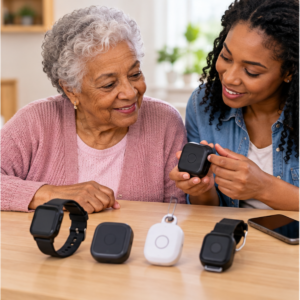
GPS tracker device types for elderly users: cellular, phone, Bluetooth, and alert systems
Families comparing a GPS Tracker Device for Elderly care may encounter several different technologies.
Some devices provide independent cellular location tracking.
Others depend on smartphones, Wi-Fi, or nearby Bluetooth networks.
The most important distinction is how the device determines its location and communicates that information to the caregiver.
Cellular GPS tracker device for elderly travel and wandering
A cellular GPS Tracker Device for Elderly users may communicate without requiring a nearby smartphone.
These trackers generally use GPS positioning alongside a cellular modem and an active service plan.
This arrangement may suit older adults who regularly leave home but do not consistently carry a smartphone.
Potential advantages include:
- Independent cellular communication.
- Remote location sharing.
- Safe-area notifications.
- Caregiver application access.
- Location history.
- SOS features on supported models.
However, cellular GPS tracking depends on network coverage, battery power, account activation, and subscription status.
A cellular GPS tracker device for seniors may stop sending updates when service becomes unavailable.
Before purchasing, confirm the exact network, supported regions, service plan, and coverage along the person’s usual routes.
Phone-based GPS tracker app for an elderly parent
An existing smartphone may function as a GPS Tracker Device for Elderly care without requiring additional dedicated tracking hardware.
Modern smartphones commonly provide GPS positioning, cellular communication, Wi-Fi, and location-sharing applications.
A phone-based tracking arrangement may be appropriate when the older adult consistently carries and charges their smartphone.
Potential benefits include:
- Familiar communication technology.
- GPS location sharing.
- Voice calls.
- Text messaging.
- Emergency contacts.
- Existing cellular connectivity.
- Accessibility settings.
However, smartphone-based tracking has limitations.
A person may forget the phone, leave it charging, disable location permissions, or run out of battery.
A GPS tracker application cannot report the person’s actual location when the phone has been left behind.
Test the complete location-sharing process during a normal, planned outing.
Bluetooth and community-network trackers for elderly location
Bluetooth trackers may help locate nearby devices or personal belongings.
Some products can also report a last-known location through participating smartphone networks.
However, these devices should not automatically be considered independent GPS trackers for elderly users.
A Bluetooth tracker may depend on nearby compatible devices to provide location information.
This can create delays or missing updates when compatible devices are unavailable.
Before using Bluetooth tracking for elderly safety, determine whether the system provides:
- Independent GPS positioning.
- Cellular communication.
- Current location updates.
- Caregiver notifications.
- Emergency communication.
A Bluetooth item tracker may support a broader safety arrangement but should not be described as guaranteed personal GPS monitoring.
Medical alert GPS tracker versus a location-only device
A medical alert system and a GPS Tracker Device for Elderly users may serve different purposes.
A location-focused GPS tracker helps caregivers identify where a device has been detected.
A medical alert system may provide an emergency help button, two-way communication, or professional monitoring, depending on the service.
Some products combine GPS tracking and medical alert functions.
However, these features should be verified separately.
Important questions include:
- Does the device contact family members or a response center?
- Is professional monitoring included?
- Does the product provide an SOS button?
- Is two-way voice communication available?
- Are fall-related alerts supported?
- Is cellular service required?
- What happens when the wearer cannot speak?
A GPS tracker device for elderly adults should not be presented as professional emergency monitoring unless the exact service provides that capability.
Choose a GPS tracker device for elderly routines, not a generic feature list
The most suitable GPS Tracker Device for Elderly care depends on the person’s lifestyle, mobility, communication abilities, and willingness to use the technology.
A device with advanced features may still be unsuitable if it is uncomfortable, complicated, or difficult to charge.
Caregivers should begin with the person’s ordinary activities.
GPS tracker device for seniors who live independently
A GPS Tracker Device for Elderly adults living independently may provide location reassurance during normal activities.
These activities may include:
- Neighborhood walks.
- Grocery shopping.
- Medical appointments.
- Community events.
- Visiting friends.
- Public transportation.
- Outdoor recreation.
Before choosing a tracking device, identify which situation requires support.
For example, a caregiver may want confirmation that an older adult arrived at a community center.
Another family may want notifications after an unexpected change in a familiar walking route.
The GPS tracker should support these specific goals without unnecessarily limiting the person’s independence.
GPS tracker device for elderly parents with memory changes
A GPS Tracker Device for Elderly parents experiencing memory changes may help caregivers respond to wandering concerns or unexpected route changes.
However, tracking devices cannot prevent wandering.
The National Institute on Aging recommends combining GPS tracking, when appropriate, with additional safeguards such as identification, recent photographs, and home safety measures.
Families should also consider:
- Whether the person accepts wearing the device.
- Whether they remove it frequently.
- Whether caregivers receive useful location updates.
- Whether the device requires daily charging.
- Whether safe-area notifications are appropriate.
- Whether an emergency response plan is available.
A GPS tracker for elderly parents with dementia should be selected as part of a broader individualized care arrangement.
The device should not be the only safeguard when wandering creates a significant safety concern.
GPS tracker device for elderly adults with vision, hearing, or dexterity needs
Accessibility is an important consideration when selecting a GPS Tracker Device for Elderly users.
Some older adults may have difficulty reading small screens, hearing notifications, operating touch controls, or fastening narrow straps.
A suitable tracker should match the person’s abilities.
Consider features such as:
- Large buttons.
- Clear displays.
- Adjustable text size.
- High-contrast interfaces.
- Vibration alerts.
- Audible notifications.
- Simple charging connectors.
- Accessible emergency controls.
Test the device with the person before relying on it.
A GPS tracker that requires complicated interactions may create difficulties during an urgent situation.
GPS tracker device for elderly users with sensory sensitivities
A GPS Tracker Device for Elderly adults should remain comfortable during ordinary activities.
Some people may dislike tight straps, heavy watches, loud notifications, vibration, or certain materials.
Others may prefer carrying a compact device rather than wearing one.
Ask the person which option feels most comfortable.
Observe whether the tracker causes:
- Skin irritation.
- Pressure.
- Heat discomfort.
- Clothing interference.
- Unexpected vibration.
- Difficulty moving.
- Frustration with the controls.
A comfortable tracking arrangement is more likely to be used consistently.
GPS tracker device placement, wearability, and consent for older adults
A GPS Tracker Device for Elderly care is useful only when it remains with the person and functions as expected.
Device placement affects comfort, accessibility, attachment reliability, and privacy.
Some people prefer wearing a smartwatch.
Others may choose a necklace pendant, clothing clip, pocket tracker, or smartphone.
Wearable GPS tracker for elderly clothing, wrist, pocket, or bag
Different tracking placements have practical advantages and limitations.
A GPS smartwatch may be easy to remember for someone who already wears a watch.
A clip-on GPS tracker may suit someone who dislikes wrist devices.
A pocket tracker may feel comfortable but can be forgotten during clothing changes.
A pendant may provide accessible controls but requires attention to cord safety and comfort.
A bag-mounted tracker may remain attached to belongings after the person moves elsewhere.
Before choosing the placement for a GPS Tracker Device for Elderly adults, test it during:
- Dressing.
- Walking.
- Sitting and standing.
- Transportation.
- Bathing routines.
- Charging.
- Clothing changes.
- Ordinary household activities.
Choose an attachment that supports the safety goal without creating unnecessary discomfort.
GPS tracker device consent and autonomy for elderly care
Consent should be part of every GPS Tracker Device for Elderly safety plan.
Explain what information the device collects, when location is shared, who can access it, and whether tracking history is stored.
Discuss the purpose openly.
For example, caregivers may explain that location information can help them respond when an agreed walking routine changes unexpectedly.
Ask whether the older adult prefers continuous sharing, scheduled check-ins, emergency-only location access, or another arrangement.
Do not assume that hidden tracking is appropriate simply because family members are concerned.
When decision-making authority is uncertain, seek appropriate legal or professional guidance.
GPS tracker for elderly privacy when a caregiver can see location history
A GPS Tracker Device for Elderly users may collect sensitive information about home locations, routines, appointments, relationships, and travel.
This information should be protected.
Review the provider’s privacy policy before activating location sharing.
Important questions include:
- Who can view location information?
- How long is tracking history stored?
- Can the history be deleted?
- Is information shared with third parties?
- Does the device record audio?
- Can access permissions be revoked?
- How is the account closed?
Limit tracking access to authorized caregivers.
Use secure passwords and multi-factor authentication when supported.
GPS tracker device coverage, GPS accuracy, and indoor location limits
A GPS Tracker Device for Elderly users depends on multiple technologies working together.
GPS signals help determine geographic position.
Cellular, Wi-Fi, or Bluetooth connectivity may be used to transmit or supplement location information.
A caregiver application then displays the available update.
Problems at any point may result in inaccurate, delayed, or missing information.
GPS tracker device accuracy near buildings, trees, and indoors
GPS accuracy can vary according to the environment.
GPS.gov explains that satellite signals may be weakened or obstructed by buildings, bridges, trees, and indoor structures.
A GPS Tracker Device for Elderly users may provide less reliable positioning in:
- Large apartment buildings.
- Hospitals.
- Shopping centers.
- Parking garages.
- Underground locations.
- Areas with dense trees.
- Buildings with limited satellite visibility.
A map marker may indicate a general location without identifying the exact room or floor.
Caregivers should check the timestamp and treat the displayed position as an estimate.
Cellular coverage for a GPS tracker device for elderly travel
A cellular GPS Tracker Device for Elderly adults requires appropriate network service.
Before purchasing a device, verify coverage in locations the person regularly visits.
These may include the home, neighborhood, medical facilities, stores, and familiar transportation routes.
Also confirm whether the device supports travel outside its primary service region.
International roaming and regional carrier compatibility may introduce additional costs or limitations.
A nationwide coverage claim does not guarantee uninterrupted communication inside every building.
Wi-Fi and Bluetooth support in an elderly location tracker
Wi-Fi and Bluetooth may help a GPS Tracker Device for Elderly users communicate or estimate nearby locations.
However, these technologies have different coverage characteristics.
Wi-Fi-dependent systems may stop communicating outside supported networks.
Bluetooth-based trackers may require nearby compatible smartphones or devices.
A tracker that functions correctly at home may behave differently during an outdoor walk.
Test the actual tracking method along the person’s normal routes.
GPS tracker device battery life, charging, and service costs
Battery life and service costs are important when evaluating a GPS Tracker Device for Elderly care.
A tracking device may have an affordable purchase price but require ongoing cellular service or accessories.
A realistic comparison should include the entire operating arrangement.
GPS tracker for elderly no monthly fee: what to verify
Some products advertise a GPS Tracker Device for Elderly users without monthly fees.
However, the absence of a separate tracker subscription does not necessarily mean independent location tracking is free.
A device may depend on:
- An existing smartphone.
- Mobile data.
- Home Wi-Fi.
- Bluetooth.
- Nearby compatible devices.
- Prepaid cellular service.
- Limited free application features.
Before purchasing, determine how the device sends location information to caregivers.
Also verify which functions stop working when a trial, prepaid service, or account benefit expires.
GPS tracker device battery life versus update frequency
Battery performance can vary according to tracking settings.
Frequent location updates may increase power consumption.
Other factors include:
- Cellular signal strength.
- Voice calls.
- GPS activity.
- Temperature.
- Battery age.
- Display use.
- Notification frequency.
A GPS Tracker Device for Elderly users should be tested under normal conditions rather than evaluated only by the manufacturer’s maximum battery claim.
Establish a predictable charging routine.
Keep an alternative communication method available while the device is charging.
GPS tracker device replacement, warranty, and cancellation terms
Before purchasing a GPS Tracker Device for Elderly care, review the warranty, service contract, cancellation policy, and replacement options.
Determine whether damaged or lost equipment can be replaced.
Check the availability of:
- Replacement batteries.
- Charging cables.
- Attachment clips.
- Straps.
- Technical support.
- Account transfers.
- Service cancellation.
- Data deletion.
Keep relevant purchase and support information in a secure record.
GPS tracker device alerts, geofences, SOS, and caregiver response
A GPS Tracker Device for Elderly users may generate alerts when specific events occur.
However, an alert does not automatically provide assistance.
Caregivers must understand what each notification means and how to respond appropriately.
GPS tracker device geofence alerts for an elderly person’s routine
Geofencing allows caregivers to define virtual boundaries around selected locations.
Some GPS trackers generate notifications when the device enters or leaves these areas.
Potential locations include:
- Home.
- A familiar neighborhood.
- Community centers.
- Regular medical facilities.
- Family residences.
- Frequently visited stores.
However, GPS location variation can affect the timing and accuracy of geofence alerts.
A boundary that is too narrow may generate unnecessary notifications.
A boundary that is too large may provide less useful information.
Test the settings during normal routines.
A geofence is not a physical barrier or guarantee of safety.
GPS tracker device SOS and two-way voice limits
Some GPS Tracker Device for Elderly models include emergency buttons or two-way communication.
These features may help the wearer request assistance.
However, the response depends on the exact product and service.
An SOS button may notify family members, connect a call, or contact a monitoring service.
Not every device includes professional emergency response.
Caregivers should verify:
- Who receives an SOS alert.
- Whether voice communication is available.
- Whether cellular service is required.
- What happens if the wearer cannot speak.
- How accidental alerts are handled.
- Whether professional monitoring is included.
Test the feature using the manufacturer’s approved procedure.
GPS tracker device response ladder for a possible wandering event
A GPS Tracker Device for Elderly users should be supported by a written caregiver response plan.
A practical response process may include:
- Reviewing the latest location timestamp.
- Checking battery and connectivity.
- Contacting the older adult.
- Contacting an authorized backup caregiver.
- Checking the expected destination and familiar routes.
- Contacting local emergency services when danger is possible.
The response should reflect the person’s individual risks and circumstances.
Do not delay emergency assistance while waiting for a GPS device to reconnect.
False alerts and missed updates from an elderly GPS tracker
False alerts can occur when GPS positioning varies, a safe-area boundary is too narrow, or the device experiences connection problems.
Missed updates may occur because of low battery, interrupted service, or application settings.
Keep a short record of tracking problems.
Include:
- Alert type.
- Timestamp.
- Battery level.
- Connection status.
- Reported location.
- Actual circumstances.
- Caregiver response.
Use this information to identify patterns and improve the tracking arrangement.
Avoid disabling all alerts simply because some notifications are inconvenient.
GPS tracker device testing before elderly care depends on it
A GPS Tracker Device for Elderly care should be tested before becoming part of a regular safety routine.
A successful setup should confirm that the wearer accepts the device, the service works in familiar locations, and caregivers understand the resulting notifications.
GPS tracker device setup test for an older adult and caregiver
Use the following setup checklist:
- Confirm the exact device model.
- Activate the appropriate service.
- Charge the battery.
- Configure location permissions.
- Add authorized caregivers.
- Verify emergency contacts.
- Check the latest successful location update.
- Test the normal attachment position.
- Complete a planned route test.
- Verify caregiver notifications.
- Review the backup response plan.
Testing should take place under safe, ordinary conditions.
GPS tracker device failure test: battery, signal, and phone access
A GPS Tracker Device for Elderly users should be evaluated for common technical failures.
Review what happens when:
- The battery becomes low.
- Cellular service is unavailable.
- The device is left at home.
- Wi-Fi disconnects.
- A smartphone is silenced.
- An application loses permissions.
- A caregiver becomes unavailable.
- A subscription expires.
Use controlled tests and manufacturer instructions.
Do not create a real missing-person emergency to evaluate the tracking system.
GPS tracker device monthly readiness review for elderly care
A monthly review can help families maintain the GPS tracking arrangement.
Check:
- Battery performance.
- Charging accessories.
- Device attachments.
- Service status.
- Authorized caregiver access.
- Application updates.
- Safe-area settings.
- Emergency contacts.
- Privacy permissions.
- Backup response procedures.
Reevaluate the system when the older adult’s routines, abilities, or care needs change.
GPS tracker device privacy, data retention, and family access
Privacy is an essential consideration when selecting a GPS Tracker Device for Elderly users.
Location tracking can reveal sensitive personal routines and relationships.
The tracking arrangement should collect only the information needed for the agreed safety purpose.
GPS tracker device location history and data minimization
Some GPS tracking services store detailed location history.
Caregivers should determine whether this information is necessary.
For certain situations, a recent location and meaningful alert may be sufficient.
Other arrangements may require limited movement history.
Review retention settings and delete unnecessary information when the service allows it.
Avoid collecting detailed location records without a clear purpose.
GPS tracker device caregiver accounts and password security
A GPS Tracker Device for Elderly users should be protected by appropriate account security.
Use individual caregiver accounts when supported.
Enable multi-factor authentication when available.
Avoid sharing passwords through unprotected messaging groups.
Review authorized access regularly.
Remove caregivers who no longer require tracking information.
Secure the phones used to monitor location.
GPS tracker device privacy for dementia and capacity changes
Memory-related conditions may affect how an older adult understands location sharing.
However, a diagnosis alone does not determine what tracking arrangement is appropriate.
Include the person in decisions whenever possible.
When necessary, involve qualified professionals and legally authorized decision-makers.
Document the safety purpose, privacy expectations, authorized caregivers, and review arrangements.
Use the least intrusive system that adequately addresses the person’s needs.
GPS tracker device limits, backup plans, and other safety layers
A GPS Tracker Device for Elderly users should be one component of a broader safety arrangement.
Technology can fail because of battery problems, lost devices, unavailable networks, and human error.
An effective backup should not depend entirely on the same technology.
When a GPS tracker device does not address the main elderly safety risk
A GPS tracker may not be the appropriate first solution when the primary concern involves:
- Falls inside the home.
- Medication management.
- Unsafe household equipment.
- Medical emergencies.
- Difficulties transferring between surfaces.
- Fire safety.
- Inability to request assistance.
Other services may address these concerns more directly.
Examples include medical alert systems, home safety modifications, medication support, door sensors, professional care, and scheduled check-ins.
Independent backups when an elderly GPS tracker fails
A GPS Tracker Device for Elderly care should be supported by practical alternatives.
Possible safeguards include:
- Identification bracelets.
- Updated photographs.
- Printed emergency contacts.
- Familiar route information.
- Trusted nearby contacts.
- Scheduled check-ins.
- Home safety alerts.
- Backup communication devices.
- Written emergency response plans.
The National Institute on Aging recommends layered safeguards when wandering is a concern.
Choose arrangements that match the person’s individual needs.
GPS tracker device and medical alert system: complementary roles
A GPS tracking device and medical alert system may complement one another.
GPS tracking helps provide location information.
A medical alert service may offer emergency communication or professional monitoring.
However, features depend on the specific devices and service plans.
Families should verify which functions are included and who receives notifications.
Do not assume that a GPS tracker automatically provides medical emergency response.
GPS tracker device for elderly care: practical decision table
The following table can help families evaluate a GPS Tracker Device for Elderly users according to actual safety needs.
| Decision area |
What to verify |
Independent backup |
| Safety purpose |
Location sharing, wandering concerns, route changes, or emergency communication |
Appropriate caregiver or professional support |
| Device type |
Cellular, phone-based, Bluetooth, or medical alert technology |
A separate communication method |
| Wearability |
Comfort, charging, attachment, and consistent use |
Identification and caregiver check-ins |
| Coverage |
Connectivity at home and familiar destinations |
Nearby trusted contacts |
| Battery |
Real operating time and low-battery alerts |
Charging support and backup communication |
| Alerts |
Primary caregiver, backup responder, and notification behavior |
Written emergency response plan |
| Privacy |
Consent, authorized access, and retention settings |
Regular permissions review |
| Costs |
Hardware, subscriptions, repairs, and cancellation terms |
Alternative service arrangement |
Before an elderly GPS tracker outing
Before an older adult leaves home with a GPS Tracker Device for Elderly safety support:
- Confirm that the device is charged.
- Verify the latest successful location update.
- Check that the tracker is attached correctly.
- Confirm that caregivers are available.
- Review the expected destination.
- Establish the approximate return time.
- Ensure identification is available.
- Confirm that the wearer understands the agreed arrangement.
Keep the departure process simple and predictable.
After a GPS tracker device alert or failed update
When a GPS Tracker Device for Elderly users generates an important alert or stops updating:
- Check the location timestamp.
- Review battery and network status.
- Attempt to contact the wearer.
- Confirm the expected destination.
- Contact the backup caregiver when appropriate.
- Follow the written response plan.
- Contact emergency services promptly when danger is possible.
- Review the tracking failure after the situation is resolved.
Do not assume an old map marker represents the person’s current position.
2 comentarios en «📡 GPS Tracker Device for Elderly: A Practical Guide»