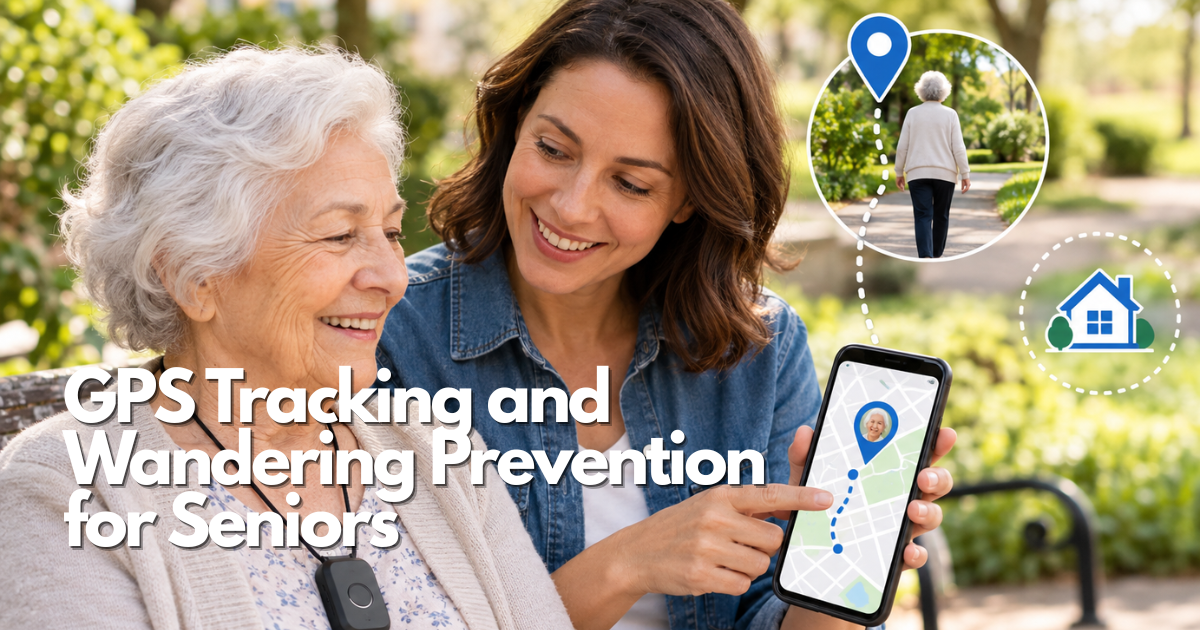
GPS tracking devices, wearable location systems, wandering alarms, and caregiver applications offer different ways to support older adults who want to continue walking, shopping, visiting friends, or participating in community activities.
However, choosing the right GPS tracking and wandering prevention solution requires more than comparing products or selecting the device with the most features. A useful system must match the person’s abilities, daily routine, comfort preferences, communication needs, and caregiver availability.
This comprehensive guide to GPS Tracking and Wandering Prevention for Seniors explains how to compare personal GPS trackers, smartwatches, wearable devices, home-based wandering alarms, and smartphone location-sharing tools. It also covers GPS accuracy, cellular connectivity, geofencing, privacy, consent, battery maintenance, costs, and emergency backup planning.
Safety note: GPS tracking cannot physically prevent wandering, guarantee a person’s safety, or replace professional emergency assistance. A location marker may be delayed or inaccurate, and a device may be removed, forgotten, disconnected, or uncharged. If an older adult is missing or may be in immediate danger, contact local emergency services promptly rather than waiting for another tracking update.
Quick answer: how can GPS tracking and wandering prevention for seniors improve safety?
GPS Tracking and Wandering Prevention for Seniors can provide additional information to caregivers when an older adult leaves an agreed area, misses a scheduled check-in, or needs help communicating their location.
Depending on the system, available features may include:
- GPS location sharing.
- Real-time or scheduled location updates.
- Safe-area and geofencing notifications.
- Door-opening and exit alerts.
- SOS buttons.
- Two-way communication.
- Location history.
- Low-battery warnings.
- Caregiver applications.
- Emergency contact notifications.
However, the most suitable solution depends on the actual situation.
For an older adult who regularly walks independently, a wearable GPS tracker may be useful.
For someone who needs a warning when an exterior door opens, a home-based wandering alarm may address the concern more directly.
For a person who consistently carries a smartphone, an existing location-sharing application may be sufficient for certain check-in routines.
The goal of GPS Tracking and Wandering Prevention for Seniors is not to monitor every movement. It is to create a practical, respectful safety arrangement that supports appropriate independence and a timely human response.
When GPS tracking for seniors may be appropriate
A GPS tracking system may be worth considering when an older adult:
- Regularly takes independent walks.
- Sometimes forgets familiar routes.
- Has difficulty communicating their location.
- Frequently travels between known destinations.
- Has experienced a concerning unexpected departure.
- Wants additional reassurance during outings.
- Benefits from coordinated family check-ins.
The decision should reflect observed needs rather than age alone.
What GPS tracking and wandering prevention cannot guarantee
GPS tracking does not guarantee that someone can be located immediately.
Coverage, satellite reception, network connectivity, battery power, device placement, and caregiver availability all affect the system.
A geofence cannot physically stop someone from leaving an area.
A last-known location does not necessarily identify where the person is now.
For these reasons, GPS Tracking and Wandering Prevention for Seniors should form one part of a broader safety plan that includes identification, communication, caregiver support, and appropriate emergency procedures.
Compare GPS trackers for seniors and wandering prevention options
GPS tracking technology includes several device categories with different purposes.
Families should compare the complete communication system rather than assuming every device marketed for older adults provides the same functions.
Personal GPS trackers for seniors
A personal GPS tracker is a small device that may be attached to clothing, worn using compatible accessories, or carried in a designated pocket.
Some models use independent cellular communication to send location information to caregivers.
Potential features include GPS updates, safe-area notifications, location history, SOS controls, and low-battery alerts.
A personal tracker may suit an older adult who does not want a smartwatch.
However, the attachment method must be tested carefully.
A device left in a jacket or handbag may display the location of that item rather than the person.
GPS tracker watches for seniors
A GPS tracker watch may provide location features in a familiar wrist-worn design.
Depending on the model, a smartwatch may also include cellular calls, emergency controls, notifications, and fall-related features.
A watch can be convenient for someone who already wears one daily.
However, a GPS smartwatch may require frequent charging, compatible smartphone software, and an active cellular plan for independent communication.
The best GPS tracker watch for elderly users should be selected according to usability, comfort, connection requirements, and caregiver support.
Wearable GPS trackers for elderly adults
Wearable GPS trackers may include bracelets, pendants, wristbands, clothing clips, and other attachments.
Different forms offer different advantages.
A pendant may provide an accessible help button.
A bracelet may feel familiar but require careful sizing.
A clothing clip may be comfortable but can become separated from the person.
Test the actual device through dressing, walking, transportation, rest, and charging.
Smartphone GPS tracker apps for elderly users
A smartphone may already provide location-sharing tools without requiring additional tracking hardware.
This may be suitable when the older adult carries and charges their phone consistently.
However, smartphone-based tracking depends on the phone remaining with the person, appropriate permissions, battery power, and connectivity.
A phone left at home cannot report the person’s current location.
Home wandering alarms and door sensors
Wandering prevention is not limited to GPS.
Door alarms and home-based alert systems may notify caregivers when a monitored entrance opens.
Some systems use wearable transmitters or caregiver receivers.
These systems may support home-based routines but do not necessarily provide outdoor location tracking.
Choose the technology according to whether the concern is an unexpected exit, an outdoor location, a missed arrival, or a request for assistance.
GPS trackers for seniors: explore the related guides
This article serves as the broad educational starting point for GPS Tracking and Wandering Prevention for Seniors.
More specific questions can be covered in dedicated guides once each article has been reviewed and published.
GPS tracker devices and wearable options
Related article topics include:
- AngelSense GPS Tracker for Elderly.
- GPS Tracker Device for Elderly: A Practical Guide.
- GPS Tracker for Elderly People: A Practical Guide.
- Best Personal GPS Tracker for Elderly: Buying Guide for 2026.
- Wearable GPS Tracker for Elderly.
- GPS Tracker Bracelet for Elderly.
- GPS Tracker Necklace for Elderly.
- Wristband GPS Tracker for Elderly.
- Small GPS Tracker for Elderly.
- Keychain GPS Tracker for Elderly.
Each topic addresses a narrower device type or selection question.
GPS watches and caregiver applications
Additional topics include Best GPS Tracker Watch for Elderly: Buying Guide for 2026, GPS Tracker Watch for Alzheimer’s, GPS Tracker App for Elderly, and Real Time GPS Tracker for Elderly.
These guides can explain specific connection requirements, usability considerations, and caregiver functions.
Dementia-related tracking and wandering alarms
More specialized topics include Free GPS Tracker for Dementia Patients, Personal GPS Tracker for Alzheimer’s, GPS Tracker for Elderly Dementia, Elderly Wandering Alarm, Wandering Patient Alarm System, Anti Wandering Door Alarm, and Wandering Prevention Devices.
These topics should be evaluated according to the specific safety concern, not simply the availability of a device.
Regional coverage and subscription questions
Dedicated guides may address GPS Tracker for Elderly No Monthly Fee, GPS Tracker for Seniors Canada, GPS Tracker for Elderly Ireland, GPS Tracker for Elderly NZ, and other regional or carrier-related questions.
Service availability and product specifications should be verified for the relevant country and model.
Publishing note: These titles represent related content topics. Do not insert working links until the corresponding articles have been published and their destinations verified.
Eight important decisions when choosing GPS tracking and wandering prevention for seniors
The best decision begins with the person rather than a product catalog.
The following eight factors help families identify what a tracking arrangement must do.
1. Person and safety purpose
Define the actual concern.
For example, a caregiver may need to know whether an older adult arrives at a familiar community center.
Another household may need an alert when someone leaves home unexpectedly.
Describe the concern using specific, observable situations.
Avoid broad goals such as monitoring everything.
A clear purpose makes product comparisons easier and prevents unnecessary tracking.
2. Comfort and accessibility
A GPS tracking device should remain comfortable throughout normal activities.
Evaluate wrist size, clothing attachments, skin contact, buttons, sound, vibration, and charging.
Older adults may have different vision, hearing, memory, dexterity, and mobility needs.
A device that requires precise touchscreen actions may be unsuitable for someone who cannot reliably perform them.
3. Controls and usability
The wearer and caregiver should understand the necessary actions.
Test whether the older adult can identify an important notification, request help, and place the device on its charger.
Keep instructions simple.
The system should not require complicated steps during an unexpected situation.
4. GPS coverage and connectivity
Satellite positioning and remote communication are different functions.
A device may determine its location but fail to transmit it when cellular coverage is unavailable.
Test the system in familiar locations, including the home, walking routes, stores, and transportation areas.
Check location timestamps.
Do not assume a map marker represents a continuously updated position.
5. Privacy and consent
GPS Tracking and Wandering Prevention for Seniors should respect personal dignity.
Explain who receives location data, which notifications are active, and whether movement history is stored.
Limit access to authorized caregivers.
Use only the level of location sharing necessary for the agreed purpose.
Revisit consent as caregiving arrangements or needs change.
6. Caregiver support
A notification has value only when someone can respond.
Identify the primary caregiver, appropriate backup contacts, and circumstances requiring further assistance.
Do not assume that a family group chat creates reliable response coverage.
Assign responsibilities clearly.
7. Service and total cost
Evaluate the entire ownership cost, including:
- Device purchase.
- Activation.
- Cellular service.
- App subscriptions.
- Replacement accessories.
- Repairs.
- Technical support.
- Cancellation terms.
A GPS tracker for elderly users with no monthly fee may depend on a smartphone, Bluetooth network, or prepaid service.
Verify exactly what is included.
8. Independent backup planning
Every GPS tracking arrangement needs a backup.
A dead battery, disconnected network, missing device, or unavailable caregiver should not leave the household without a response plan.
Backup measures may include identification, printed emergency contacts, scheduled check-ins, trusted nearby contacts, and appropriate home safety tools.
Match GPS tracking and wandering prevention for seniors to daily routines
The effectiveness of any tracking arrangement depends on how it fits everyday activities.
Independent walking and community activities
For familiar walks, agree on the route, expected return, and preferred check-in method.
Confirm that the tracking device is charged and attached before leaving.
Avoid using unnecessary continuous notifications when a simpler check-in is sufficient.
Transportation and unfamiliar destinations
Public transportation, vehicles, and large buildings can create additional tracking challenges.
A location alert may identify a general area without explaining which floor, entrance, or transit platform the person is using.
Provide a written destination and appropriate contact method when useful.
Wandering concerns and memory changes
Memory-related navigation difficulties may require additional safeguards.
GPS location information can help caregivers understand an unexpected route change, but it cannot physically prevent wandering.
Combine tracking with appropriate identification, caregiver planning, familiar routines, and home safety measures.
Home-based wandering concerns
If the primary concern is someone leaving home unexpectedly, consider whether a door alarm, home sensor, or supervised check-in arrangement would address that concern more directly.
A GPS tracking device may provide location information after departure, while a door alert may provide earlier notice.
These systems may complement each other.
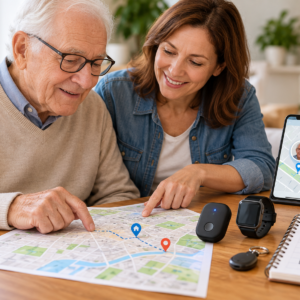
Set up and maintain GPS tracking systems for seniors
A tracking device must remain usable after its first successful demonstration.
Maintenance should include charging, connectivity, attachment, software, account access, and caregiver responsibilities.
Initial GPS tracking setup
Record the exact device model, account information, service status, and support contact.
Configure only necessary location-sharing and safety features.
Add authorized caregivers and emergency contacts.
Test the device through ordinary activities before depending on it.
Daily GPS tracker readiness check
Before important outings, verify:
- The tracker is charged.
- The device is correctly attached.
- The latest location update is recent.
- Cellular or smartphone connectivity is available.
- The primary caregiver is reachable.
- A backup communication method is available.
A short routine can prevent common failures.
Charging and signal maintenance
Battery performance can change according to location update frequency, voice calls, network strength, and device age.
Establish a charging schedule that fits the older adult’s activities.
Check what the application displays when connection is unavailable.
A last-known map location should be clearly distinguished from a current update.
Cleaning, accessories, and updates
Inspect straps, clips, charging cables, cases, and buttons.
Follow manufacturer cleaning instructions.
Check for skin irritation or damaged equipment.
Review software permissions after updates and verify that important notifications still work.
Travel and caregiver handoffs
Before travel, confirm coverage, roaming requirements, charger compatibility, and caregiver responsibilities.
When responsibility transfers to another caregiver, explain the location application, notifications, and response plan.
Do not assume that a new caregiver understands the system simply because they can open the app.
Test GPS tracking and wandering prevention for seniors in realistic situations
Testing should involve familiar, safe activities rather than artificial emergencies.
Test 1: An ordinary day
Have the older adult use the tracker during a normal routine.
Observe comfort, device attachment, charging, notifications, and location accuracy.
Check whether the caregiver can interpret the information correctly.
Test 2: A challenging but familiar location
Test an environment where GPS performance may be limited, such as inside a large building or near tall structures.
Review the timestamp and accuracy of the result.
If the system cannot provide useful information in an important location, document that limitation.
Test 3: Caregiver handoff
Ask an authorized backup caregiver to review device status, understand an example alert, and explain the response procedure.
A system that only one person can operate may be difficult to maintain.
Test 4: Disrupted communication
Review how the application behaves when the battery is low, location updates stop, or a caregiver notification is unavailable.
Use manufacturer-approved tests.
Do not create a real missing-person emergency to evaluate the system.
How to choose the best GPS trackers for seniors without relying on marketing claims
Marketing descriptions such as real-time tracking, nationwide coverage, and caregiver-friendly design may not explain the device’s actual operating limits.
Families should request specific answers.
Questions to ask before purchasing
Ask the manufacturer or provider:
- Which exact device and service are included?
- Does the tracker need a cellular subscription?
- Can it communicate without a nearby phone?
- What is the expected battery life under normal use?
- How frequently are location updates transmitted?
- Does the caregiver application show timestamps?
- Which alerts are included?
- Who receives an SOS request?
- Is professional monitoring included?
- How is location history protected?
- What happens after cancellation?
- Which warranty and return terms apply?
Record the answers for the exact model.
Common mistakes when selecting an elderly GPS tracker
Families sometimes focus on one appealing feature while overlooking practical limitations.
Examples include choosing a device that is uncomfortable, assuming Bluetooth provides independent GPS tracking, relying on an unavailable caregiver, or overlooking recurring fees.
The better approach is to test the complete system.
Why the most advanced tracker is not always the best option
A sophisticated device may offer many features but require complicated charging, account management, or touchscreen interactions.
A simpler tracker may be more practical if it reliably addresses the agreed safety purpose.
The best GPS tracker for seniors is the arrangement that the person accepts and caregivers can maintain.
GPS tracking and wandering prevention for seniors: practical decision table
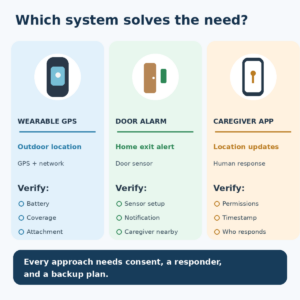
Use this table to compare technology categories without treating any product as universally superior.
| Safety purpose | Potentially useful option | Important limitation | Practical test |
|---|---|---|---|
| Independent outdoor walks | Wearable cellular GPS tracker | Battery and coverage may vary | Test the familiar route and timestamps |
| Location sharing with an existing phone | Smartphone tracking application | Phone may be forgotten or disconnected | Test a complete planned outing |
| Familiar wrist-worn communication | GPS smartwatch | Charging and smartphone compatibility | Test controls, comfort, and phone-free functions |
| Finding a nearby personal item | Bluetooth item tracker | Not equivalent to independent wide-area GPS | Test the actual nearby-device network |
| Unexpected exit from home | Door alarm or wandering sensor | May not provide outdoor location | Test normal door-opening notifications |
| Memory-related wandering concern | GPS tracker with layered safeguards | Device may be removed or left behind | Practice caregiver and backup responses |
| Urgent medical help | Appropriate medical alert service | GPS alone may not provide emergency monitoring | Verify the exact response service |
| Travel between regions | Supported cellular tracking service | Roaming and coverage restrictions | Verify service before departure |
Use the comparison table with the older adult
Review the situation together whenever possible.
Ask what problem needs to be addressed and which device feels acceptable.
Confirm that the caregiver understands the technology.
If the system cannot be tested or maintained, reconsider the option before relying on it.
GPS tracker alerts, geofencing, and caregiver response
Geofencing can help caregivers receive notifications when a tracking device enters or leaves a selected area.
However, a geofence is not a physical boundary.
Set realistic safe areas
Choose meaningful locations such as home, a community center, or a frequently visited store.
Allow for normal GPS variation.
Test the boundary during a safe, planned activity.
A boundary that is too narrow may generate excessive notifications.
Respond to unexpected departures
When an unexpected alert arrives, review the location timestamp, battery, connection status, and planned activity.
Contact the older adult using the agreed method.
If the person is missing or danger is suspected, seek emergency assistance promptly.
Do not repeatedly refresh a map while delaying necessary help.
Reduce unnecessary alerts
Review whether notifications reflect actual safety needs.
Too many alerts can create caregiver fatigue.
Adjust settings without disabling important protections.
Each notification should have a clear purpose and assigned responder.
Privacy, consent, and dignity in GPS tracking for seniors
Location tracking can reveal personal routines, relationships, appointments, and time spent away from home.
This information requires careful handling.
Explain location sharing clearly
Show the older adult what information appears in the caregiver application.
Explain when location updates occur and who can see them.
Discuss whether continuous location history is necessary.
Use the least intrusive arrangement that adequately addresses the agreed concern.
Limit caregiver account access
Grant access only to authorized caregivers.
Use strong passwords and multi-factor authentication when supported.
Remove former caregivers promptly.
Avoid sharing live map screenshots in public or broad messaging groups.
Review privacy after changes
Revisit the arrangement after a move, new caregiver, software update, device replacement, or change in care needs.
If decision-making authority becomes uncertain, involve appropriate qualified professionals or legally authorized representatives.
GPS tracking and wandering prevention for seniors: safe everyday use
A successful safety arrangement should support daily activities without unnecessarily restricting them.
Prepare for an outing
Confirm the device is ready and the expected destination is understood.
Agree on a reasonable check-in method.
Carry identification and necessary contact information.
Practice device controls
If the device has an SOS button or calling function, teach the simplest appropriate action.
Follow manufacturer instructions for safe testing.
Avoid complicated procedures that may be difficult to remember during an unexpected situation.
Keep a human response available
Caregivers should know who is responsible during the outing.
If the primary responder becomes unavailable, activate the backup arrangement.
Do not rely on notifications that nobody is assigned to review.
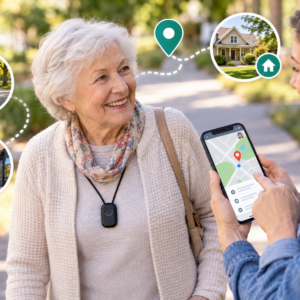
Emergency planning and independent backups for elderly GPS trackers
A GPS tracking system should make a safety plan easier to follow, not replace it.
Keep a non-GPS backup
Maintain an alternative communication method and appropriate identification.
Keep a recent photograph, important contacts, and familiar destinations accessible to authorized responders.
A backup should not depend on the same depleted battery or unavailable network.
Document contact and escalation steps
Identify the primary caregiver, backup contacts, and appropriate emergency procedures.
Make sure each person understands their role.
If an older adult is missing or may be in immediate danger, contact local emergency services promptly.
Reassess after a change in routine or health
Review the tracking arrangement after significant changes in mobility, memory, communication, residence, or caregiving responsibilities.
A device that previously worked well may no longer match the person’s needs.
Know when another service is necessary
GPS tracking is not a clinical assessment.
If the main concern involves falls, acute medical problems, medication safety, or environmental hazards, consider appropriate medical or home safety support.
Frequently asked questions about GPS tracking and wandering prevention for seniors
What is the best GPS tracking device for seniors?
There is no universally best GPS tracker for every older adult.
The most suitable option depends on the person’s activities, comfort, connectivity requirements, caregiver availability, privacy preferences, and budget.
Compare device types and test the complete system before relying on it.
Can GPS tracking prevent seniors from wandering?
GPS cannot physically prevent wandering.
Some trackers may help caregivers receive notifications or access location information after an unexpected departure.
Combine GPS tracking with identification, appropriate home safeguards, caregiver coordination, and an emergency response plan.
Do GPS trackers for seniors work without a smartphone?
Some cellular GPS trackers can communicate without a nearby smartphone.
However, they may require an active cellular service plan and supported network coverage.
Other devices depend on a phone, Wi-Fi, or Bluetooth.
Verify the exact model before purchasing.
Are there GPS trackers for elderly users with no monthly fee?
Some location-sharing options do not require a separate monthly tracker subscription.
However, they may depend on an existing smartphone, internet connection, Bluetooth network, or prepaid service.
No monthly fee does not automatically mean independent real-time GPS tracking.
Are GPS trackers accurate indoors?
GPS accuracy may decrease indoors, underground, near tall buildings, or where satellite signals are obstructed.
Some products use additional positioning technologies.
Treat indoor locations as estimates and check the timestamp.
Can an elderly wandering alarm replace GPS tracking?
A wandering alarm and a GPS tracker may serve different purposes.
A door alarm may notify caregivers when an entrance opens.
A GPS tracker may provide location information after a person leaves.
Some households may benefit from combining appropriate systems.
Do GPS trackers include emergency monitoring?
Not automatically.
Some devices include SOS buttons or communication features, but professional monitoring depends on the exact service.
Verify who receives alerts and what response is provided.
How often should a GPS tracker be tested?
Test the tracker during initial setup, during normal activities in the first week, after significant device or service changes, and at intervals the household can maintain.
Review charging, location timestamps, notifications, comfort, and caregiver access.
How should families protect GPS tracking privacy?
Explain location sharing openly, restrict caregiver access, secure accounts, and review location-history retention.
Reassess permissions when caregiving relationships or needs change.
What should caregivers do if a GPS tracker stops updating?
Check the last successful location, battery, connection, and device status.
Use the agreed contact and backup procedures.
If the person is missing or may be in immediate danger, contact emergency services promptly rather than waiting for the tracker to reconnect.
Final thoughts on GPS tracking and wandering prevention for seniors
GPS Tracking and Wandering Prevention for Seniors works best when technology supports a clear, respectful, person-centered plan.
Choose devices according to the older adult’s actual routines, accessibility needs, and preferences.
Test connectivity, comfort, charging, and caregiver notifications in real situations.
Protect location privacy and establish independent backups.
The strongest safety arrangement is not the device with the longest feature list. It is the combination of appropriate technology, informed consent, dependable human support, and a response plan that can be followed when it matters.
Sources used for this guide
Official sources support the framework; they do not endorse a company or guarantee performance.
- Services for Older Adults Living at Home — National Institute on Aging.
- Aging in Place: Growing Older at Home — National Institute on Aging.
- Unique Considerations in the Home — U.S. Food and Drug Administration.
- Recognizing medical emergencies — MedlinePlus, U.S. National Library of Medicine.
Build a safer plan
Return to the Safety & Alert Resource Center for broad planning; focused child assets remain inactive until reviewed.