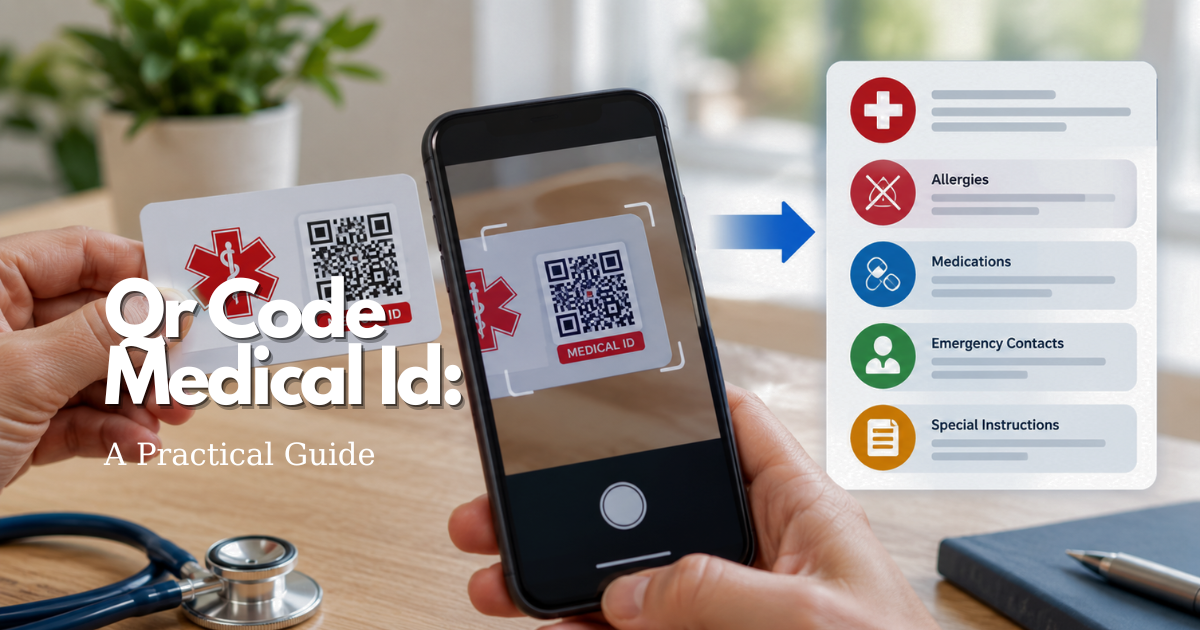
This is general safety and information guidance, not medical or legal advice. A QR profile does not diagnose a condition, replace a clinician, call emergency services by itself, or guarantee that a responder will scan it. If someone is in immediate danger, call the local emergency number first.
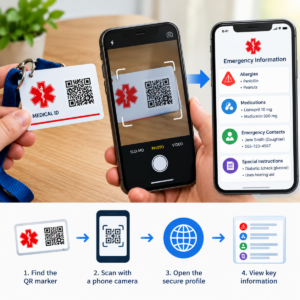
What a QR code medical ID is—and what it is not
A QR code is a two-dimensional pattern that stores or points to information. In a medical ID use case, the pattern commonly opens a web page, profile, or document prepared by the individual or a service provider. The scanner may see a short emergency summary, a full profile, or instructions for contacting a trusted person. The code itself usually carries very little readable meaning; its usefulness depends on the destination it opens.
That distinction matters. A printed code is not the same thing as a staffed response service. It does not have a speaker, GPS radio, fall sensor, cellular connection, or call center merely because it is printed next to a medical symbol. It is also not the same as a physical medical ID engraving. A physical ID can communicate a short warning without a phone, while a QR profile can hold more context if a compatible camera, a data connection, and a willing reader are available.
The best way to think about this tool is as an additional information channel. A responder might notice the code on a card, key tag, phone case, luggage label, or wearable. They may scan it, ignore it, or be unable to scan it. The emergency plan should still work when the code is damaged, the device is offline, the page is unavailable, or the person cannot consent in the moment.
There are three common designs:
- A code that opens a public emergency profile. It is convenient, but anyone who sees the code may be able to view the profile.
- A code that opens a page with a limited summary and a second step for more information. This can reduce casual exposure, but an emergency responder may not have time for a complicated login.
- A code that stores plain text directly. This may work without a website, but the amount of information is limited and updating the code may require printing a new one.
Before choosing a design, decide what the code is supposed to accomplish. If the goal is to communicate one critical fact, a clearly printed line may be more dependable. If the goal is to provide several current details, a maintained profile may be useful. The more a system relies on an online account, the more carefully you need to check access, privacy, service continuity, and recovery options.
When a QR medical ID can help
A QR profile can be helpful when a person cannot speak clearly, is confused, is unconscious, has communication barriers, or needs a responder to reach a caregiver quickly. It may also help during a transition between settings, such as travel, a move, or a change in medication. The profile can provide context that is difficult to fit on a small tag, such as a preferred name, communication needs, an emergency contact, or a concise list of conditions and medications.
Use it as a supplement rather than a promise. A responder may not recognize the symbol, may not have a phone, may not have signal, or may follow agency policy that does not allow personal-device scanning. A cracked screen, glare, poor lighting, a tiny code, or a page that requires a password can stop the process. Some people will also reasonably decline to scan an unfamiliar code for security reasons.
For older adults, the human factors are especially important. The marker should be visible, the explanation should be brief, and the plan should not depend on fine motor control, remembering a password, or navigating a small menu. A family member or caregiver should know where the information is kept and how to update it. The wearer should understand what is shared and with whom, as much as possible.
How to choose the information destination
Start with the destination, not the artwork. A good destination opens quickly on a normal mobile browser, uses readable text, has a stable address, and makes the urgent information visible near the top. It should not require an app download for basic access. If a service uses an account, document the recovery process and confirm that a trusted person can maintain the profile when appropriate.
Ask these questions before relying on the page:
- Can a person view the emergency summary without knowing the wearer’s password?
- Does the page work on both iPhone and Android devices?
- Does it remain readable with large text and ordinary screen magnification?
- Does the URL remain stable if the profile is edited?
- Can the owner export, print, or recover the information?
- What happens if the provider closes the account, changes its terms, or stops operating?
- Can the owner delete the profile and revoke public access?
- Does the service collect analytics, location, device data, or contact information?
A short, static emergency page can be more dependable than a feature-heavy dashboard. At the same time, a static page may become stale if no one takes responsibility for updates. The right choice is the one the person and caregiver can maintain. A theoretically sophisticated system that no one checks is less useful than a simple profile reviewed on a schedule.
What to put in the emergency summary
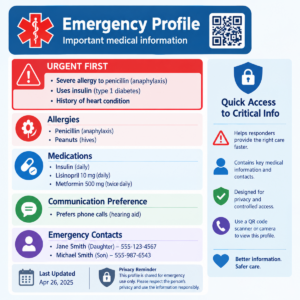
Write for a stranger who may have only a few seconds. Put the highest-consequence information first, use plain language, and avoid long explanations. The summary should help someone decide what to tell emergency services or a clinician; it should not tell a responder to ignore symptoms or make a diagnosis.
Identity and communication
Include the person’s name or preferred name, pronouns if useful, a language preference, and a communication note when relevant. A simple instruction such as “Speak slowly and face me” or “I use a communication device” can be more actionable than a long description. If the person has a cognitive, hearing, speech, or vision-related support need, describe the practical accommodation without using stigmatizing language.
Critical conditions and allergies
List conditions that a responder should know about, especially those that affect immediate care. List serious allergies separately and state the reaction if known. Do not assume that a medication list communicates an allergy. If an allergy history is uncertain, say so rather than presenting a guess as fact.
Medications and treatment equipment
List current medications only if the owner can maintain the list. Use the medication name and the prescribed form or purpose when helpful, but do not create dosing instructions for responders unless a clinician has provided a specific plan. Mention essential equipment such as an insulin pump, oxygen, a pacemaker, a cochlear implant, a feeding tube, or mobility equipment when the information is accurate and relevant. The profile should not replace the medication labels or a current medical record.
Emergency contacts and care preferences
Give the name and relationship of one or two contacts, with consent. Include the best phone number and an alternate if needed. Tell the contact that their information will be exposed to anyone who can access the profile. A care preference can be useful, but it must be clear that emergency professionals use their clinical judgment and applicable law. Avoid absolute directions such as “never call an ambulance” in a general-purpose profile.
Update date and source note
Show “Last reviewed” with a month and year, or a more precise date if the platform supports it. State who maintains the profile. This lets a responder judge whether a detail might be stale. If a line is unknown, write “not provided” rather than leaving a confusing blank.
Information to leave out or handle carefully
More data is not automatically safer. A public profile should generally avoid a full address, Social Security number, insurance member number, passwords, financial information, detailed medical records, and unnecessary family details. Do not put a medication refill history or a lengthy diagnosis narrative where a stranger can read it casually.
Location deserves particular care. A home address can be important to a formal emergency service, but placing it on a public QR page can increase privacy and personal-safety risk. Consider whether an emergency contact or a response organization can provide the address through a controlled process. If the code is attached to luggage or a vehicle, assume that it may be seen when the person is not present.
Do not publish another person’s information without permission. A caregiver may help manage a profile, but management authority does not automatically mean that every family member’s phone number, diagnosis, or photograph should be public. Talk through what will be shared, why it is needed, and how it will be removed.
Privacy, security, and QR code medical ID decisions
Privacy is a design choice, not a switch that can be solved by adding a medical symbol. A public QR destination can be copied, photographed, indexed, forwarded, or accessed by someone who finds the marker. Even if the page is not indexed by search engines, its URL may be shared. Treat the content as information that could become public.
In the United States, HIPAA protections depend on the type of organization and its relationship to the health information. The U.S. Department of Health and Human Services explains that HIPAA generally applies to covered entities and business associates, and that information entered into a personal app is often outside HIPAA when the app is not provided by or on behalf of a covered entity. Do not assume that a QR service is “HIPAA protected” merely because it stores medical information; read the provider’s privacy policy and terms, and ask precise questions about access, retention, deletion, and secondary use.
Consider a layered approach:
- Keep the public summary minimal: the urgent facts, a communication note, and an emergency contact path.
- Use a provider that explains encryption, account security, deletion, backups, and breach notification in understandable language.
- Use a strong, unique password for the owner or caregiver account, and enable multifactor authentication if it will not prevent emergency maintenance.
- Review the page from a device that is not signed in. This shows what a stranger can actually see.
- Remove old contacts and outdated diagnoses instead of leaving them “just in case.”
Privacy can conflict with speed. A login may protect more information but create a barrier during an emergency. A public page may be faster but expose more data. The appropriate balance depends on the person, the risk, and the information’s urgency. Make the decision deliberately and revisit it when circumstances change.
How to create and print the code
After the destination is ready, generate the code through the chosen service or a reputable QR generator. Use the full destination URL, not a temporary preview link. If the provider uses a redirect, confirm that the redirect remains active after an account change. Save a copy of the destination address in the person’s records so the code can be recreated if the printed marker is lost.
Make the code large enough to scan at a practical distance. Leave clear blank space around it, use strong contrast, and avoid placing it on a shiny surface where glare obscures the pattern. Do not distort the square, cover its corner markers, or place decorative graphics over the data modules. A beautiful code that fails under indoor lighting is not a useful safety tool.
Print a human-readable instruction beside it, such as “Scan for emergency information,” along with a short fallback line. The fallback may be the most important warning or a phone number, depending on the person’s plan. Do not assume a scanner will know what the pattern means. If space allows, include “If unable to scan, call emergency services and contact [name/role].”
Decide where the marker belongs based on visibility and durability. A card in a wallet may be easy to carry but hard to find if the wallet is lost. A phone case may be visible but exposed to wear. A wearable may be noticed quickly but can be damaged by water, abrasion, or skin products. A home copy may help during a household emergency but not while traveling. Multiple copies can improve redundancy, provided that each copy points to the same maintained destination.
Testing access before relying on it
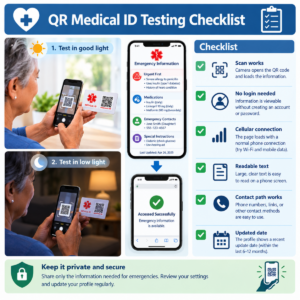
Test the complete experience, not only whether a camera recognizes the square. Use at least two different phones if possible, one signed out of the service. Test over Wi-Fi and cellular data, in bright and dim light, with the code at its intended size and distance. Confirm that the page opens without an app, that the urgent section appears first, and that a person can read it without knowing the owner’s password.
Ask a trusted person who has not seen the profile to follow the instruction. Can they identify the critical allergy or condition? Can they find the emergency contact? Do they understand that the code is not a call button? If they need a long explanation, simplify the page or the printed instruction.
Test failure modes deliberately:
- Turn off Wi-Fi and use cellular data.
- Open the code with an older supported phone if one is part of the household’s plan.
- Use a damaged or partially covered print to see when it stops working.
- Try the old printed copy after changing a noncritical profile detail.
- Sign out of any account that might conceal a login requirement.
- Check what happens when the emergency contact does not answer.
Do not test by calling emergency services unless an official testing process allows it. A family drill can verify scanning and information flow without creating a false emergency. Record the date of the test and fix any issue immediately.
Maintaining the profile over time
A QR marker can remain visually intact while its information becomes dangerous through neglect. Create a maintenance routine. Review the profile after a medication change, new diagnosis, allergy evaluation, change of physician, change of phone number, move, change in caregiver, or change in communication need. Also review it after a hospitalization or a change in emergency preferences.
Set a calendar reminder at a reasonable interval, such as every three months, even if no change is expected. The reminder should check both the content and the access path. Open the profile from a signed-out device, scan a printed copy, confirm the last-reviewed date, and verify that every contact still agrees to be listed.
Use version discipline. If the service lets you keep an audit history, record why a significant change was made. If it does not, keep a private note with the date and the person who reviewed the page. Do not store a duplicate medical history in several systems unless someone is responsible for reconciling them. Conflicting lists can confuse a responder.
When a service is discontinued, delete the profile if possible, remove the printed markers, and replace them with a new destination. When a person dies or no longer wants the tool, do not leave a public page active. If a device is transferred to a new owner, remove the old code and check the new user’s information.
QR medical ID and built-in phone Medical ID features
A QR profile can complement the emergency information built into a phone, but the two systems have different access paths. Apple’s current iPhone guidance says a Medical ID can be made available from the Lock Screen, and it describes fields such as allergies, medical conditions, medications, and emergency contacts. Google’s Android guidance describes emergency information and emergency contacts that can be made available from the lock screen on supported devices, while noting that features vary by device, Android version, region, and carrier.
Set up the phone feature separately if it suits the person. Check what is shown while locked, whether emergency contacts are visible, and whether the owner is comfortable with that exposure. Do not assume that a phone’s Medical ID will be visible on every model or that a QR page will be reachable if the phone has no connection. Redundancy is useful only when each channel is kept current.
Keep a paper fallback when appropriate. A printed emergency card inside a wallet, bag, or home file can provide information when the phone is dead or a QR page is unavailable. The paper copy should carry a review date and should not contain more personal information than the owner is willing to expose if it is lost.
Common mistakes and safer alternatives
Making the code too small
A code that scans only when held directly against a camera is hard to use in an unfamiliar emergency. Print a larger version with generous white space and test it in the place where it will be worn or stored.
Hiding the urgent facts below a login
A responder may not have time to create an account, request a reset, or wait for a text message. Keep the minimum actionable summary visible or use a clear, fast emergency access process.
Assuming the page is permanent
Web addresses, subscriptions, companies, and account settings change. Review the destination and retain a private recovery copy. A code that points to a discontinued account is only decoration.
Publishing a full medical history
Emergency access does not require every detail. Limit the public profile to information that could change immediate communication or care, and keep the deeper record in the appropriate clinical or personal system.
Calling the code an alert system
Words such as “alert,” “monitoring,” or “automatic response” can create a dangerous misunderstanding. A QR marker shares information when someone scans it. It does not automatically summon help unless a separate, specifically verified service provides that function.
Using a code without a human fallback
Print a short instruction and keep a phone-based or paper-based alternative. A person should know what to do when the camera cannot focus, the page will not load, or the responder will not scan.
Questions to ask before choosing a QR service
Use this list when comparing a provider or deciding whether a self-managed page is appropriate:
- What exactly can a stranger view by scanning?
- Can the owner control which fields are public?
- Is the profile readable without an app or account?
- What security protections are offered to the administrator?
- What data is collected about visitors and scans?
- Is the data sold, shared for advertising, or used for analytics?
- How are backups, export, deletion, and account recovery handled?
- What happens if a payment ends or the provider closes?
- Can an authorized caregiver edit the profile safely?
- Can a printed code be replaced without changing the address?
- Is there a visible last-reviewed date?
- What is the fallback when the code or website is unavailable?
Do not let a low price or a polished design answer questions that only the service’s current documentation can answer. Terms and privacy policies can change. Save the date on which you reviewed them and revisit the decision when the provider makes a material change.
A simple setup plan
- Define the purpose: information sharing, contact access, or another specific task.
- Choose the smallest useful public information set.
- Ask the person and listed contacts for informed agreement.
- Create the destination and make the urgent summary readable at the top.
- Generate a stable QR code and print it with a human-readable instruction.
- Add a fallback card or line for non-scanning situations.
- Test on more than one phone, signed out, with Wi-Fi and cellular data.
- Show the person and caregiver what is public and how to update it.
- Record the last-reviewed date and set the next reminder.
- Replace or remove every copy when the destination or person’s needs change.
This plan is intentionally ordinary. The value of a QR-based ID comes from dependable communication, not from technical complexity. If the setup creates more confusion, exposure, or maintenance than the person can reasonably manage, choose a simpler emergency information method.
How to explain the plan to a caregiver
A QR system works better when the person who wears or carries it understands the plan. Explain, in plain language, what the code does, what it does not do, and what information is visible to a stranger. If the person can make the decision, ask what they want shared and what they want kept private. Do not treat a caregiver’s convenience as a reason to publish information the person would not choose to disclose.
Make a one-page private handoff for the caregiver. It can include the destination address, the administrator’s name, the account-recovery steps, the next review date, and a list of events that require an update. Keep this handoff separate from the public QR profile. A person who finds the printed code should not automatically receive the administrator’s password or the full maintenance history.
Show the caregiver how to make a safe change. The caregiver should know how to edit an emergency contact, remove an outdated medication, change the review date, and replace a printed copy. If a clinician’s advice is needed, identify who should confirm the change. The caregiver should not guess at a dose, diagnosis, or treatment instruction simply because a field is available in the profile.
Agree on a communication rule for updates. For example, the owner or authorized caregiver can review routine changes monthly, while a medication change or new allergy triggers an immediate review. If more than one person helps, assign one person to reconcile the profile so that two well-meaning editors do not leave contradictory information. Record who made the last review and when.
Plan for temporary situations. A person may travel, enter rehabilitation, change residences, or have a short-term caregiver. Decide whether the profile should include temporary information, whether it should expire, and who will remove it. Temporary details can become misleading if they remain after the situation ends. A visible “temporary” label and an expiration reminder can prevent that problem.
Finally, practice the explanation a responder would hear: “This code opens emergency information. It is not an emergency call button. If it does not scan, use the printed fallback and call emergency services.” That sentence keeps expectations realistic and gives the caregiver a clear way to describe the tool under stress.
When a simpler method is better
A QR profile is not required for a useful medical ID. A clearly printed card, an engraved warning, a phone lock-screen message, or a clinician-provided emergency plan may be better for a person who has limited internet access, does not want public digital information, or cannot maintain an online account. A simpler method can also be preferable when the emergency information changes rarely and fits in a few readable lines.
Use the least complicated method that meets the person’s real need. If a QR code is added, make it one layer in a small system with a fallback, a responsible maintainer, and a review date. The goal is not to adopt a particular technology. The goal is to help the right information reach the right person without creating a new safety or privacy problem.
Bottom line
A qr code medical id can make important emergency information easier to reach, especially when a person cannot explain their situation. Its limits are just as important as its convenience: it depends on visibility, a compatible camera, a working destination, readable content, and someone willing to use it. Keep the public summary short, put urgent facts first, protect private details, test the complete path, and maintain the profile after every meaningful change.
Pair the code with a clear fallback, current phone Medical ID settings when appropriate, trusted emergency contacts, and the person’s broader safety plan. A QR marker should make good information easier to find—not make the emergency plan depend on a single square of printed data.