An Iris Ally Medical Alert Device is designed to give its wearer a simple way to request help and speak with an emergency-response service. It may be worth considering when a person lives alone, has a fall risk, worries about getting to a phone, or wants family members to have another safety layer. The important question is not whether an Iris Ally Medical Alert Device sounds reassuring in a brochure; it is whether the person can wear it, charge it, use it comfortably, and understand what happens after the button is pressed.
This guide explains the practical decisions to make before enrolling in an Iris Ally Medical Alert Device: who the device may suit, what to confirm about response and location features, how to prepare an emergency plan, and when another type of safety support may be a better fit. Device features, service terms, availability, and costs can change, so verify current details directly with Consumer Cellular before ordering an Iris Ally Medical Alert Device.
Iris Ally Medical Alert Device: Quick Answer
The Iris Ally Medical Alert Device may be a sensible option when the wearer can keep it charged, can use the help button and speaker, and has a clear emergency-contact plan. Do not choose an Iris Ally Medical Alert Device on brand recognition alone. Confirm the current service terms, cellular coverage at the home and usual destinations, the response sequence, privacy choices, and the routine that will keep the device available every day.

Iris Ally Medical Alert Device Use Starts With the Daily Routine
A personal emergency device is most useful when it fits the moments in which help would otherwise be hard to reach. Think through the person’s usual day: bathing, gardening, taking out trash, walking to the mailbox, sleeping alone, or managing dizziness after medication changes. An Iris Ally Medical Alert Device that stays in a drawer, is removed for comfort, or is left charging during the only risky part of the day cannot provide the protection the family expects.
Ask the wearer to handle the Iris Ally Medical Alert Device before making a decision. Can they press the button with the hand strength and dexterity they have? Can they hear a two-way conversation clearly? Will the charging routine be realistic? These questions matter more than a long list of features. If the person has memory changes, include the person who will help maintain charging, contact details, and any emergency plan for the Iris Ally Medical Alert Device.
Who May Benefit—and Who Needs a Different Layer of Support
This kind of device can be useful for an older adult who spends meaningful time alone, has had a near-fall, wants a direct route to assistance, or worries that a phone may be out of reach. It can also make sense for a family that wants an agreed emergency process rather than a vague instruction to “call if you need anything.” The person must be comfortable wearing the device and participating in the plan for the Iris Ally Medical Alert Device.
It is not enough on its own for someone who is unable to activate it, is likely to remove it, cannot reliably take part in a two-way conversation, or has a safety concern that requires clinical assessment or in-person supervision. In those situations, speak with the person’s clinician, care team, or local aging-services resource about a broader plan. An Iris Ally Medical Alert Device can support independence; it cannot diagnose a problem, prevent every fall, or replace urgent medical care.
A Simple Decision Table Before You Enroll
| Question | Why it matters | What to do before deciding |
|---|---|---|
| Can the wearer use the button and hear the speaker? | The service is only helpful if the person can activate and communicate with it when needed. | Handle a demonstration unit or ask support to explain the exact interaction. |
| Will it be worn or carried in the risky moments? | A device left on a counter cannot help after a bathroom fall or outdoor incident. | Map bathing, sleep, errands, garden, and walking routines. |
| Where will it be used? | Coverage and location tools may work differently by place and conditions. | Ask about the home, neighborhood, common travel locations, and weak-signal areas. |
| Who is in the emergency plan? | Contacts, address information, and access instructions must be current. | Confirm names, phone numbers, entry arrangements, and consent to be contacted. |
| What will it cost over time? | Service, replacement, cancellation, and tax terms can change. | Request current written terms directly from the provider. |
What Happens After an Emergency Button Is Pressed
Before choosing any medical alert device, including an Iris Ally Medical Alert Device, obtain a clear answer to the entire response sequence. Find out whether a live operator answers, how the operator communicates with the wearer, what occurs if the wearer cannot respond, and how emergency contacts are used. Ask how location information is obtained and whether it works in the places the person actually goes. A GPS feature can be helpful only when it is active, permitted, and accurate enough for the situation.
Write the answers in a one-page family plan. Include the home address, apartment or gate instructions, preferred emergency contacts, allergies or major health information the wearer wants responders to know, and the location of a house key or access code if appropriate. Review it after a move, a medication change, or a change in caregivers. Keep these details available when using an Iris Ally Medical Alert Device.
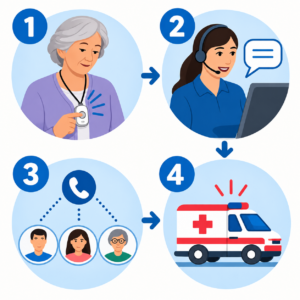
Consumer Cellular Iris Ally Medical Alert Device Details to Confirm Before Enrollment
Consumer Cellular describes Iris Ally as a medical alert device with one-touch emergency response, location tracking, and two-way communication. Treat that as a starting point for questions, not as a substitute for reading the current terms. Ask the company to confirm the precise device model, service availability at the person’s address, charging expectations, whether cellular coverage is required in the places they visit, and what happens if a call is dropped before enrolling in an Iris Ally Medical Alert Device.
- What are the one-time and recurring charges, taxes, cancellation rules, and replacement terms?
- Is the device intended for shower use, and what are its current water-resistance limits?
- How often must an Iris Ally Medical Alert Device be charged, and what alerts show that the battery is low?
- Can the wearer test the help button without triggering an unnecessary emergency response?
- Who receives notifications, and how can contact information be updated?
- What information is shared during an alert, and what privacy choices are available?
If any answer is unclear, pause rather than assuming. A short call to customer support and a written record of the answers can prevent disappointment later when evaluating an Iris Ally Medical Alert Device.
How to Read Iris Ally Medical Alert Device Reviews
Iris Ally Medical Alert Device reviews can reveal useful day-to-day questions, but they are not a substitute for current provider information. Give more weight to details that can be checked: whether the reviewer describes the same device and service arrangement, when the experience occurred, how support handled a specific issue, and whether the person’s routine resembles the wearer’s. A complaint about a billing process or coverage in one place does not prove that every household will have the same experience.
Use Iris Ally Medical Alert Device reviews to build a list of questions, not to choose on ratings alone. Look for the practical issues that determine use: speaker clarity, charging habits, comfort, the process after a button press, contact updates, and whether the wearer actually keeps the device on. Then confirm those points directly with the provider before enrolling in an Iris Ally Medical Alert Device.
Compare the Service to the Alternatives You Already Use
Families often compare a medical alert device with a smartphone, smartwatch, home voice assistant, daily check-in call, or neighbor network. Each can help, but each fails differently. A phone might be in another room, a watch may be removed to charge, and a daily call does not provide immediate help after a fall. A home-based device may not travel with the person. The better choice depends on the person’s routine, not on which option has the longest feature list.
Write down the one problem you are trying to solve. For example: “Mom cannot always reach her phone after a fall,” or “Dad walks the dog alone and needs a simple way to speak to someone.” Then test each option against that one situation. If the plan needs location assistance outside the home, ask how the provider handles that case. If the concern is night-time movement indoors, also improve lighting and keep a phone or alert method within reach alongside an Iris Ally Medical Alert Device.
Privacy and Consent Deserve a Direct Conversation
Any connected safety service may involve location information, emergency contacts, account details, and communication during an alert. The wearer should understand what information may be shared, who can update contacts, and how to report a lost device. Families should not treat monitoring as a substitute for a conversation about the person’s preferences. Decide together what level of support feels helpful rather than intrusive when considering an Iris Ally Medical Alert Device.
Before enrollment, read the current privacy notice and ask how the account is secured, how location information is used during an alert, and how an authorized family member can make changes. Keep the account password and emergency-plan document in a safe place that the appropriate people can access if the primary caregiver is unavailable.
Set Up an Emergency Contact Plan That Someone Can Actually Use
Emergency contacts are not a decorative field on an account form. They are the people who may need to answer a call, make a decision, meet responders, or check on the person. Ask each contact before adding their name. Confirm that they are comfortable receiving calls, know the person’s city and address, and understand what they should do if they cannot reach the wearer using the Iris Ally Medical Alert Device.
Keep the plan short enough to be useful under stress. One page is usually enough. List the person’s full name, address, apartment number, building access information if they consent to share it, primary contact, backup contact, medication or allergy information the person chooses to make available, and the location of any important documents. Do not put passwords, financial information, or unnecessary private details on a sheet that may be visible in the home.
It also helps to decide who has authority to change the account. A daughter may handle billing, a neighbor may be the first person nearby, and a distant relative may be the backup. Those roles should be clear. When responsibilities are vague, families often discover that no one has updated a disconnected phone number or a moved emergency contact until there is an alert from an Iris Ally Medical Alert Device.
Iris Ally Medical Alert Device Battery Life, Charging, and Maintenance
Connected devices need maintenance, and that maintenance has to fit the person’s actual life. Choose one predictable time and place for charging an Iris Ally Medical Alert Device. A stable table at seated height is often better than a low outlet behind furniture. The area should have good light, a clear walking path, and no loose cord that creates a fall risk. If the charger has indicator lights or sounds, make sure the wearer can see or hear them.
Agree on what counts as a missed charge. For one household, that may mean a family member calls after a low-battery alert. For another, it may mean the wearer places the device on its charger while making coffee. The best routine is the one that repeats without needing a complicated checklist. If a person relies on a caregiver, include a backup person for vacations, illness, and unexpected schedule changes.
Inspect the Iris Ally Medical Alert Device and charging accessories periodically for visible damage. Do not use a frayed cord, loose plug, cracked case, or unapproved replacement charger. If the device becomes lost, damaged, or behaves unpredictably, use the provider’s current support process instead of guessing at a repair. Service instructions and replacement policies can change, so the account holder should save the current support number and account information in the family plan.
Plan for Use at Home, Outdoors, and During Travel
Many people focus on the home bathroom or bedroom, but the risk of being unable to reach a phone can also occur in a driveway, garden, parking lot, hotel, or unfamiliar home. Discuss where the person expects to wear the Iris Ally Medical Alert Device and where they do not. A device may be appropriate for a short walk or errand only if its current service and coverage conditions support that use. Do not assume that a feature described as mobile will work identically in every location.
For travel, keep the charger and any required accessories in a familiar pouch, not at the bottom of a suitcase. Update the emergency contacts if the person will be away for an extended period. If they are visiting family, decide whether the response plan needs the temporary address or new entry instructions. The person should still carry ordinary identification and a phone when possible; an Iris Ally Medical Alert Device complements those tools rather than replacing them.
Outdoor routines deserve a separate check. Consider footwear, uneven pavement, weather, hearing in noisy areas, and whether the person knows how to describe their location. If the person often goes out alone and has had recent falls, dizziness, or confusion, discuss the situation with a healthcare professional rather than relying only on consumer technology.
Review the Plan After a Change in Health or Living Situation
A device that suited someone last year may not suit them now. Review the arrangement after a hospitalization, a new diagnosis, a medication change that affects balance or alertness, a move, a change in home layout, or a change in the caregiver network. The review does not need to be alarming. It is simply a chance to ask whether the person still wears the Iris Ally Medical Alert Device, can still charge it, and understands how help is reached.
Include the wearer in the review. Older adults are more likely to use a safety tool consistently when it respects their routine and preferences. Ask what feels inconvenient, what makes them more confident, and whether any part of the plan feels confusing or intrusive. If an Iris Ally Medical Alert Device is rejected because it is uncomfortable or hard to use, address that practical problem rather than insisting that the person comply.
Keep an eye on changes that call for more than a technology adjustment. Repeated falls, new confusion, fainting, chest pain, severe shortness of breath, or an inability to manage daily activities should be discussed promptly with a qualified healthcare professional. In a life-threatening emergency, call 911 or local emergency services.
Prepare for Ordinary Problems Before They Become Urgent
Every safety system has ordinary points of failure. An Iris Ally Medical Alert Device can be misplaced, a charger can be unplugged, a contact can change numbers, a cellular signal can be weak, or the wearer may press a button unintentionally. None of these possibilities means the device is useless. They mean the family needs a calm, agreed response instead of discovering the problem in the middle of a stressful event.
Keep the provider’s current support information with the account details. Decide who reports a lost device, who updates a phone number, and who checks a low-battery message when the primary helper is unavailable. Ask the provider what a false alert looks like and what the approved cancellation or testing procedure is. Do not tell the wearer to avoid pressing the button out of fear of “bothering someone”; that hesitation can defeat the purpose of the tool. The goal is to understand appropriate use, not to make the person afraid to ask for help.
It is also wise to discuss access. If a responder is sent to the home, can they locate the address and reach the person? The answer may involve a visible address number, a building call box, a key lockbox used with informed consent, or a nearby contact who can meet responders. Choose an arrangement that is safe for the household and review it after any move or change in building policy.
Involve Caregivers Without Taking Away the Wearer’s Voice
Caregivers often manage the practical details of an alert device, but the person wearing the Iris Ally Medical Alert Device should remain central to the decision. Start with their goal: staying in the garden longer, living alone with more confidence, taking a short walk, or feeling less worried overnight. Then explain the tradeoffs plainly: a device may require charging, may share limited information during an alert, and still depends on an emergency plan.
Use a short practice conversation. Ask the wearer what they would do after feeling unsteady, after a fall they cannot get up from, or after pressing the button by mistake. Ask the caregiver what they would do if they receive an alert while driving, at work, or out of town. These answers can uncover gaps without making the person feel tested. A useful plan should be understandable to both the wearer and the backup helper.
Respecting the wearer’s preferences is practical as well as ethical. Someone who dislikes a neck pendant may be more consistent with another form factor. Someone who values privacy may want a narrower contact list. Someone with hearing difficulty may need to test speaker clarity in a noisy room. Comfort, dignity, and control are not optional extras; they influence whether the Iris Ally Medical Alert Device is used when it matters.
Keep the Expectations Realistic
Marketing for personal safety technology can make a device sound like a complete solution. An Iris Ally Medical Alert Device is not. A response service cannot remove a tripping hazard, manage medications, assess an injury, or guarantee that every event will be detected. The best outcome comes from combining the device with sensible home safety, regular health care, an accessible phone, and people who understand the plan.
That perspective also makes it easier to evaluate reviews. A review may describe one person’s billing, coverage, service, or equipment experience, but it cannot predict the experience of another household. Look for questions that apply to the wearer’s own routine: how easily can they use it, will they charge it, how will help be reached, and what support is available if the Iris Ally Medical Alert Device does not fit? A careful decision is more valuable than a search for a universally “best” medical alert device.
Make the First Week Part of the Decision
The first week after an Iris Ally Medical Alert Device arrives is more informative than a product description. Set aside a quiet time for the wearer and, if helpful, one caregiver to learn the approved setup steps. Confirm that the device is comfortable in the place it will actually be worn, that the speaker can be heard in the rooms where the person spends time, and that charging does not create a new obstacle. A plan that works only when someone else is standing nearby has not yet been made practical.
Use the provider’s current instructions for activation and testing. During that process, write down what each alert means, how to recognize a low-battery notice, who can make account changes, and where the support number is kept. If a practice interaction reveals a problem with hearing, dexterity, or understanding, stop and resolve it before treating the Iris Ally Medical Alert Device as part of the safety plan. The purpose of a trial is to discover friction early, not to prove that the wearer can manage without help.
Notice ordinary behavior rather than asking the person to perform a perfect demonstration. Do they remember the Iris Ally Medical Alert Device when leaving the bedroom? Can they return it to the charger without bending or reaching unsafely? Are they embarrassed by its appearance, worried about a false alert, or unsure when to use it? Those concerns deserve a respectful answer. A device that the person trusts and uses consistently is more useful than one with a longer feature list that remains in a drawer.
Use a Simple Record That Survives a Busy Day
A one-page emergency record can prevent small details from being lost among texts, calendars, and account emails. Keep it in a location agreed by the wearer and caregivers. It can include the provider’s support contact, the service address on file, the names and phone numbers of emergency contacts, a note about entry instructions if the household chooses to share them, and the date the plan was last reviewed. Avoid putting sensitive information where visitors can easily see it.
The record should clarify responsibility without becoming a burdensome care binder. For example: the wearer charges the Iris Ally Medical Alert Device after dinner; a family member checks in if a low-battery notice is received; a second contact is named in case the first cannot answer; and the account holder verifies current billing and service details before renewal. These modest assignments are more dependable than an assumption that “someone will handle it.”
Review the record after changes in phone numbers, caregivers, residence, health, or travel plans. If the person uses other emergency tools, such as a phone emergency-contact feature or medical identification, make sure the information does not conflict. Consistency matters because responders and family members may be making decisions quickly and under stress.
Fit, Comfort, and Charging in an Iris Ally Medical Alert Device Routine
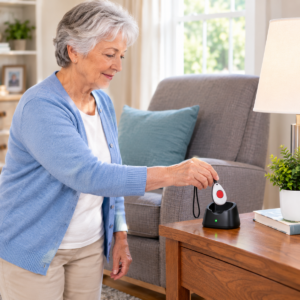
A wearable device should feel ordinary enough to use every day. Consider whether a pendant, wrist-worn device, or another form factor is easiest with the person’s clothing, arthritis, skin sensitivity, hearing, and sleep habits. Test where the Iris Ally Medical Alert Device will be kept while charging. The charger should be at a stable height, close to an outlet, with enough light to see the connection and no cord across a walking path.
Create one routine that is easy to repeat: for example, charge at the same seated spot while reading the morning paper or watching evening television. Do not rely on a vague reminder. If a caregiver helps, decide who checks the battery, how often, and what happens if the Iris Ally Medical Alert Device is missing.
Build the Device Into a Wider Emergency Plan
An emergency button does not replace fall prevention, medication review, home access planning, or a reliable phone. It is one layer in a larger system. Keep frequently used paths clear, use lighting that makes nighttime movement easier, and make sure emergency contacts know how to enter the home if assistance is needed. A medical ID can also help responders find important information when the wearer cannot explain it.
Test the plan when everyone is calm. Confirm that emergency contacts answer the phone, verify the address and access instructions, and practice the Iris Ally Medical Alert Device’s approved test procedure. Repeat that check after any major change in health, residence, caregiver arrangement, or contact number.
When Another Option May Fit Better
A device with a response center may not be the best solution for every situation. Someone who mainly needs help reaching family may benefit more from a simplified phone or an agreed check-in routine. A person who spends most of the day with another capable adult may need different support. Conversely, someone with frequent falls, confusion, or rapidly changing health needs may require a clinician-led care plan in addition to any consumer device.
Use an Iris Ally Medical Alert Device as a practical aid, not a promise that every emergency will be prevented or resolved automatically. If there is immediate danger, call 911 or the local emergency number whenever possible.
Iris Ally Medical Alert Device Reviews: Questions to Answer Before Deciding
Does a Medical Alert Device Replace a Phone?
No. A phone remains useful for ordinary calls, appointments, and many emergencies. A personal alert device is intended to provide a simpler help pathway in situations where a phone is not reachable or practical. Keep both parts of the plan current when using an Iris Ally Medical Alert Device.
Should a Person Test the Help Button?
Only use the provider’s approved test procedure. Ask how to test the device, how often to do it, and whether a test requires notice to the response center. Never improvise a test that could summon emergency services unnecessarily.
Can a Fall-Detection Feature Be Trusted to Catch Every Fall?
No detection feature should be treated as a guarantee. Falls vary, devices can be worn incorrectly, and a person may still need to press the help button. Keep the focus on prevention, reachable communication, and a plan for getting help.
What Information Should Emergency Contacts Know?
They should know the person’s preferred response plan, address, entry instructions when appropriate, who else to call, and where the current emergency-information list is kept. Review these details whenever someone moves or a caregiver arrangement changes.
Practical Checklist Before You Decide
- Have the wearer tried the button, speaker, charger, and wearing method?
- Is the response process understood from button press through emergency contact?
- Are battery, testing, and contact updates assigned to a real routine?
- Have you confirmed current pricing, cancellation, coverage, and privacy details directly with the provider?
- Does the home access plan work if the wearer cannot get to the door?
- Have you confirmed that the Iris Ally Medical Alert Device fits the wearer’s daily routine?
A device is most likely to help when the answer to each question is clear before it is needed.
Make the Choice With the Wearer, Not for the Wearer
Before enrolling, have the person try the routine, review the emergency plan, and decide whether the Iris Ally Medical Alert Device fits their comfort and independence. Then verify the current Iris Ally details directly with Consumer Cellular and keep a written record of the plan. For a broader comparison framework, use the SeniorTechLife guide to medical alert systems for seniors when that resource is available.