emergency communication for seniors | SeniorTechLife safety & alert guide
For many older adults, staying connected during an emergency can be challenging. A phone may be in another room, a caregiver may be unavailable, or a medical situation may make complicated controls difficult to operate.
Modern emergency communication technology includes personal emergency response devices, wearable SOS buttons, medical alert pendants, emergency phones, smartwatches, voice-activated systems, and professionally monitored medical alert services.
However, selecting Emergency Communication for Seniors requires more than choosing a device with a large red emergency button. Families should evaluate accessibility, communication coverage, connection reliability, charging requirements, alert routing, caregiver availability, privacy, and total ownership costs.
An emergency call button for seniors may provide a convenient way to initiate an assistance request, but different devices have different capabilities. Some contact designated family members, others connect to monitoring centers, and certain systems may support emergency calling under specific conditions.
This comprehensive guide explains how Emergency Communication for Seniors works, compares emergency call buttons and monitoring systems, evaluates communication technology, reviews service costs, and provides practical guidance for creating dependable emergency communication and backup plans.
Safety note: Emergency communication devices cannot guarantee immediate assistance, successful connection, or emergency response. Network outages, depleted batteries, inaccessible controls, inaccurate location information, and unavailable caregivers may prevent successful communication. During an immediate emergency, contact local emergency services through an available communication method rather than relying solely on a consumer alert device.
Quick answer: what is the best emergency communication for seniors?
The best Emergency Communication for Seniors solution is one that the older adult can activate comfortably and that connects the request for help to an appropriate, available response.
Someone who spends most of their time at home may benefit from an in-home emergency call button connected to a compatible base station or service.
An older adult who frequently leaves home may prefer a portable emergency communication device with appropriate cellular coverage.
Someone who already uses a smartphone comfortably may benefit from its supported emergency functions, although these features have different limitations from professionally monitored systems.
Important features include:
- Accessible emergency buttons.
- Simple activation.
- Clear audio communication.
- Appropriate network coverage.
- Suitable battery life.
- Easy charging.
- Wearable comfort.
- Water-resistance specifications.
- Emergency contact management.
- Professional monitoring when appropriate.
- Location-sharing capabilities.
- Privacy and consent controls.
- Caregiver notifications.
- False alert management.
- Maintenance requirements.
- Reliable communication backups.
A good Emergency Communication for Seniors plan should identify not only which device is used but also who receives the request, what information they need, and how assistance will be coordinated.
Why emergency communication technology for elderly adults matters
Emergency communication may become more difficult when an older adult experiences changes in mobility, vision, hearing, hand dexterity, or memory.
A suitable device can simplify the process of contacting assistance.
For example, a wearable help button may be more accessible than reaching for a phone elsewhere in the home.
However, technology should support the resident’s actual needs rather than create unnecessary monitoring or complicated responsibilities.
What emergency call systems can and cannot do
Emergency call systems may initiate selected calls, messages, or notifications.
Certain products provide two-way communication or professional monitoring.
However, pressing a button does not guarantee successful delivery, contact availability, or a particular response time.
Emergency Communication for Seniors should always include realistic expectations and an appropriate backup plan.
How does emergency communication for seniors work?
Emergency communication systems generally connect an action taken by the user to a configured communication service.
Step 1: The senior requests assistance
Depending on the device, the user may press an SOS button, activate a supported voice command, or use another accessible calling method.
Some systems also offer automatic event detection, although that is a separate feature with its own limitations.
Step 2: The device initiates communication
The system may use cellular service, Wi-Fi, a connected phone, a landline, or a compatible base station.
Communication requirements vary by product.
Step 3: A designated person or service receives the request
The alert may be directed to family members, caregivers, a monitoring center, or emergency services where supported.
The recipient and communication method should be verified during setup.
Step 4: The response is coordinated
An appropriate contact or service evaluates available information and follows the agreed response procedure.
The outcome depends on successful communication, available responders, and the actual situation.
Why emergency communication sometimes fails
Failures may involve:
- Unavailable network coverage.
- A discharged battery.
- Device damage.
- Incorrect emergency contacts.
- An expired service plan.
- Unavailable caregivers.
- Incorrect configuration.
- An inaccessible help button.
- Unclear or outdated instructions.
Recognizing these limitations is an essential part of Emergency Communication for Seniors.
Compare the main types of emergency communication for seniors
Different emergency communication products support different needs.
Emergency call buttons for seniors
An emergency call button for seniors provides a direct way to initiate a configured assistance request.
Some buttons are wearable, while others are installed or placed in accessible areas of the home.
Potential features include audible confirmation, wireless connection, caregiver alerts, and two-way communication.
However, not every button directly contacts emergency services.
Verify where the signal goes and whether a separate service is required.
Personal emergency response devices
A personal emergency response device, sometimes called a PERS device, is designed to support requests for assistance.
Systems may include a wearable transmitter, communication unit, and monitoring service.
Some products offer optional automatic fall detection.
The exact capabilities depend on the provider and subscription.
Emergency phones for seniors
An emergency phone for seniors may offer accessible dialing, simplified contact shortcuts, or dedicated assistance functions.
Some models resemble ordinary mobile phones, while others emphasize basic calling.
Important factors include speaker clarity, button readability, cellular compatibility, charging, and network coverage.
Wearable emergency call buttons
Wearable emergency call buttons may be designed as pendants, bracelets, or watches.
A wearable device can be useful when the person wants to keep an assistance control nearby throughout the day.
However, comfort, battery life, proper wearing position, and connection requirements determine whether it is practical.
Emergency call button necklaces
An emergency call button necklace may provide a familiar and simple form of personal alert technology.
Before purchasing, evaluate:
- Pendant weight.
- Cord or clasp design.
- Activation force.
- Water resistance.
- Communication range.
- Battery requirements.
- Monitoring arrangements.
A necklace should be used according to the manufacturer’s safety and wearing instructions.
In-home emergency call systems
In-home systems may connect wearable or wall-mounted buttons to a household communication hub.
These arrangements can provide convenient communication within their supported range.
However, walls, building layout, connection problems, and power failures may affect operation.
Voice-activated emergency calling
Some smart speakers, phones, and connected systems support selected voice communication features.
These functions may help when reaching a button is inconvenient.
However, speech recognition, microphone availability, internet connectivity, and service compatibility can affect reliability.
Voice assistants are not automatically equivalent to dedicated emergency response systems.
Professionally monitored emergency communication
Professional monitoring services may provide an established process for handling assistance requests.
Before subscribing, verify service availability, communication methods, monitoring hours, cancellation terms, and how emergencies are escalated.
Professional monitoring does not guarantee a particular arrival or response time.
Emergency Communication for Seniors: explore related guides
This article serves as the broad educational foundation for Emergency Communication for Seniors.
Specific products, phone settings, subscriptions, and narrow technical questions should be addressed in dedicated articles.
Personal emergency response and call button guides
Related topics include:
- Personal Emergency Response Device.
- Best Emergency Call Button for Elderly.
- Emergency Response Device.
- Wearable Emergency Call Button.
- Emergency Call Button Necklace.
- SOS Button for Seniors.
- In Home Emergency Call Button.
- 911 Emergency Call Button.
These guides can examine device design, accessibility, communication methods, and practical limitations.
Emergency call button and smartphone guides
Related topics include:
- Emergency Call Button iPhone.
- Android Emergency Call Button.
- What Does the Emergency Call Button Do?
- How Does the Emergency Call Button Work?
- How Do I Remove the Emergency Call Button?
- How to Remove Emergency Call Button?
- How to Stop Emergency Call from Power Button?
- How to Stop Emergency Call from Power Button in Motorola?
- How to Stop Emergency Call from Power Button in Oppo?
- How to Stop Emergency Call from Power Button in Realme?
Device-specific guides should verify software versions, manufacturer instructions, and available emergency features.
Emergency communication connectivity guides
Related topics include:
- Wi-Fi Emergency Call Button.
- Voice Activated Emergency Call.
- Emergency Call Monitoring.
- Emergency Call Button for Seniors No Monthly Fee.
- Emergency Phone for Seniors.
These articles can compare actual service requirements, costs, network limitations, and assistance arrangements.
Specialized emergency communication topics
Additional related topics include:
- Elevator Emergency Call Button.
- Elevator Emergency Phone Monitoring.
- Emergency Call Button Sign.
Elevator emergency communication systems operate under different technical and regulatory requirements and should be evaluated separately from personal medical alert equipment.
Publishing note: These are planned related editorial resources, not verified active links. Activate links only when their individual articles have been published and reviewed.
Eight important decisions when choosing emergency communication for seniors
The best Emergency Communication for Seniors begins with the actual person and their everyday environment.
1. Identify the primary emergency communication need
Determine what the system must accomplish.
Examples include:
- Calling a family member.
- Contacting a caregiver.
- Reaching a monitoring center.
- Supporting emergency communication at home.
- Providing a portable assistance method.
- Communicating while away from home.
Different goals require different capabilities.
2. Evaluate accessibility and physical controls
The older adult should be able to locate and activate the intended device.
Consider hand dexterity, vision, hearing, reach, language, and technical familiarity.
A small button may be difficult to operate even when the device is described as senior-friendly.
3. Verify the communication connection
Determine whether the system uses cellular service, Wi-Fi, a compatible phone, a base station, or landline equipment.
Check actual coverage in the places where it will be used.
4. Understand the alert recipient
Identify who receives assistance requests.
Confirm whether the system contacts caregivers, professional monitoring staff, or emergency services.
Never assume the device automatically contacts 911.
5. Respect privacy and consent
Emergency devices may transmit location, contact information, or health-related details.
Review what is shared and who has access.
The older adult should participate in these decisions whenever possible.
6. Coordinate caregiver response
An emergency alert becomes useful only when the appropriate response can follow.
Define primary contacts, backup contacts, and communication responsibilities.
7. Compare total ownership costs
Expenses may include:
- Device purchase.
- Activation fees.
- Cellular service.
- Professional monitoring.
- Monthly subscriptions.
- Replacement batteries.
- Accessories.
- Repairs.
- Technical support.
Evaluate the entire service arrangement before purchasing.
8. Establish a communication backup
Every Emergency Communication for Seniors plan should include an alternative way to request assistance.
A backup may involve an accessible phone, an agreed caregiver check-in procedure, or another suitable communication method.
Senior emergency call buttons: important features to compare
Button size and activation
The help button should be recognizable and manageable.
Check whether activation requires a long press, repeated presses, or another specific action.
Audible or visual confirmation
Some products provide a sound, light, or display notification when an assistance request begins.
Consider whether the user can perceive that confirmation.
Two-way communication
Some devices include microphones and speakers for conversation with responders.
Others transmit notifications without voice communication.
Wireless range
In-home systems may have a specified operating range.
Actual performance can vary with construction materials, installation, and other conditions.
Water resistance
Bathroom use may be relevant, but water-resistance ratings differ.
Check the manufacturer’s approved conditions.
Battery and charging
A device must have sufficient power to perform its intended function.
Select a charging routine that the person can understand and maintain.
Emergency Communication for Seniors: practical comparison table
| Communication option | Main purpose | What to verify | Important limitation |
|---|---|---|---|
| Wearable SOS button | Request assistance directly | Fit and connection | Requires activation |
| Medical alert pendant | Portable personal alert | Range and monitoring | Features vary |
| Emergency smartphone | Place calls or activate supported SOS features | Coverage and configuration | Can be misplaced or discharged |
| In-home call button | Request help within supported range | Base station and household coverage | May not work outdoors |
| Cellular alert device | Support communication away from home | Network and service plan | Coverage gaps |
| Voice-activated system | Initiate supported commands | Speech recognition and connectivity | Not always emergency monitoring |
| Professional monitoring | Route requests to a response service | Actual monitoring terms | No guaranteed response time |
| Caregiver call tree | Coordinate trusted contacts | Availability and contact accuracy | Depends on human response |
Emergency call button for seniors with no monthly fee
Some households prefer emergency communication equipment without professional monitoring subscriptions.
Understand what no monthly fee means
A device may have no dedicated monitoring fee while still requiring a mobile plan, internet connection, or other recurring service.
Compare family notifications with professional monitoring
A self-managed system may send alerts to selected caregivers.
A professionally monitored service may provide a separate response process.
Neither guarantees that help arrives within a particular time.
Evaluate contact availability
A family-managed system depends on the designated people being reachable.
Consider work schedules, nighttime availability, travel, and backup contacts.
Review ownership costs
Compare device price, data plans, replacement equipment, service fees, and possible contract obligations.
A lower monthly cost is only one part of the decision.
Smartphone emergency calling for seniors
Smartphones may provide useful communication functions when properly configured.
Emergency calling shortcuts
Some phones offer emergency calling through supported button combinations or dedicated interface controls.
Exact activation methods depend on the manufacturer and software version.
Emergency contacts and medical information
Certain phones allow users to store emergency contact details or selected medical information.
Review what can be accessed from a locked screen and who may view it.
Location sharing during emergencies
Some systems support location information during selected emergency functions.
Accuracy, availability, and transmission depend on device settings, network conditions, and regional support.
Understanding 911 limitations
In the United States, emergency calling capabilities vary by device, connection, and service status.
A wireless phone without an active subscription may still be able to place a 911 call when a compatible network is available, but location and callback capabilities can be limited.
Text-to-911 and accessible communication
Text-to-911 may be available in certain jurisdictions, but it is not supported everywhere.
People who need text-based communication should verify applicable local emergency communication services and available accessibility options.
Emergency Communication for Seniors: real-world family planning
Emergency communication should be evaluated through ordinary household routines.
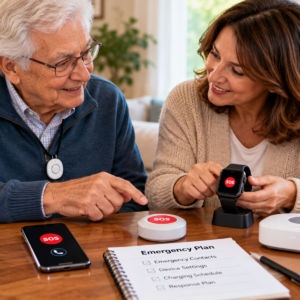
Emergency communication accessibility for vision, hearing, and mobility
An appropriate Emergency Communication for Seniors system should match the user’s abilities.
Large buttons for limited dexterity
Large, easy-to-press controls may help people who find small buttons difficult.
However, excessive activation force or complicated sequences can still create problems.
Visual alerts for hearing difficulties
Some communication systems offer visible or vibrating notifications.
Check that the user understands when an alert has been initiated or received.
Accessible communication for low vision
Raised buttons, clear contrast, large text, and voice feedback may support selected users.
A touchscreen should not automatically be considered accessible.
Mobility considerations
A wearable button may be more readily available than a phone placed elsewhere.
However, the device must be worn or carried according to its instructions.
Memory-related needs
People experiencing memory changes may benefit from familiar controls and simple routines.
Complex activation instructions may become impractical.
The device should not replace necessary supervision.
Privacy and caregiver permissions in emergency communication
Review personal information sharing
Emergency systems may collect addresses, contact information, and selected health-related details.
Share only information appropriate to the service and care arrangement.
Protect connected accounts
Use suitable passwords and supported authentication options.
Avoid unnecessary account sharing.
Obtain appropriate consent
Location sharing and connected monitoring should be discussed with the older adult whenever possible.
Update authorized contacts
Remove outdated users and phone numbers when caregiving arrangements change.
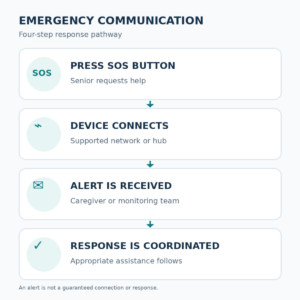
Emergency Communication for Seniors: four-step practical response guide
A clearly documented response sequence can make emergency communication easier to understand.
Step 1: Activate the help method
The user presses an accessible button or activates another supported emergency communication feature.
Step 2: Establish the connection
The device attempts to send the request through its configured network or base station.
Step 3: Reach the responsible contact
An authorized caregiver or monitoring service receives the request when transmission succeeds.
Step 4: Coordinate appropriate assistance
The contact follows the agreed response procedure based on the available information.
No step should be assumed successful without confirmation.
Testing emergency communication devices safely
Before relying on a device, confirm that its essential functions operate as intended.
Test 1: Activation and accessibility
Ask the older adult to demonstrate the supported button or control using an approved demonstration mode.
Confirm that the action is understandable.
Test 2: Contact notification
Use the provider’s authorized test process to confirm that designated contacts receive the expected message or call.
Test 3: Audio and display
Check whether the user can hear, read, or otherwise recognize appropriate communication feedback.
Test 4: Charging and network status
Review battery information, connection indicators, and charging requirements.
Test 5: Backup communication
Confirm that an alternative communication method is available when the primary device cannot operate.
Do not place unnecessary emergency calls merely to test equipment.
Power outages, Wi-Fi failures, and emergency communication backups
Cellular coverage interruptions
A mobile device may be unable to connect when cellular service is unavailable.
General coverage maps do not guarantee reliable communication in every building or location.
Wi-Fi and internet outages
Wi-Fi-based communication may stop working during network or electrical interruptions.
Check whether the device offers independent cellular communication.
Landline and VoIP limitations
Traditional telephone arrangements and internet-based calling services have different power requirements.
Some VoIP systems may become unavailable without electricity or an operating internet connection.
Backup charging
Appropriate backup power may support some devices during outages.
However, backup batteries do not resolve every service interruption.
Independent emergency contacts
Keep important contact information accessible outside the primary application or connected platform.
A printed emergency contact sheet may be helpful when electronic systems are unavailable.
Common emergency communication mistakes for seniors
Buying only because a device has an SOS button
A button may not provide the intended communication service.
Verify who receives its alert and how the system connects.
Assuming emergency alerts always reach 911
Some devices notify family members or monitoring services instead of contacting emergency responders directly.
Ignoring accessibility
A button that is difficult to locate or press may be unsuitable.
Forgetting subscription requirements
A device may require continued service payments to operate as intended.
Using only one emergency contact
A primary caregiver may be unavailable when assistance is requested.
Depending entirely on internet communication
Power or network outages can affect connected services.
Failing to review contact information
Outdated phone numbers and account settings can interrupt communication.
Daily maintenance of emergency communication for seniors
Initial setup
Document the device model, service provider, alert recipients, instructions, and relevant account information.
Daily readiness
Check whether the device is accessible, appropriately charged, and ready for use.
Weekly checks
Review obvious signs of damage, battery condition, charging equipment, and communication status.
Monthly maintenance
Check:
- Authorized emergency contacts.
- Software or firmware updates.
- Service subscriptions.
- Connection reliability.
- Device straps or clasps.
- Provider instructions.
- Backup communication methods.
After service interruptions
Confirm the device resumes normal operation.
Contact the provider when communication functions remain unavailable.
After changing caregivers
Update the contact list and access permissions.
Safe everyday use of emergency communication for seniors
An effective emergency communication system should support ordinary living rather than create unnecessary complexity.
Keep devices accessible
A portable emergency button should be worn or carried according to manufacturer instructions.
Maintain comfortable routines
Use a predictable charging and device-checking process.
Practice approved communication features
The older adult should understand the supported help function without needing to memorize complicated instructions.
Include family support appropriately
Caregivers may assist with setup and maintenance.
The older adult should remain involved in decisions when possible.
Review ongoing suitability
A system that worked previously may become less practical after changes in mobility, hearing, vision, memory, or caregiver availability.
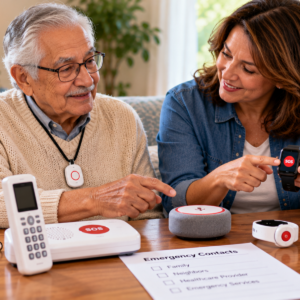
Emergency communication costs, monitoring, and service agreements
Compare equipment costs
Some products require an upfront purchase.
Others are provided under an ongoing service agreement.
Review monitoring subscriptions
Professional monitoring may involve monthly or annual charges.
Verify which functions are included.
Check cancellation and return terms
Review equipment return requirements, cancellation fees, and contract duration.
Verify service coverage
Monitoring availability and cellular coverage may vary by location.
Understand warranties and support
Ask about replacement equipment, technical assistance, repairs, and service interruptions.
Emergency and backup response planning
A dependable Emergency Communication for Seniors arrangement should explain what happens when the primary system cannot be used.
Establish primary and backup contacts
Confirm who responds to routine assistance requests and who can provide backup support.
Know when immediate emergency services are needed
Suspected medical emergencies, fires, and other immediate dangers should be directed to appropriate emergency services.
Maintain accessible instructions
Keep clear contact information and essential procedures in a format the older adult and authorized caregivers can use.
Prepare for changing care needs
Health changes, mobility limitations, and caregiver availability may require a different communication arrangement.
Review the response after incidents
A missed alert, false alarm, service interruption, or communication difficulty should lead to reassessment.
Emergency Communication for Seniors: final selection checklist
Before relying on an emergency communication system, confirm:
- The primary communication need is clearly defined.
- The device suits the older adult’s abilities.
- Activation is understandable.
- Audio or visual feedback is accessible.
- Cellular, Wi-Fi, or base station requirements are known.
- Network coverage has been reviewed.
- Emergency contacts are current.
- Alert recipients and responsibilities are understood.
- Monitoring terms are verified.
- Privacy and consent are respected.
- Battery and charging requirements are manageable.
- False alert procedures are understood.
- Service costs are clear.
- Approved device testing is complete.
- Backup communication is available.
- A review schedule has been established.
Frequently asked questions about Emergency Communication for Seniors
What is Emergency Communication for Seniors?
Emergency Communication for Seniors includes devices, services, and response procedures designed to help older adults contact appropriate assistance when needed.
What is the best emergency call button for seniors?
The best option depends on accessibility, connection reliability, device comfort, alert recipients, monitoring requirements, and caregiver availability.
How does a senior emergency call button work?
A button activates a configured communication process, which may contact a caregiver, monitoring service, or another designated recipient.
Do emergency call buttons automatically call 911?
Not necessarily.
Some devices contact family members or monitoring centers rather than emergency services directly.
Can an emergency call button work without a monthly fee?
Certain devices do not require a dedicated monitoring subscription.
However, cellular service, internet access, or other ongoing costs may still apply.
Are wearable emergency call buttons useful?
They may provide convenient access to assistance controls, particularly when a phone is not nearby.
Suitability depends on comfort, functionality, and connection requirements.
Do emergency call button necklaces work outside the home?
Some do, while others rely on a limited-range home base station.
Verify the specific product’s operating area.
Can seniors use smartphones for emergency communication?
Some phones offer supported SOS and emergency calling functions.
Exact capabilities depend on device, software, settings, connectivity, and location.
Are Wi-Fi emergency call buttons reliable?
Wi-Fi-based systems may work under suitable conditions.
However, internet and electrical interruptions can prevent communication.
Can voice assistants call emergency services?
Capabilities vary among providers and devices.
A voice assistant should not automatically be considered an emergency monitoring system.
What happens when an emergency alert is not received?
The intended response may not begin.
Families should maintain backup communication procedures and periodically verify their contact arrangements.
Can an emergency communication device detect falls?
Some products combine emergency communication with automatic fall detection.
Not every emergency call button includes that feature.
Are medical alert services the same as emergency call buttons?
Not always.
An emergency button may be one component of a larger service, while medical alert monitoring may provide additional response-related functions.
How often should emergency communication devices be checked?
Review essential readiness regularly and reassess after missed alerts, connection failures, device damage, service changes, or changes in care needs.
Final thoughts on Emergency Communication for Seniors
Emergency Communication for Seniors works best when accessible technology, dependable connectivity, clear caregiver responsibilities, personal preferences, and realistic emergency procedures are considered together.
A useful emergency communication arrangement does not necessarily require the most expensive medical alert system or a complicated collection of connected devices.
An accessible emergency phone, wearable SOS button, suitable home communication system, or professionally monitored service may provide meaningful support when matched to the person’s needs.
The strongest Emergency Communication for Seniors plan includes verified device capabilities, current contacts, appropriate privacy protections, regular maintenance, and an independent backup for situations when the primary system cannot operate.
Sources used for this guide
Official sources support the framework; they do not endorse a company or guarantee performance.
- Services for Older Adults Living at Home — National Institute on Aging.
- Recognizing medical emergencies — MedlinePlus, U.S. National Library of Medicine.
- Unique Considerations in the Home — U.S. Food and Drug Administration.
Build a safer plan
Return to the Safety & Alert Resource Center for broad planning; focused child assets remain inactive until reviewed.