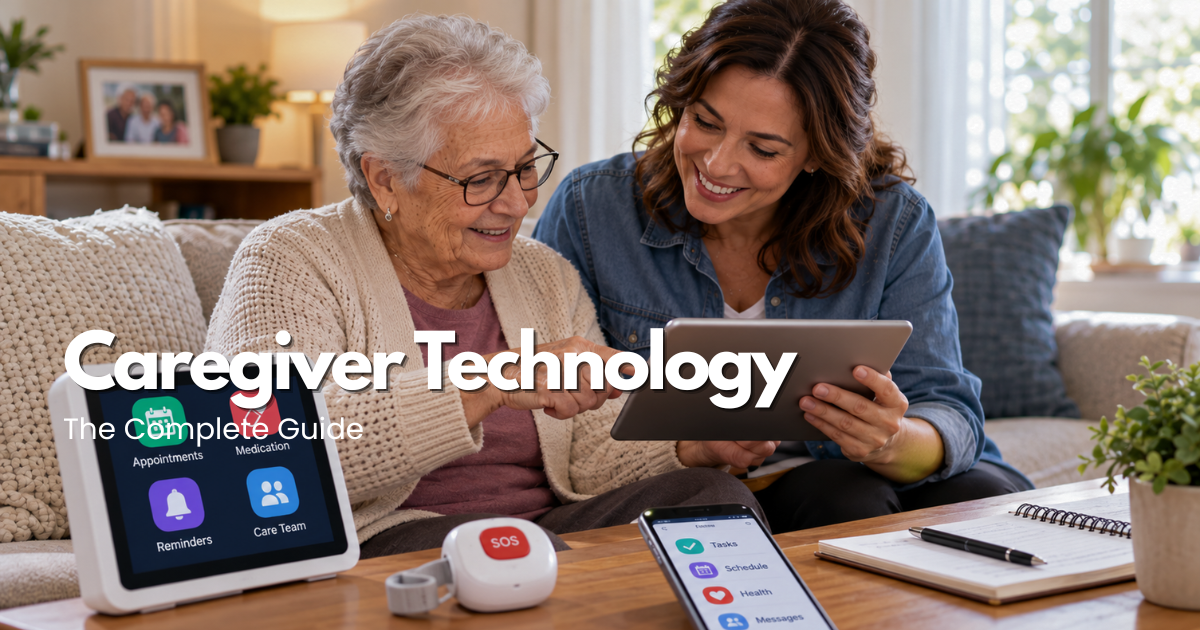
caregiver technology | SeniorTechLife caregiver resources guide
Modern caregiver technology includes mobile applications, shared calendars, medication reminders, secure communication platforms, video calling devices, remote monitoring tools, and digital care management systems.
For families supporting an older adult, caregiving often involves several responsibilities at once. Appointments must be scheduled, medications must be organized according to professional instructions, important changes need to be communicated, and different caregivers may need access to the same current information.
However, choosing Caregiver Technology requires more than downloading a highly rated application or purchasing the newest connected device. An effective system should reflect the older adult’s abilities, the caregiver’s responsibilities, privacy preferences, communication requirements, technical confidence, and available support.
Some households may benefit from a simple shared calendar and contact list. Others may need caregiver scheduling software, medication management tools, authorized health information sharing, or a more structured care coordination platform.
This comprehensive guide explains how to choose Caregiver Technology, compare caregiver apps, improve family communication, organize caregiving schedules, coordinate medication information, evaluate remote monitoring tools, protect privacy, understand costs, and establish practical backup arrangements.
Safety note: Caregiver apps, reminders, connected sensors, and digital care platforms cannot guarantee safety, accurate medication administration, emergency response, or continuous supervision. These tools should support an agreed care plan rather than replace necessary healthcare professionals, personal assistance, or emergency services.
Quick answer: what is the best caregiver technology for families?
The best Caregiver Technology helps caregivers complete clearly defined tasks while respecting the older adult’s independence and privacy.
For a family coordinating occasional appointments, a shared calendar may be sufficient.
For households involving several caregivers, a dedicated caregiver app may help organize visits, responsibilities, notes, and communication.
Professional caregiving organizations may require additional scheduling, documentation, or workforce management systems.
Useful caregiver technology features may include:
- Shared caregiving calendars.
- Appointment reminders.
- Family communication tools.
- Authorized medication records.
- Caregiver scheduling.
- Daily activity checklists.
- Secure document storage.
- Emergency contact information.
- Video calling.
- Appropriate location-sharing features.
- Connected device notifications.
- Accessible interfaces.
- Privacy controls.
- Offline information access.
- Caregiver handoff notes.
- Technical support.
The right solution depends on the actual care arrangement.
A complicated application with numerous features may be less useful than a simple, dependable tool that caregivers understand and maintain.
Why caregiver technology for seniors matters
Caregiving responsibilities can become difficult to coordinate when important information is distributed across text messages, notebooks, calendars, and different family members.
Caregiver Technology can help organize selected responsibilities in one accessible location.
For example, a shared system may help caregivers confirm who is attending an appointment, identify who is responsible for grocery shopping, or access agreed instructions for an ordinary daily activity.
These tools can improve organization without automatically replacing direct communication.
What caregiver technology can and cannot do
Caregiver apps may send notifications, store notes, organize schedules, or display selected device information.
However, they cannot guarantee that a caregiver will respond, that a medication was taken correctly, or that an older adult is safe.
A successful caregiver technology arrangement requires accurate information, authorized access, clear responsibilities, maintenance, and appropriate backup procedures.
Compare the main types of caregiver technology
Different forms of Caregiver Technology support different activities.
Understanding the available categories helps families avoid purchasing equipment that does not address their actual needs.
Family caregiver apps
Family caregiver apps are designed to help relatives and trusted caregivers coordinate selected responsibilities.
Depending on the application, available features may include:
- Shared calendars.
- Task assignments.
- Appointment tracking.
- Care notes.
- Family messages.
- Contact lists.
- Document organization.
- Medication reminders.
- Caregiver availability.
Before selecting an application, verify its supported features, privacy settings, account requirements, and subscription terms.
A family caregiver app should simplify communication rather than create additional administrative work.
Caregiver scheduling apps
Caregiver scheduling apps may help coordinate who provides assistance and when.
These tools can be useful when several relatives, neighbors, or professional caregivers share responsibilities.
Common functions may include visit calendars, shift confirmations, task lists, and notifications about schedule changes.
However, a scheduled visit is not the same as a verified completed visit.
Caregivers should understand how changes, cancellations, and unexpected absences are handled.
Caregiver apps for work
Professional caregiver apps may support employee scheduling, work assignments, electronic documentation, time tracking, and communication with an organization.
These functions are different from those required by a household care coordination app.
Before using workplace software, review employer procedures, privacy requirements, and the scope of information staff are authorized to access.
Caregiver apps to pick up shifts
Some workforce platforms allow caregivers to discover or accept available work shifts.
This is a separate purpose from managing care for a family member.
Caregiver apps to pick up shifts may include employment-related features such as availability, credentials, scheduling, and shift confirmations.
Caregivers should verify the actual organization, work requirements, compensation terms, and relevant professional obligations.
Medication management technology
Medication reminder applications and selected dispensing devices may help organize medication routines.
However, reminders should follow verified prescribing instructions.
A reminder notification does not confirm that medication was taken correctly.
Prescription questions and medication changes should be handled by appropriate healthcare professionals.
Video calling and communication technology
Tablets, smartphones, and compatible smart displays may help older adults communicate with family members and caregivers.
Accessible controls, clear sound, readable screens, and reliable connectivity are important.
Video calling should not be confused with professional emergency monitoring.
Remote monitoring and connected care tools
Some caregiver technology uses sensors, location-sharing features, or health-related devices to provide selected information.
However, connected data may be delayed, incomplete, or inaccurate.
A monitoring device cannot guarantee immediate assistance.
Monitoring arrangements should respect consent, privacy, and appropriate professional guidance.
Dementia caregiver apps
Some dementia caregiver apps focus on daily routines, reminders, communication, care notes, or family coordination.
Features should match the individual’s current abilities and needs.
Location-sharing technology may supplement an agreed safety plan, but it cannot guarantee that a person will be located or assisted immediately.
Caregiver Technology: explore related guides
This article serves as the broad educational foundation for understanding Caregiver Technology.
More specific application comparisons, employment tools, and product questions should be covered in dedicated guides.
Family caregiver application guides
Related topics include:
- Best Caregiver Apps: Buying Guide for 2026.
- Family Caregiver App: A Practical Guide.
- Caregiver Apps for Seniors: A Practical Guide.
- Free Caregiver Apps: A Practical Guide.
- Private Caregiver Apps: A Practical Guide.
These guides can compare scheduling, family communication, privacy, accessibility, and cost.
Professional caregiver application guides
Related topics include:
- Caregiver Apps to Pick Up Shifts.
- Caregiver Apps for Work.
- Swedish Caregiver Apps.
- Caregiver Apps Providence.
Professional application guides should distinguish employee scheduling, organization-specific tools, and actual caregiving responsibilities.
Specialized caregiver technology guides
Additional topics include:
- Dementia Caregiver Apps.
- Google Caregiver Apps.
- In Home Caregiver Technology.
These articles can address particular platforms, dementia-related support, compatible communication systems, and in-home technology arrangements.
Publishing note: The titles above are planned related articles, not confirmed active navigation links. They should become clickable only when their corresponding pages have been published, reviewed, and verified.
Eight important decisions when choosing caregiver technology
Choosing Caregiver Technology should begin with the actual caregiving activity rather than a list of advertised features.
1. Identify the main caregiving responsibility
Start by deciding which problem technology should solve.
Examples include:
- Coordinating family visits.
- Organizing appointments.
- Sharing daily care notes.
- Managing caregiver availability.
- Accessing authorized medication information.
- Communicating with healthcare professionals.
- Organizing household tasks.
- Supporting accessible communication.
A clearly defined goal makes it easier to compare suitable tools.
2. Evaluate accessibility for everyone involved
Caregiver technology may be used by people with different levels of technical experience.
Consider visual accessibility, readable buttons, clear navigation, language options, hearing needs, and ease of using a touchscreen.
A sophisticated application may be impractical if the intended users cannot operate it comfortably.
3. Compare scheduling and communication features
Determine whether the system supports the household’s real communication arrangements.
A shared calendar may be sufficient for simple schedules.
A more structured platform may help when several people need to coordinate responsibilities.
Avoid maintaining conflicting schedules across multiple applications.
4. Verify connectivity and device requirements
Some caregiver apps require an internet connection, compatible operating system, or active subscription.
Check how the system behaves when Wi-Fi or cellular service becomes unavailable.
Important information should remain accessible through an appropriate backup.
5. Protect privacy and obtain appropriate consent
Caregiver Technology may contain sensitive information about health, daily routines, location, household access, and family relationships.
Review who can see, edit, export, or share this information.
The older adult should participate in decisions about monitoring and information sharing whenever possible.
6. Define caregiver responsibilities
Assign responsibility for maintaining calendars, reviewing notifications, updating records, and responding to important changes.
Do not assume that receiving a notification means someone will take action.
7. Evaluate costs and ongoing service
Caregiver technology expenses may include:
- Application subscriptions.
- Hardware.
- Internet or cellular plans.
- Connected device services.
- Installation.
- Technical support.
- Replacement equipment.
- Professional software licensing.
Compare total ownership costs rather than relying only on introductory pricing.
8. Establish a backup plan
Caregiver apps and connected systems may fail.
Maintain appropriate alternative communication, accessible instructions, current contact information, and backup caregiving arrangements.
Family caregiver apps: communication and coordination
Family caregiver apps can support households where several people contribute to an older adult’s care.
Create one shared calendar
Use a consistent calendar for appointments and agreed caregiving activities.
Check who is authorized to add or change events.
Assign clear responsibilities
A caregiver technology system should show who is responsible for each task.
For example, one person may coordinate transportation while another manages grocery orders.
Tasks should not be considered completed solely because they were assigned.
Maintain useful daily care notes
Notes may help caregivers communicate changes in routines, preferences, or household arrangements.
Record relevant information accurately.
Avoid unnecessary personal details.
Organize important contacts
Maintain current contact information for authorized caregivers, healthcare offices, and relevant service providers.
Sensitive records should remain appropriately protected.
Review communication regularly
An application can centralize information, but direct conversation may still be necessary.
Families should agree on which issues require immediate contact rather than an ordinary app message.
Medication reminders and digital caregiving tools
Medication-related functions require particular attention because errors can have significant consequences.
Maintain accurate medication information
A medication record should reflect current professional instructions.
If different records conflict, ask the pharmacist or prescriber to clarify the regimen.
Use reminders appropriately
Medication reminders may help someone recognize a scheduled task.
However, the notification itself does not confirm correct administration.
Coordinate authorized caregiver assistance
Clarify who is responsible for updating the list, arranging refills, or providing permitted assistance.
Tasks involving medication administration must follow applicable professional and legal requirements.
Respond correctly to missed or uncertain doses
Do not automatically repeat or skip medication based on a caregiver app.
Seek medication-specific guidance from the pharmacist or healthcare professional.
Caregiver Technology: practical comparison table
| Technology category | Main purpose | What to verify | Important limitation |
|---|---|---|---|
| Family caregiver app | Coordinate family responsibilities | Sharing, permissions, ease of use | Requires updated information |
| Caregiver scheduling app | Organize visits and shifts | Confirmations and changes | Scheduled visits may not occur |
| Professional caregiver platform | Support workforce tasks | Employer requirements and security | Not always suitable for families |
| Medication reminder app | Provide scheduled notifications | Accurate regimen and alerts | Cannot confirm medication ingestion |
| Video calling device | Support visual communication | Audio, screen, connectivity | Not emergency monitoring |
| Connected home sensor | Report selected household events | Coverage and notification delivery | Cannot establish overall safety |
| GPS or location-sharing tool | Share selected location information | Consent, coverage, battery | Location can be delayed or unavailable |
| Digital care notes | Organize relevant observations | Accuracy and authorized access | Not a substitute for clinical records |
| Shared document storage | Maintain agreed care information | Security and recovery | May become outdated |
| Emergency contact system | Organize response information | Contact availability and backup | Does not guarantee a response |
Caregiver technology for in-home care
In-Home Caregiver Technology can support selected household responsibilities when properly configured.
Organize daily activities
Caregiving applications may help structure meals, appointments, social activities, and other agreed routines.
The plan should reflect the older adult’s preferences.
Support accessible communication
Large-screen devices, appropriate telephones, or simple video calling systems may make conversations easier.
Verify that the older adult can use the technology comfortably.
Manage selected household notifications
Some connected devices can report door activity, selected environmental conditions, or other configured events.
These notifications should not automatically be interpreted as emergencies.
Coordinate family and professional caregivers
When both relatives and professionals provide support, define which information each person may access.
Use appropriate documentation and permissions.
Preserve independent household controls
Essential lighting, doors, communication, and emergency arrangements should not depend entirely on connected technology.
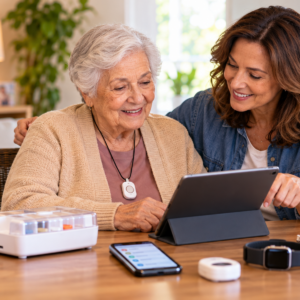
Privacy, consent, and digital security in caregiver technology
Protecting personal information is an essential part of choosing Caregiver Technology.
Review information-sharing permissions
Caregiver apps may contain personal, health-related, financial, or household information.
Not every caregiver needs unrestricted access.
Use role-based permissions where supported.
Discuss monitoring and location sharing
Location tracking, cameras, and sensors may reveal private activities.
The older adult should understand the purpose of monitoring and who may receive the information, to the extent possible.
Avoid concealed surveillance.
Use secure accounts
Choose strong account protections and supported multi-factor authentication.
Do not share passwords unnecessarily.
Protect healthcare information
Caregiver applications are not automatically subject to the same privacy rules as healthcare providers.
Review the provider’s privacy policy, security practices, and data-sharing arrangements.
Remove outdated access
When a caregiver leaves or responsibilities change, review authorized accounts and permissions.
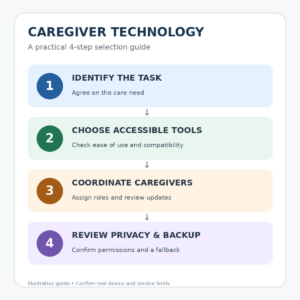
Caregiver Technology: practical four-step planning guide
An effective Caregiver Technology plan should be understandable, measurable, and regularly maintained.
Step 1: Identify the care task
Determine the specific problem that technology should address.
For example, the household may need appointment coordination rather than continuous monitoring.
Step 2: Choose an accessible solution
Compare caregiver apps and devices according to usability, privacy, compatibility, and total cost.
Step 3: Assign caregiver responsibilities
Clarify who enters information, receives notifications, maintains devices, and responds to problems.
Step 4: Test and review the arrangement
Use the technology during ordinary activities.
Confirm that information remains accurate and that backup procedures work when needed.
Test caregiver technology during everyday caregiving activities
Technology should be tested in the environment where it will actually be used.
Test 1: A normal caregiving day
Use the system to coordinate familiar activities.
Observe whether caregivers understand the information and can complete their responsibilities.
Test 2: An appointment change
Use a harmless scheduling example to verify that authorized caregivers receive updated information.
Confirm who is responsible for responding.
Test 3: Caregiver handoff
Have another authorized caregiver review the agreed instructions.
Check whether essential information is accessible and understandable.
Test 4: Internet or device disruption
Review the provider’s supported offline functions and backup procedures.
Do not create an actual interruption to essential care merely to test the system.
Test 5: A change in care needs
Reassess the technology after a major change in health, communication, mobility, or caregiver availability.
The original setup may no longer meet the person’s needs.
Common caregiver technology mistakes
Choosing apps based only on ratings
A highly rated application may lack the exact features a family needs.
Compare actual requirements.
Installing too many overlapping applications
Using several calendars, messaging services, and care logs may cause confusion.
Prefer a manageable set of tools.
Assuming notifications guarantee action
An alert is useful only when someone receives, understands, and responds to it appropriately.
Ignoring privacy settings
Sensitive information should be shared only with authorized people.
Confusing workforce apps with family caregiving apps
Caregiver apps to pick up shifts address employment needs, while family caregiver apps organize personal care responsibilities.
Choose the category that matches the intended activity.
Forgetting backup communication
Important caregiving arrangements should not depend entirely on one phone, application, or internet connection.
Caregiver technology maintenance and ongoing support
A successful Caregiver Technology system requires regular review.
Initial setup
Document the devices, applications, account owners, essential settings, and authorized users.
Weekly review
Check important schedules, upcoming responsibilities, outstanding tasks, and relevant notifications.
Monthly maintenance
Review:
- Application updates.
- Device batteries.
- Connectivity.
- Authorized accounts.
- Contact details.
- Subscription charges.
- Backup instructions.
- Data accuracy.
After a caregiver change
Update responsibilities and permissions.
Ensure that important information remains accessible to the new authorized caregiver.
After a technical failure
Identify the affected function and use the agreed alternative process.
Seek the provider’s support when necessary.
Safe everyday caregiver technology use
Technology should make caregiving easier without removing meaningful personal interaction.
Begin with familiar tools
Use applications and devices that the family can understand and operate consistently.
Keep care instructions accurate
Update information after relevant changes.
Do not rely on outdated notes.
Encourage older adult participation
Include the person receiving care in decisions about routines, communication, and monitoring whenever appropriate.
Support direct family communication
Digital tools should complement conversations rather than replace all personal contact.
Keep the system manageable
Remove unnecessary features when they create confusion or additional workload.

Caregiver technology costs, subscriptions, and support
Compare free and paid caregiver apps
Some caregiver apps offer basic features without a subscription.
Others charge for advanced scheduling, storage, notifications, or professional functions.
Review exactly what is included.
Check device and connectivity expenses
An application may require a compatible smartphone, tablet, internet service, or additional hardware.
These costs should be included in the comparison.
Review support and training
Find out whether the provider offers instructions, accessibility assistance, technical support, and account recovery.
Understand cancellation and data export
Before subscribing, confirm how to cancel the service and whether essential information can be exported.
Avoid paying for unnecessary features
The best Caregiver Technology arrangement may use simple tools that already meet the household’s needs.
More features do not automatically mean better care.
Emergency communication and backup planning
A Caregiver Technology plan should include procedures for interruptions and urgent situations.
Maintain independent contact information
Keep important contacts available outside the primary app.
Prepare for caregiver unavailability
Identify an appropriate backup caregiver or support arrangement.
Understand emergency monitoring limitations
A caregiver app may send messages or device notifications without offering professional emergency response.
Verify the exact service.
Protect essential information
Maintain appropriately secured backups of information necessary for care coordination.
Review after important changes
A hospitalization, move, caregiver change, or new support requirement may justify reassessing the technology plan.
Caregiver Technology: final selection checklist
Before relying on a caregiver technology system, confirm:
- The primary caregiving task is clearly defined.
- The technology matches the older adult’s preferences.
- Caregivers understand the controls.
- Applications are compatible with available devices.
- Communication responsibilities are assigned.
- Sensitive information is appropriately protected.
- Monitoring and sharing permissions are authorized.
- Medication information follows professional instructions.
- Device charging and connectivity are manageable.
- Subscription terms are understood.
- Technical support is available.
- Backup information is accessible.
- Emergency plans do not depend solely on an app.
- A routine review schedule has been established.
Frequently asked questions about Caregiver Technology
What is Caregiver Technology?
Caregiver Technology includes digital applications, communication systems, scheduling tools, connected devices, and organizational software designed to support caregiving activities.
What are the best caregiver apps for families?
The best application depends on the family’s needs.
Useful functions may include shared calendars, task assignments, care notes, authorized document access, and communication tools.
Are free caregiver apps useful?
Free caregiver apps may support basic scheduling and communication.
However, storage, privacy controls, technical support, and advanced functions vary.
Can caregiver technology help seniors remain at home?
Certain tools may make communication, scheduling, and household coordination easier.
However, they do not replace necessary personal assistance or professional care.
What are caregiver apps to pick up shifts?
These are workforce-oriented platforms that may help caregivers discover, accept, or manage available employment shifts.
They serve a different purpose from family care coordination applications.
Are caregiver apps suitable for dementia care?
Some applications can support routines, caregiver communication, and care organization.
Suitability depends on the individual’s needs and the caregiver arrangement.
Can caregiver apps manage medications?
Some apps can store medication information or provide reminders.
However, these features cannot replace professional medication management or guarantee correct administration.
Can caregiver technology provide emergency monitoring?
Not automatically.
Caregiver applications and connected devices may provide selected notifications, but professional emergency response must be verified separately.
Are caregiver apps private?
Privacy protections vary among providers.
Review data collection, account access, security settings, and sharing permissions.
What should families do when a caregiver app stops working?
Use the established backup communication and coordination plan.
Contact the service provider when technical assistance is necessary.
How much does caregiver technology cost?
Costs depend on the application, device requirements, subscriptions, connectivity, and support services.
Compare total ongoing expenses.
How often should a caregiver technology plan be reviewed?
Review it regularly and reassess after important changes in health, caregiver responsibilities, devices, connectivity, or the person’s everyday needs.
Final thoughts on Caregiver Technology
Caregiver Technology works best when communication, organization, privacy, caregiver responsibilities, and real-world support are considered together.
A reliable caregiving arrangement does not necessarily require expensive connected devices or complicated digital care management software.
A shared calendar, accessible caregiver app, accurate care notes, dependable communication method, and clearly assigned responsibilities may provide meaningful support.
The strongest Caregiver Technology plan respects the older adult’s independence, protects sensitive information, supports caregivers, and remains manageable as care needs change.
Sources used for this guide
Official sources support the planning framework; they do not endorse a company, provider, organization, or product.
- Caregiving — National Institute on Aging.
- Aging in Place: Growing Older at Home — National Institute on Aging.
Build a safer plan
General education only; seek qualified professional, clinical, legal, or emergency help when appropriate.